Cash Flow Planning and Tracking
Cash Flow shows not only the actual state of your funds but also the planned state, based on scheduled income and expenses for the current and future periods. This lets you understand the direction of cash flow at a glance and identify cash shortfalls in advance.
Planning Mode
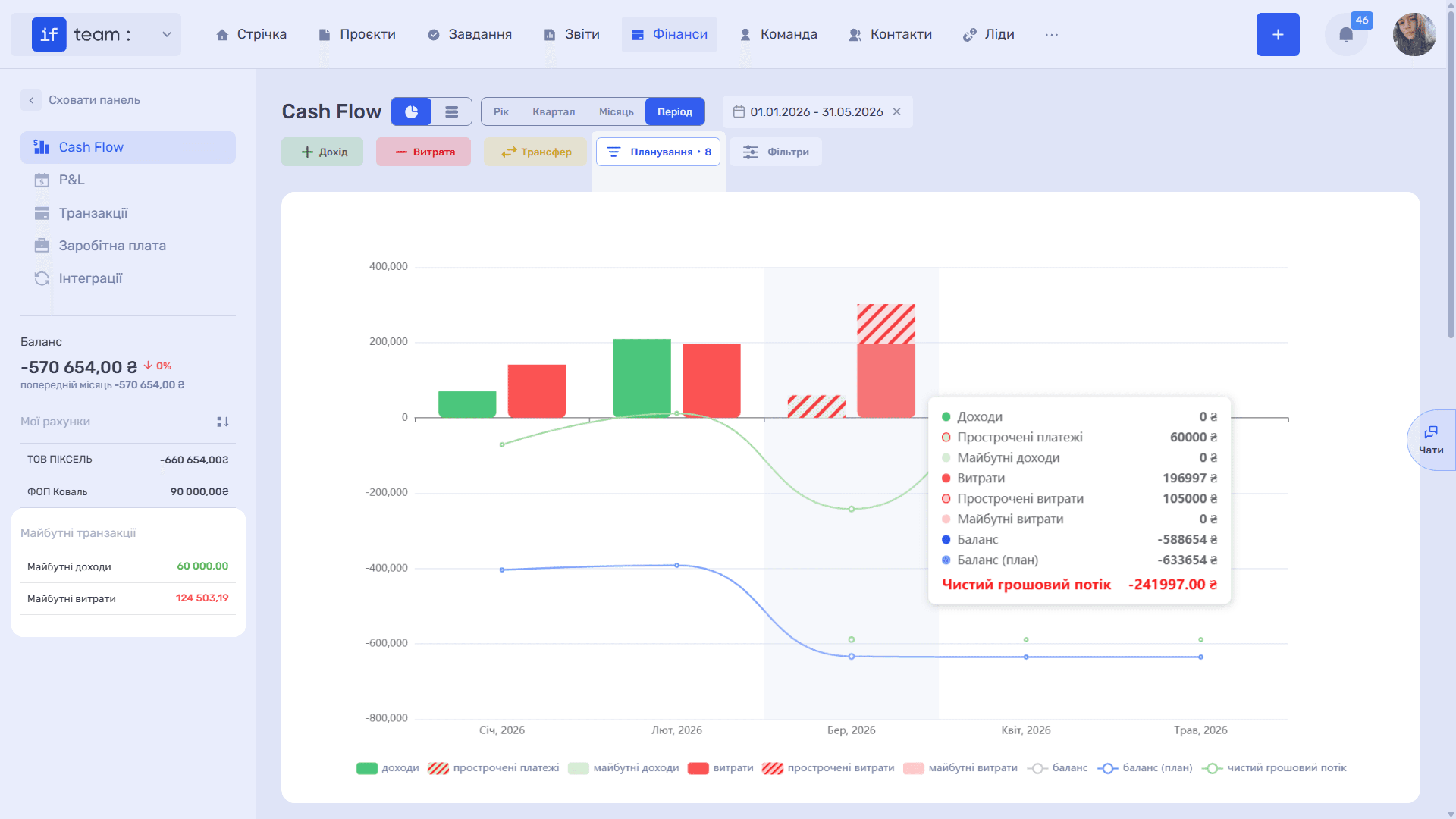
Click “Planning · N”, where the count shows the number of planned transactions, to add planned indicators to the chart:
- Upcoming Income and Upcoming Expenses are pale columns representing planned transactions whose dates have not yet arrived.
- Overdue Payments and Overdue Expenses are hatched columns representing transactions with the “Unpaid” status whose dates have already passed.
- Balance (Plan) is the expected remaining-funds line calculated using all planned transactions.
Planned data comes from transactions with the “Unpaid” status: transactions entered manually with a future date or generated from recurring templates. Their amounts are also totaled in the “Upcoming Transactions” summary in the left panel.
What This Lets You Do
- View planned and overdue incoming and outgoing payments for the current and previous months, allowing you to update statuses or remind counterparties about payment on time.
- Plan cash flow for future periods and the expected remaining funds, including identifying cash shortfalls in advance when the planned balance line falls below zero.
- Analyze net cash flow trends by month to understand which months the company closes with a surplus and which with a deficit.
- Do all of this selectively. Filters let you build the plan not only for the entire company but also for a specific project, bank account, or counterparty.
Please note
A similar planning mechanism is available for individual projects. In the financial section of a project page, you can enable “Planning” to view projected labor costs, planned client payments, and expected profitability before work begins.
This is described in detail under Projects: Project Financial Planning.
Still have questions?
Maybe we haven't added this information yet. But you can always reach out:
Request a demo
Submit a request and we'll show you how the service works and its capabilities.
Book a demo