
What Is a Project Dashboard? Metrics, Example and Setup
Learn what a project dashboard is and how it differs from a report, a spreadsheet, or a Kanban board. See how to choose project metrics, structure the dashboard, and use it in meetings, with a website launch example and setup steps in if.team.

A project dashboard brings deadlines, task progress, workload, and costs together in one place. It helps project managers and teams see whether delivery is on track, spot bottlenecks, and decide what needs attention. A useful project management dashboard combines key metrics with the tasks, milestones, and decisions behind them.
Imagine an agency building a website for a client. There are ten working days left until launch. Most tasks are closed, but the client still hasn't approved the revised catalog structure, and the team has used 150 of its planned 200 hours. The completed-task count makes the project look nearly finished. Add the next milestone, unresolved decisions, and time spent, and the team has a much clearer agenda for its next meeting.
That is what a dashboard is for. Its value depends on the questions it helps answer and the reliability of the underlying data. This guide explains how to choose metrics, organize the screen, and use it in everyday work. Then we'll set up a project page in if.team. All names, figures, and situations in the worked example are fictional.
What is a project dashboard?
A project dashboard is a shared overview of a project's status, progress, and constraints. The term comes from a vehicle's instrument panel: it brings relevant information together so a manager can see how work is progressing and where their input is needed.
A project dashboard might show the completion date, current phase, people responsible, spending to date, and tasks holding up other work. These details are useful together. An overdue task calls for a very different response depending on whether it blocks the launch or concerns a minor improvement.
A metric needs context
“150 hours” tells you little about a project's condition until you know what it represents. Is it the total planned effort, time already spent, or an estimate of the work remaining? What period does it cover? Has everyone logged their time?
A clear label answers some of those questions: “150 of 200 planned project hours used.” But it still doesn't tell you how close the work is to completion. The team may have spent most of that time on difficult research that will make the next phase faster. Or most of the development work may still lie ahead.
Show what the metric should be compared with: the plan, a previous period, or an estimate of the remaining work. Make it possible to open the records behind the number.
A dashboard combines an overview with working context
Different products use “dashboard” to describe slightly different screens. In a business intelligence system, it often means a collection of visualizations. In project management software, it may also include files, comments, work lists, and basic information about the job.
In if.team, the project page connects tasks, people, budgets, and materials. You can arrange it around the work: move phases and tasks higher up, for example, and place financial blocks together. The team can then see both the project's status and the information that helps explain it.
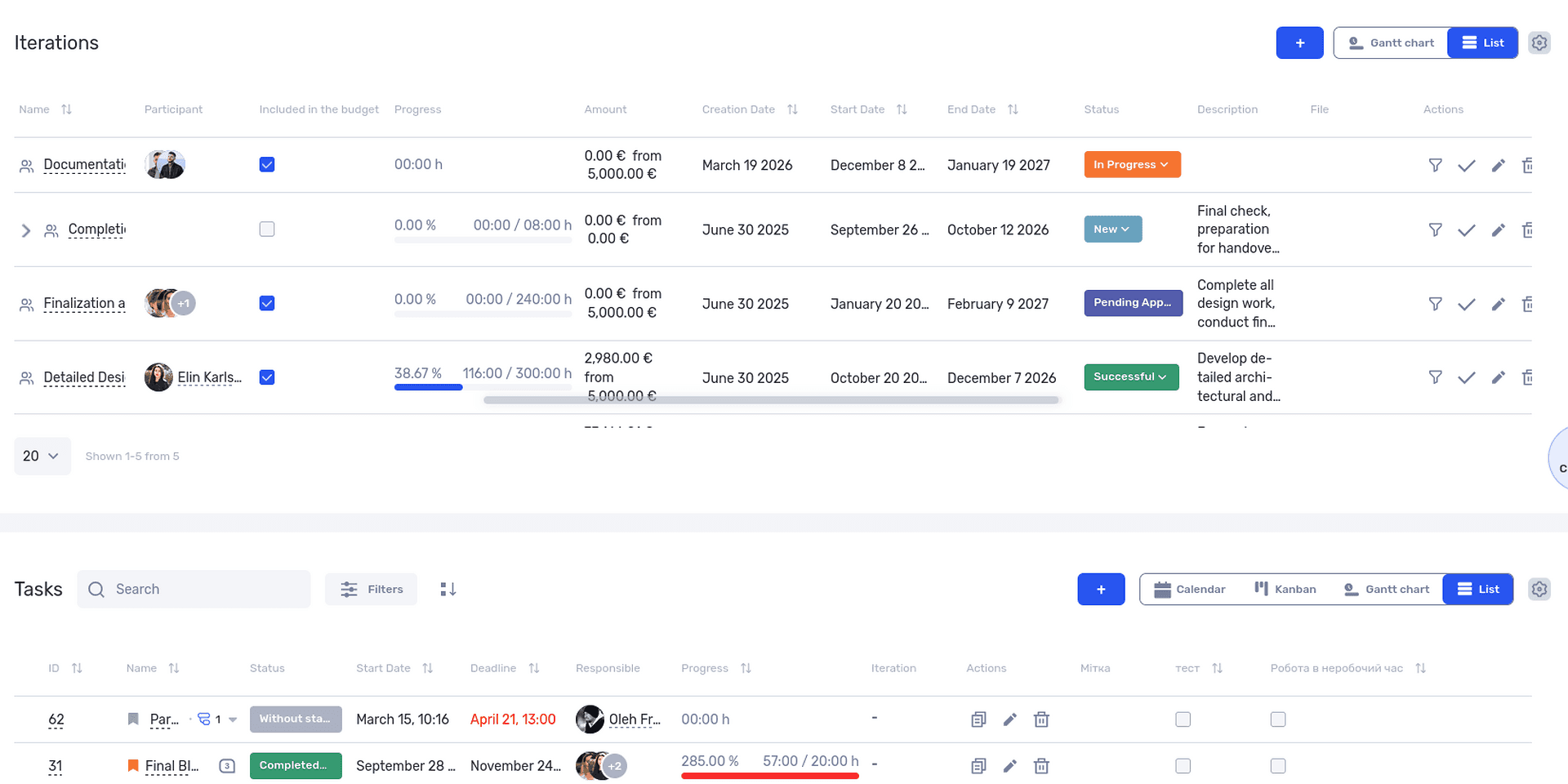
A project dashboard brings working blocks together on one page.
This is useful when you need to get up to speed before speaking with the team. It doesn't automatically explain every variance, though. If costs have risen, you still need to check the scope, time entries, or agreements with a contractor.
Dashboards, reports, spreadsheets, and Kanban boards: what's the difference?
The same data can be presented in several ways. The right format depends on what someone needs to do: assess the situation quickly, investigate the details, calculate a metric, or organize the work.
A dashboard is usually used for regular reviews. A report provides a more detailed breakdown based on defined rules. A spreadsheet helps you work with individual records and calculations. A Kanban board shows how work moves through stages. These formats can overlap: dashboards may contain tables, and reports may start with a summary.
| Tool | Question it answers | Project example |
|---|---|---|
| Dashboard | What is happening, and what needs attention? | Deadline, current phase, costs, and important unfinished tasks |
| Report | What makes up the result for this period? | Hours broken down by person, task, and phase |
| Spreadsheet | What records do we have, and how can we compare them? | Expenses with dates, categories, and owners |
| Kanban board | What stage is each task at? | Planned, in progress, awaiting review, or complete |
A chart alone won't explain why development has exceeded its estimate. The manager needs to open the detailed records and see which tasks took the time. If the problem is an approval queue, a board may make it easier to see where work is piling up.
Our guide to Kanban boards explains columns and transitions in more detail. For a dashboard, take the information needed for the overview, such as blocked tasks and the people responsible for resolving them.
Don't copy every report row onto the main screen. If a summary and a few exceptions answer the everyday question, leave the detail in a separate view. Users should have a clear route to it when they need it.
Types of dashboards and who uses them
It helps to distinguish dashboards by the decisions they support. That determines both the data to include and how often it needs reviewing. One manager removes project blockers every day; another reviews a business unit's performance once a month.
Dashboards are commonly described as operational, analytical, or strategic. A product may combine these purposes on one screen.
Operational dashboards for day-to-day work
An operational dashboard helps you understand what is happening now and what to do next. For a project, that might mean the current phase, next deadline, work awaiting approval, changes in ownership, and outstanding decisions.
For our agency, the review starts with the catalog structure: the developer cannot finish that part of the website without approval. A link to the current version and a note identifying who will follow up with the client belong nearby.
Update frequency needs to match the process. A dashboard based on a week-old copy of the data won't support daily coordination if the team changes tasks every day. Equally, a metric reviewed once a month rarely needs minute-by-minute updates.
Analytical dashboards for finding patterns
An analytical dashboard helps you compare results and investigate differences. An agency might want to know where it most often exceeds estimates: design, development, or revision rounds.
That requires comparable data from several projects. If one project includes meetings in its time records and another does not, some of the difference comes from recording practices. Agree on what you are comparing first.
Check whether your system can bring several projects into one report. If it cannot, you may need a separate business intelligence (BI) tool to analyze and visualize the data.
Strategic dashboards for company leadership
At a strategic level, the focus is on trends: how a business unit is performing, which jobs are using resources, and whether the project portfolio supports the company's goals. This requires a longer time horizon and consistent calculation rules. Data on upcoming work, such as inquiries and deals still at the sales stage, usually lives in a CRM system.
An executive doesn't necessarily need every unfinished task from every team. They may need to see the projects at risk of missing their deadlines, along with the consequences for client commitments and team capacity.
An aggregate should not hide a critical exception. An average delay of two days may look acceptable even though one major launch is a month behind. Pair summaries with a way to inspect the projects that have the greatest impact.
How to choose metrics for a project dashboard
Start with questions that come up repeatedly in project meetings. Will we be ready to launch? What is holding up this phase? Can we finish within the agreed hours? What decision do we need from the client? Each question points to data the screen should show.
Add a metric when you know who will use it and what they can do with it. If a number is discussed regularly but never affects a decision, reconsider its purpose.
Deadlines and milestones
A completion date gives the team a target. It does not tell them whether that target is still achievable. Show the next milestone and the work that must be finished to reach it.
For the website project, that milestone might be approval of the catalog structure. If the launch date cannot move, the manager needs to consider the alternatives: speed up approval, change the order of work, or agree on a smaller first release.
Alongside the date, show who owns the decision and where it stands. “Waiting for the client” is too vague. “Get the sales director's approval of the structure by Wednesday” makes the required action clear.
Scope and progress
Completed tasks are easy to count, but the result needs careful interpretation. Fixing a label and building a catalog may each count as one task, despite being very different amounts of work.
Completing 16 of 20 tasks means 80% by task count. It does not prove that 80% of the work is done or that 80% of the required resources have been used. The four remaining tasks may determine the entire launch schedule.
Combine the count with the status of key deliverables. For example: revised catalog structure awaiting approval; payment flow not yet tested; mobile version checked. That tells the team more than a single percentage.
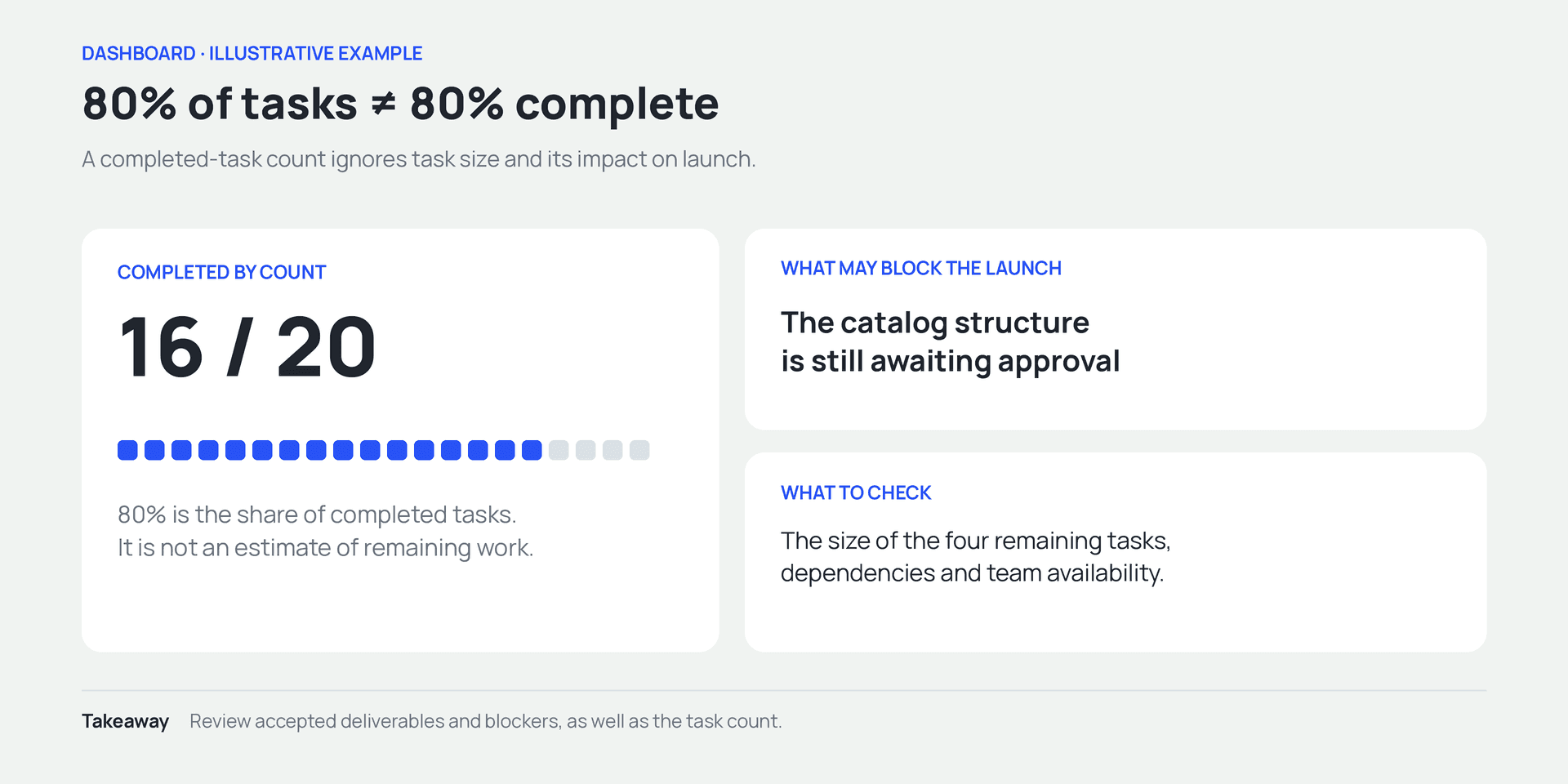
16 of 20 tasks means 80% by count, not 80% project completion.
Time spent and the estimated effort to finish
Time tracking shows how many hours the team has used, not how complete the result is. To assess a potential overrun, you also need an estimate of the remaining work. If the plan was 200 hours, 150 have been used, and the team expects another 90, the forecast total is 240 hours.
The calculation is straightforward: 150 + 90 = 240. That is 40 hours, or 20%, above the original plan. The next question is why those extra hours are needed: a scope change, rework, or an inaccurate initial estimate?
Review the remaining-work estimate regularly. Subtracting 150 from the original 200 leaves 50 unused planned hours. But the team now estimates 90 hours of work remaining. Use that current estimate for the forecast and investigate why it changed.
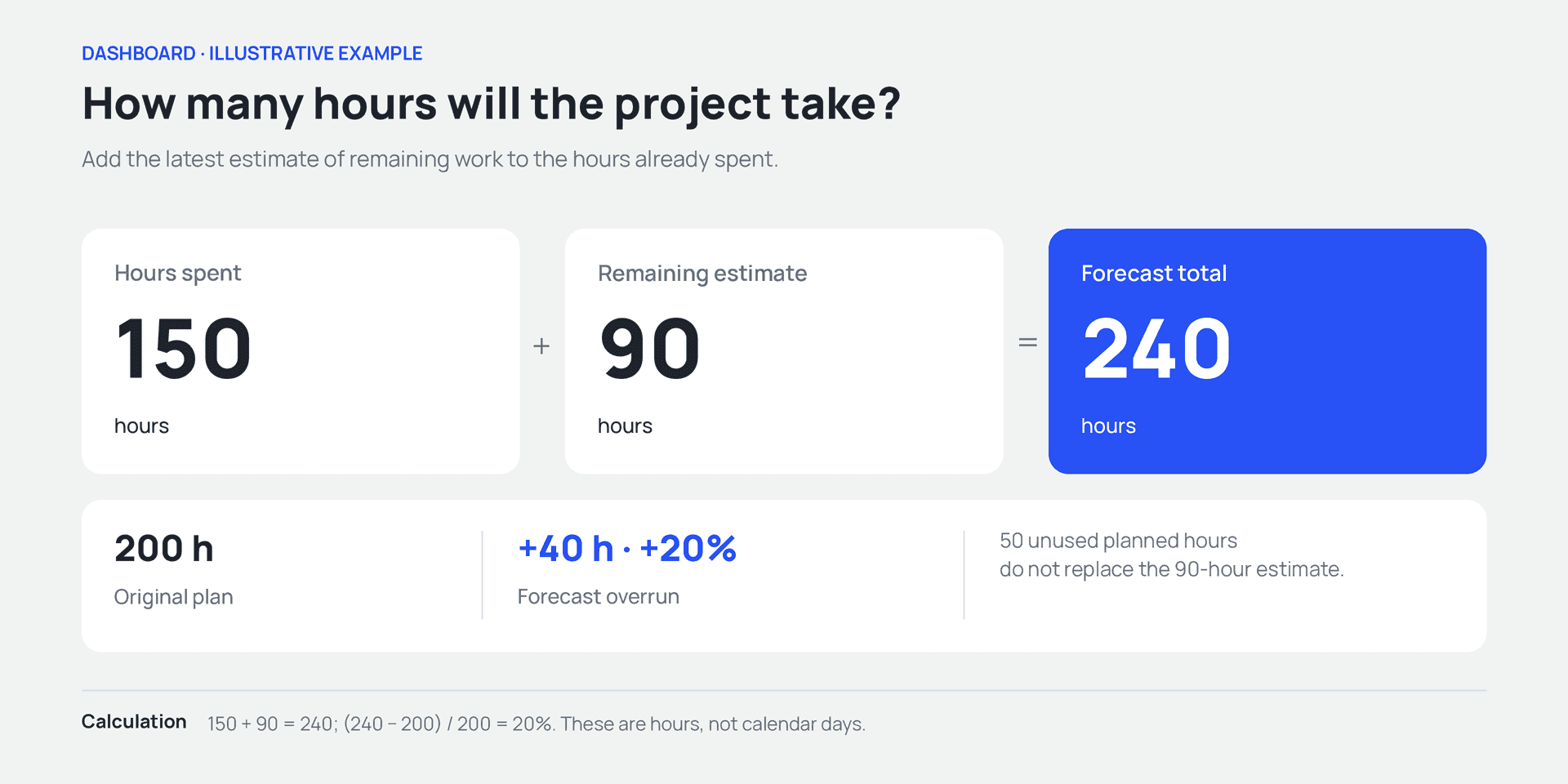
Forecast: 150 hours spent + 90 hours remaining = 240 hours, 20% above plan.
Project price, costs, and payments
Keep the agreed price, costs incurred, and payments received separate. They answer different questions. The price describes the agreement with the client; costs represent the resources used to deliver the work; payments show cash received.
For example, a project is priced at UAH 240,000 and the client has paid UAH 120,000. The outstanding balance is UAH 120,000. That does not necessarily mean a payment is overdue: the second installment may be due after launch.
Likewise, an advance payment does not tell you how profitable the job will be. You need to account for costs and the work still to be completed. Our guide to the profit and loss statement explains the distinction between revenue, expenses, and profit.
Quality and rework
Closing a task should mean that a clearly defined result has been delivered. If the team closes development tasks before testing and records defects as new tasks, the completed-task count can rise alongside the defect backlog.
Agree on what “done” means: completed, checked, and accepted by the person responsible. The dashboard can then show a status the team can rely on when planning.
Rework also needs context. It may result from an error, a new requirement, or something learned during testing. Calling all of it “poor-quality work” makes it harder to identify what actually needs to change.
How to structure a dashboard
Once you have defined the questions and metrics, decide where the blocks belong. The order should follow the user's review process: status and immediate risks first, then details, then supporting materials.
Microsoft's dashboard design guidance likewise recommends starting with the audience's needs, emphasizing the most important information, and keeping the overview focused on what users need to monitor. Those principles also apply to a project page.
Put related information together
Values that users regularly compare should sit next to each other. Planned and actual costs, the current deadline and next milestone, payments received and the balance due are easier to read without jumping between distant sections.
Size each block for its contents. A single metric may fit in a compact card. A task list needs space for names and assignees, and a chart needs room for labels and dates. A block that is too narrow forces users to open the details just to get a basic overview.
For the website project, the first screen might contain the main project information, next milestone, and current tasks. Put financials and payments below, with frequently used materials close to the work they support.
Choose the format that answers the question
Use a number when the value itself matters, such as the balance due. A line chart shows change over time. Bars help compare categories. A table is useful when people need exact amounts, names, and dates.
Not every list needs to become a chart. Three launch-blocking tasks are clearer as names with assignees. A pie chart may show their share of the total, but it won't tell you whom to contact or which decision is needed.
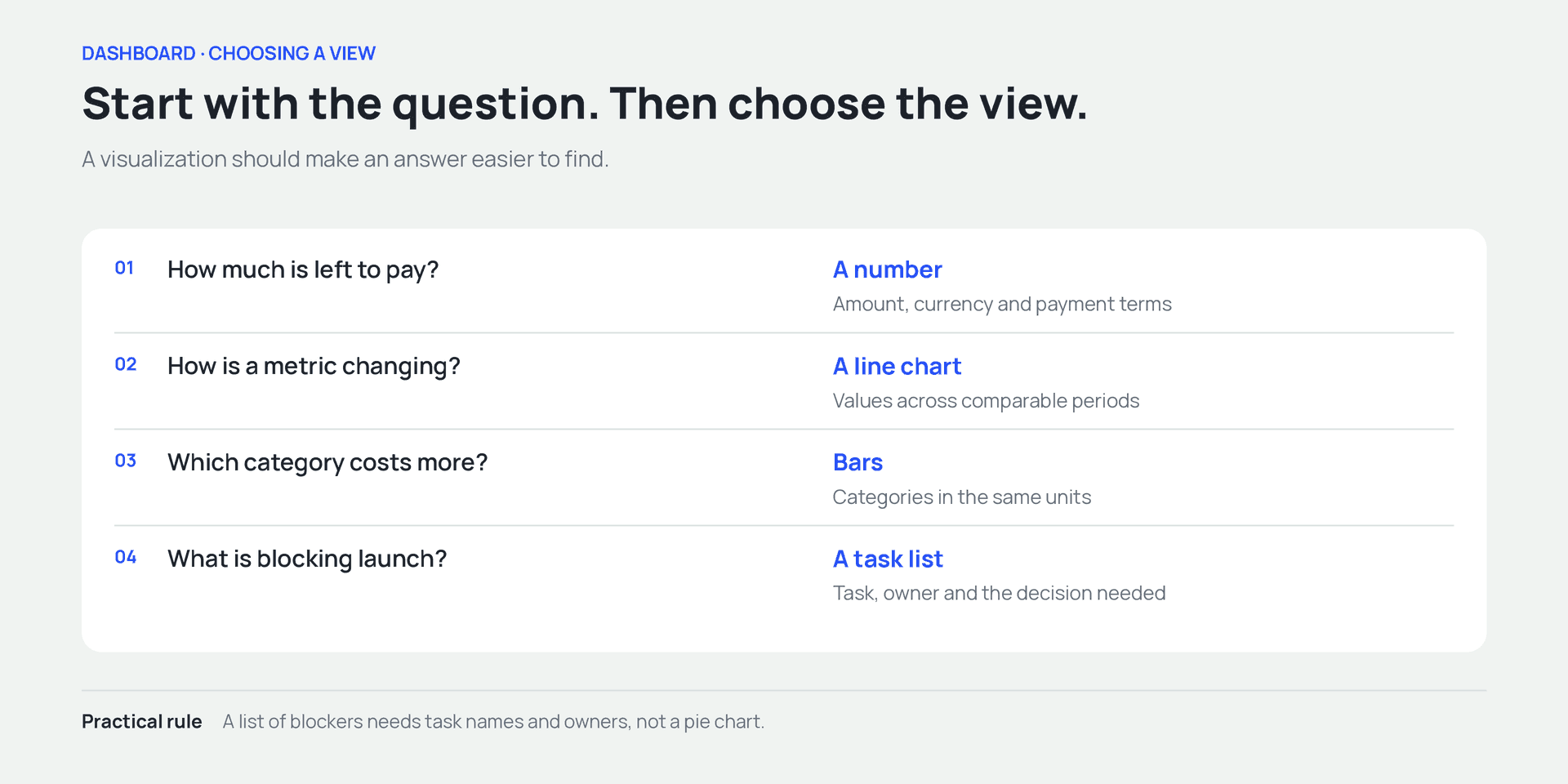
Match the view to the question: a value, trend, comparison, or action list.
When configuring an existing system, start with the views it already provides. A custom chart may require another tool and additional data preparation. Before investing that effort, check whether a standard list or report already answers the question.
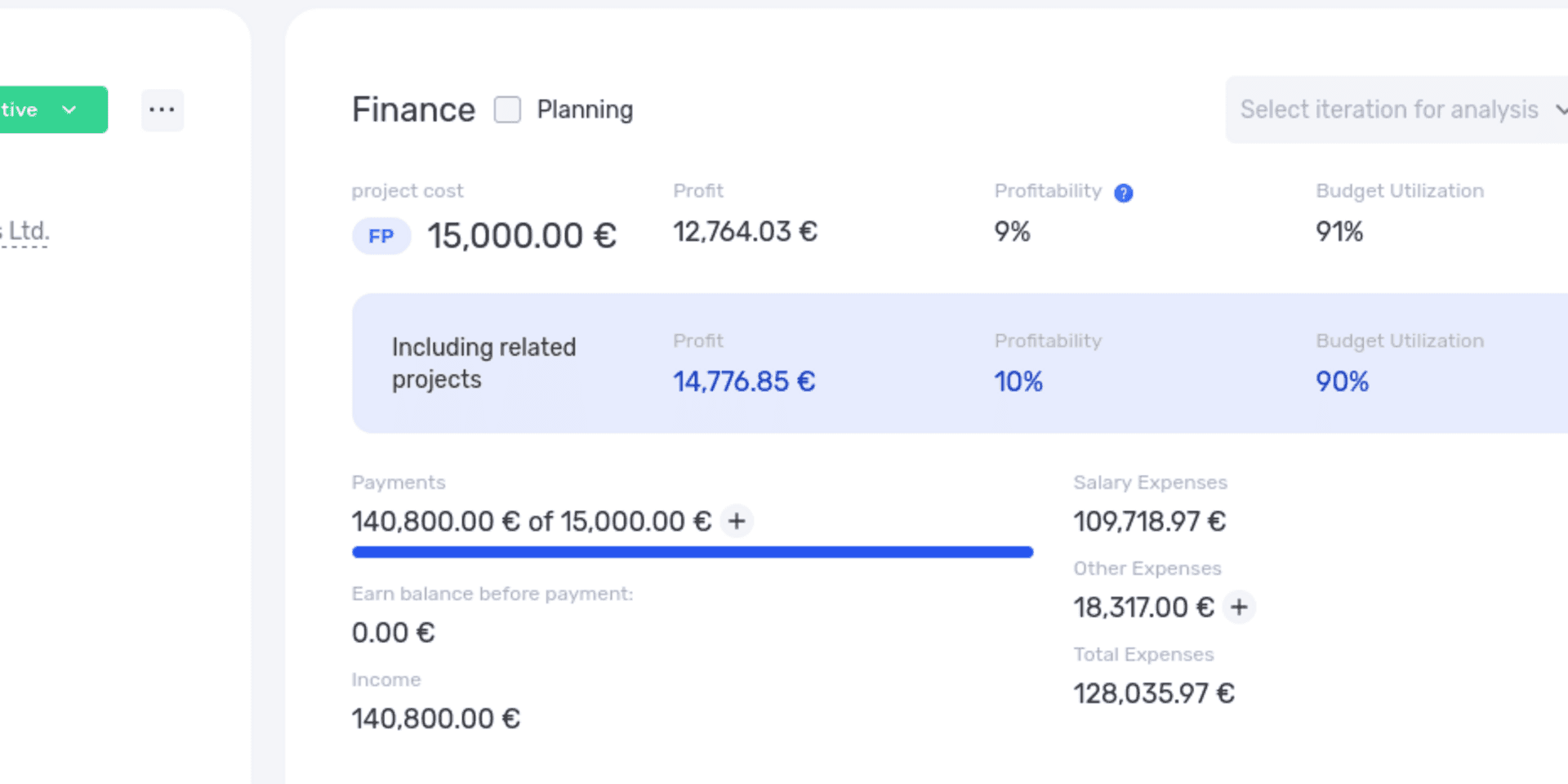
The financial block brings the project's key financial figures together.
Use consistent labels, units, and periods
“Costs” might mean all project costs or only paid invoices. “This month” does not tell the reader whether the period is the calendar month, the last 30 days, or the time since the project began. Those distinctions affect the conclusion.
Use precise labels and check the system's tooltips. When displaying data from different sources together, align currencies, reporting periods, and the rules for including records.
Use color consistently, too. If red indicates a problem, don't also use it as an ordinary category color nearby without explanation. Add labels such as “Overdue” or “Awaiting approval” so the meaning is clear without color. This follows W3C guidance on the use of color: color should not be the only way information is conveyed.
Example: a dashboard for a website launch
Let's return to the agency. It has six weeks to launch the site. The agreed fixed price is UAH 240,000, and the initial estimate is 200 hours across the team. After development starts, the client asks to change the catalog structure. The team prepares a revised version and waits for approval. At the end of week four, it prepares for a client meeting.
For the review, the manager brings together the deadline, accepted deliverables, time spent, remaining-work estimate, and payments. This is an example of how to interpret project data, not a list of built-in if.team widgets. Some rows may require a report or a manual estimate.
| What to review | Current position | Question to ask |
|---|---|---|
| Launch date | Ten working days remaining | Can the unfinished work fit into that time? |
| Next deliverable | Revised catalog structure awaiting approval | Who will get the decision, and when? |
| Completed tasks | 16 of 20 | How much work is in the four unfinished tasks? |
| Time spent | 150 of 200 planned hours | Is the original plan still realistic? |
| Remaining-work estimate | Another 90 hours | What accounts for the forecast 40-hour overrun? |
| Payments received | UAH 120,000 of UAH 240,000 | When is the remainder due under the agreement? |
The manager uses this information to prepare three specific questions. First, catalog approval: part of the work cannot proceed without it. Second, the remaining scope: the 90-hour estimate needs checking. Third, how the changes affect the deadline and the agreement with the client.
Ninety hours is total effort, not elapsed calendar time. To determine whether ten working days are enough, the manager checks people's availability and task dependencies: what can happen in parallel, and what is waiting for approval? A Gantt chart can help with that planning.
A 20% overrun in hours does not automatically mean a 20% price increase. Under a fixed-price agreement, additional costs may reduce the agency's profit; any price change needs to be agreed with the client separately. If people have different internal hourly rates, the cost of the extra 40 hours also depends on who works them.
The manager can now discuss options with the client: an additional budget, a later launch, or a smaller first release. Each option needs a clear explanation of the effect on deliverables, price, and timing.
After the meeting, record the decisions: who will approve the catalog, which tasks are included in the launch, and when the team will revisit the forecast. If the decisions stay in the conversation, the dashboard will show the same problem the next day without a clear next step.
Keep the original baseline as well. Simply replacing 200 planned hours with 240 may hide the overrun in later analysis. Retain a history of agreed estimates and the reasons for changes, even after updating the current working plan.
How to set up a project dashboard in if.team
In if.team, you can change the selection, order, and size of blocks on the project page, then save the layout as a template. The feature is described in the custom dashboards update. For our agency, we'll prepare a screen that serves as the starting point for a client-project review.
First, decide who will use the layout. In this example, it is the project manager and team reviewing current work. You'll need access to the relevant admin settings. Prepare the project data and user permissions before testing the layout.
Create a template for the workflow
Open Tasks & projects in the admin settings and find the project dashboard constructor. Create a template with a descriptive name, such as “Client website project.” Use the pencil icon next to the template to edit its layout.
The name should explain the purpose. “New 2” and “Final test” become hard to distinguish once the team has several layouts. If the template is intended to become the default, test it on one project first.
The custom dashboards documentation explains the constructor step by step. Review the template list with the person responsible for company settings to avoid creating several versions that serve the same purpose.
Add and arrange the widgets
Select + Add widget to see the available blocks. For the agency, a useful starting selection is Info, Iterations, Tasks, Graphs, Transactions, and Description and files. A comments widget can support discussions.
Place project information, phases, and tasks near the top; group the financial blocks below; and position materials where they are easy to consult while reviewing work. This is a starting layout for the example, not a fixed rule. The team can adjust it after trying it.
Drag widgets by their drag handle and resize them from the bottom-right corner. When finished, select Save or Save and close. The full list of blocks and layout controls is covered in Tasks and projects settings.
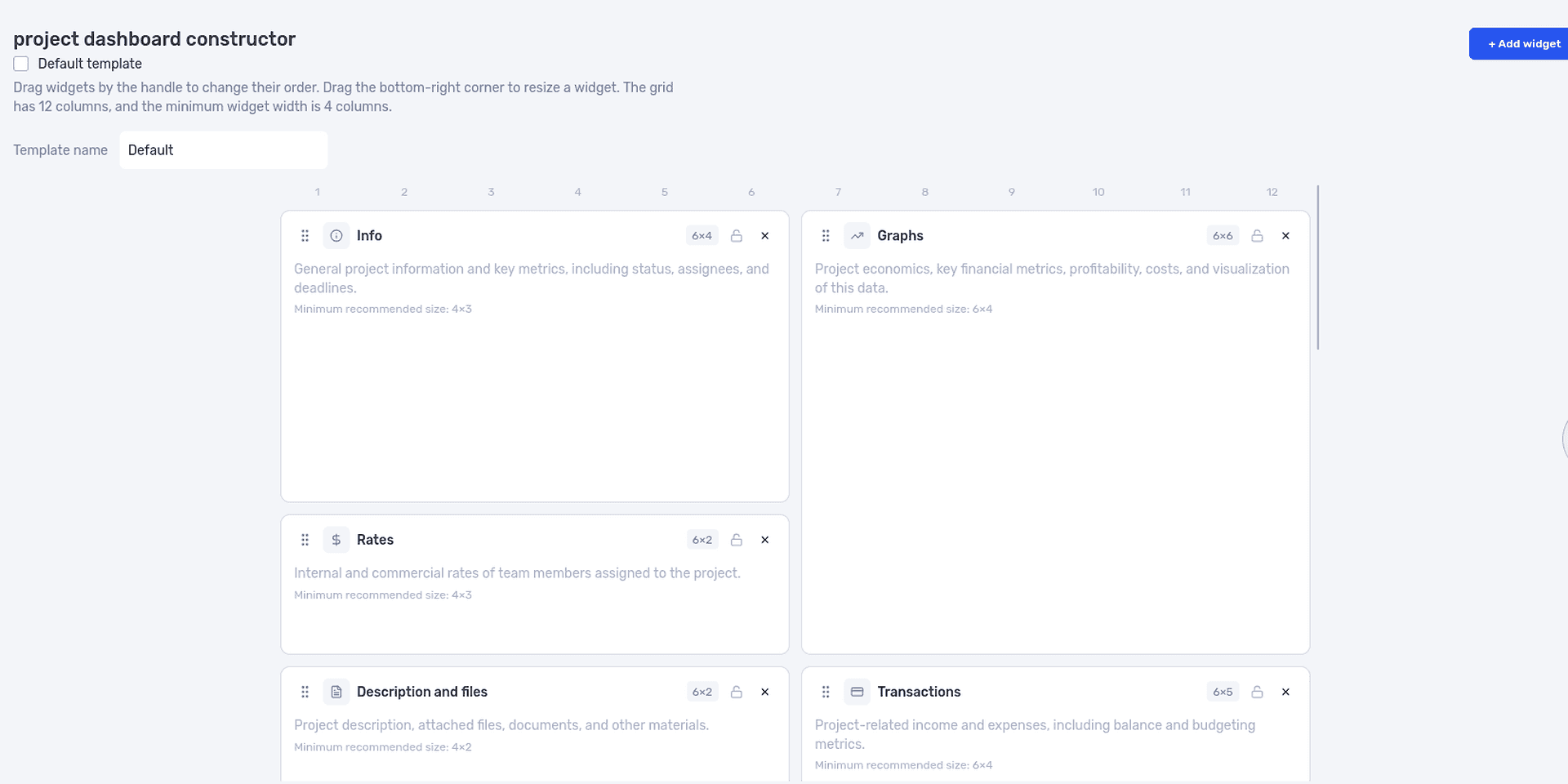
The dashboard constructor lets the team choose blocks and arrange them on the project page.
Open the saved layout on the screen people normally use. Check that task names and labels are readable and that the most important block isn't buried at the bottom. Empty widgets often hide these problems, so test with a project that contains real data.
Apply the layout to a project or business unit
In the project form, select the layout in Dashboard template. If it suits all of the agency's website projects, you can assign it to the relevant business unit.
An individual project can use a different layout. Internal research, for example, may not need the same financial overview as a client job. Check the template selection after changing the business unit: the documentation notes that this clears the field, so the layout must be selected again.
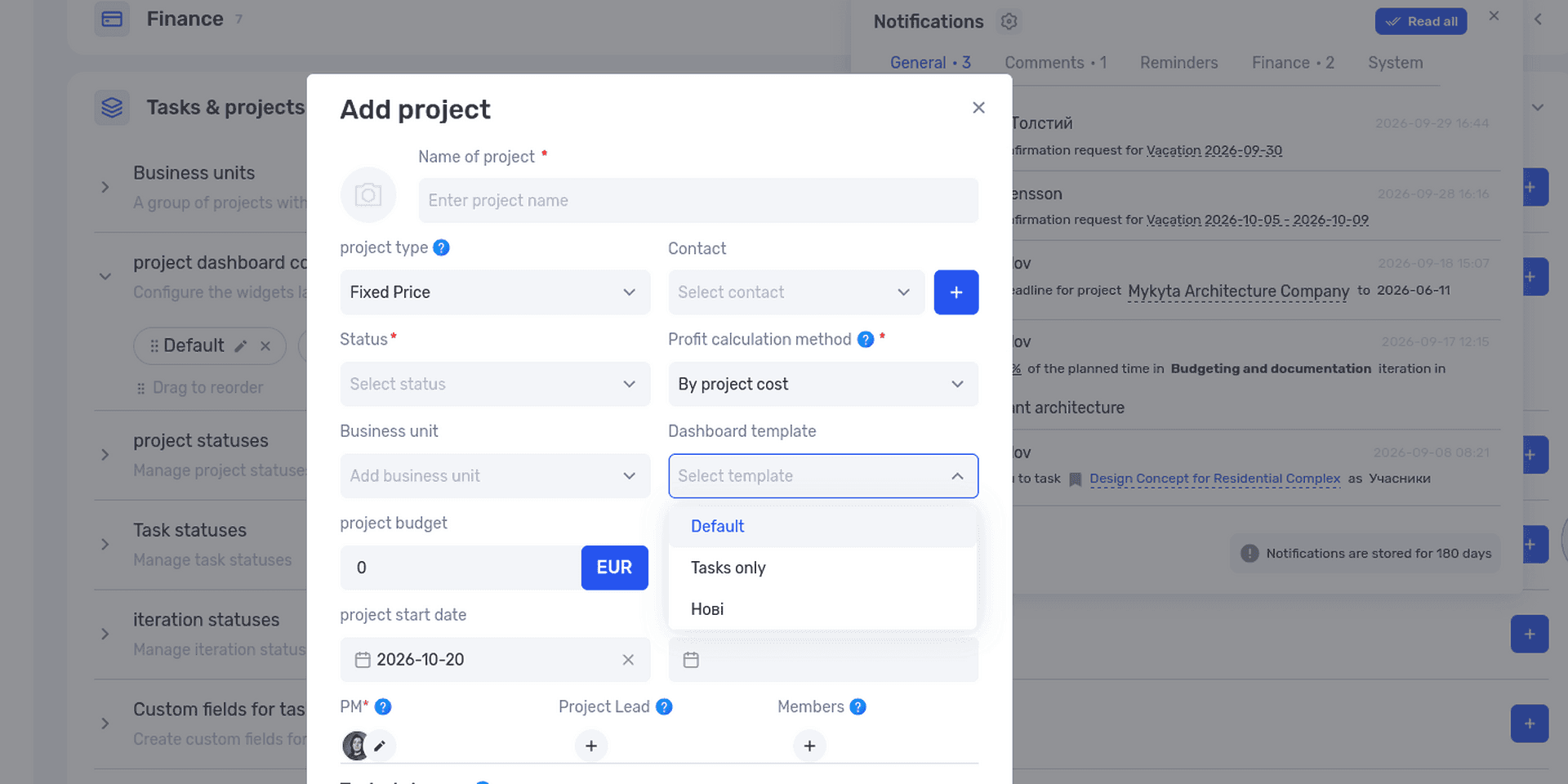
A saved layout can be selected for an individual project or assigned to a business unit.
A dashboard template controls the page layout. To reuse the structure of the work as well, use the separate project templates feature. Keep those two settings distinct when starting a new job.
Check the inputs behind the financial figures
A useful review needs up-to-date tasks, planned hours, rates, and financial records. Enabling Planning in if.team's financial block adds planned figures alongside actuals. The project financial planning documentation explains the calculations.
Before the review, check that everyone has logged their time and that task estimates are still current. Add new work to the plan before assessing the cost forecast.
Also check the project's profit calculation method. Settings include calculations based on project price and on money received. Interpret the figures according to the selected method; the metric explanations help prevent comparisons between different calculation bases.
The financial block also shows the balance due and lets you switch between project and company currencies. These features are described in the project financials update. Compare the balance with the agreed payment schedule.
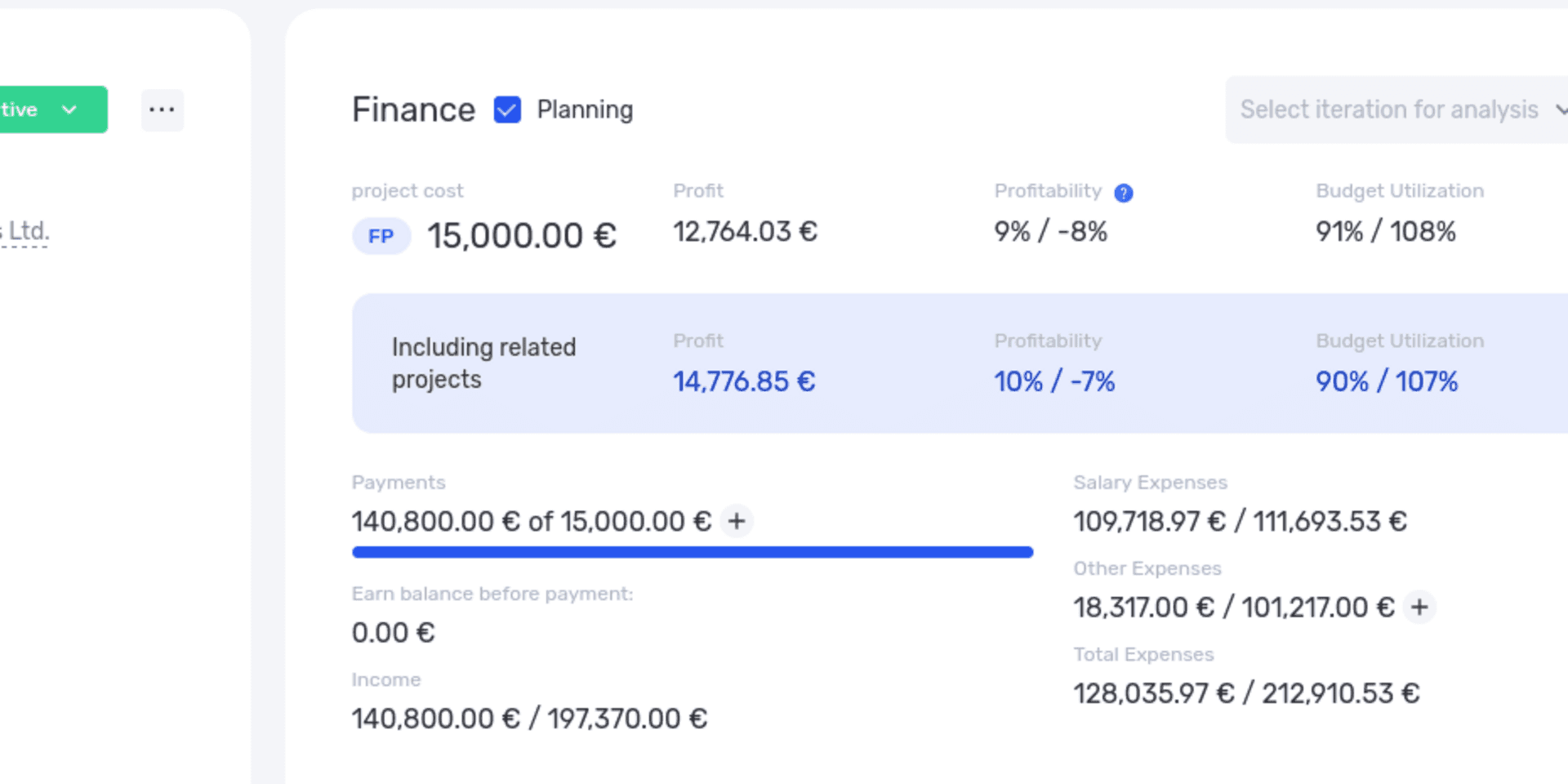
Planned figures help the team assess expected costs alongside recorded actuals.
Test the first review on a working project
Ask a colleague to open the project and find three things: the next milestone, work that needs attention, and the information needed to check costs. Don't tell them where to look first. The test will show whether the block order makes sense.
Then check the screen using an ordinary team member's role. Page layout and access permissions serve different purposes. Hiding a widget is not a way to protect financial data; verify access separately.
After the first meeting, change only what genuinely got in the way: a list that was too narrow, a milestone that was hard to find, or an unnecessary block. Small adjustments will help produce a layout the team uses every day.
How to use a dashboard in project meetings
Agree who updates the data and when, who explains variances, and where decisions are recorded. A small team can capture these rules in a few points in its shared process notes.
Before the meeting, check that the data is current
For a Monday meeting, agree when time entries and task updates are due. Otherwise, one part of the dashboard may reflect Friday's position while another is still showing Wednesday's.
Flag incomplete data upfront. For example: “The contractor's time for last week hasn't been entered yet.” You can postpone conclusions about costs while still discussing deadlines and current blockers.
Pay particular attention to empty values. No recorded costs does not prove there were no costs. No overdue tasks means little if the tasks have no deadlines.
During the meeting, discuss exceptions
You don't need to read out every number people can already see. Start with changes that affect the work: a milestone has moved, the remaining-work estimate has increased, or a new approval or expense has appeared.
For each exception, establish the cause, the impact, and the decision needed. For example: the catalog is delayed because its structure changed; this affects development; the manager needs to agree on the first-release scope with the client by Wednesday.
Assign an owner and deadline. Our guide to setting tasks for a team explains how to make work actionable. Decisions from the review should go into the system where the team manages execution.
At the next meeting, check what changed
Return to the previous agreement. Was the catalog approved? Was the estimate updated? Has the forecast completion date changed? Compare the new position with what was agreed at the last meeting.
If the team discusses the same issue for several weeks without progress, the obstacle may be authority or priorities. Another chart cannot replace a decision from someone who can change the scope, deadline, or resources.
Keep a short record of what was decided, which data informed it, and when the result will be reviewed. That helps a new team member understand why the project is being run this way.
Mistakes that make a dashboard hard to trust
Trust breaks down when the dashboard says the project is on track but the team already knows it will miss the launch. Start with the specific mismatch: what did the screen show, and what happened in practice? Then check the records, estimates, and calculation rules.
Everything looks fine, but the launch is at risk
This happens when a completed-work total hides critical dependencies. The team has closed many small tasks, but one unapproved deliverable blocks the launch.
Add milestones and important unfinished deliverables to the review. Give them clear owners and completion criteria. A high overall percentage will then be less likely to obscure the work that determines the deadline.
Not every small delay needs to become an escalation. Distinguish a local variance from a risk to the project outcome so the manager can focus attention where it matters.
Metrics are compared using different rules
One project records everyone's time; another records only the people doing production work. One includes contractor costs; another tracks them separately. Both have a “costs” metric, but a direct comparison would be misleading.
Align the data included and the period before comparing results. If the rules have changed, note that in the analysis. Old and new figures may need to be recalculated or explained separately.
The same applies to custom metrics. Write a short definition: what is included, how it is calculated, where the data comes from, and who checks it. Our article on KPIs also explores how metrics relate to goals.
The screen is overloaded, so nobody uses it
When everyone adds “one more important block,” the dashboard gradually becomes a long page. The metric people need gets lost among information reviewed once a quarter.
Check what the team actually used during its last few reviews. Leave infrequently needed information in a detailed report or another view. The everyday screen should support the team's normal working sequence.
The BigShow concert agency case study illustrates the use of different project layouts: information, financials, files, and discussions are arranged around the work. It is a useful example of how block selection depends on a company's process.
The metric becomes the goal
Judging work only by the number of closed tasks creates an incentive to split tasks into smaller pieces or close them before they are fully checked. Looking only at hours used can obscure the result and its quality.
Discuss metrics alongside the deliverables the team was meant to produce. After an hours overrun, for instance, check which results have been accepted and what still needs finishing.
Don't change a calculation simply to make a number look better. If a metric is no longer useful, explain why it is being replaced and preserve enough context to interpret earlier results.
What to check before rolling out a dashboard
Before applying a layout to every project, complete one full cycle: update the data, review it, make a decision, and check the outcome. That tells you more than looking at an empty page in the constructor.
- The intended users and decisions are clear.
- Metrics have names, units, and a defined period.
- Planned, actual, and forecast figures are distinguishable.
- Important unfinished work remains visible even when overall progress is high.
- Figures can be checked against tasks, hours, payments, or other records.
- Data owners and update times are defined.
- Blocks can accommodate real task names and amounts.
- Access permissions have been checked separately from the layout.
- Decisions made in the review have owners and deadlines.
Start with one project in if.team: choose the widgets, save a template, and use it in the team's next review. Try the workflow in the system to see which information belongs on your first screen. After a few working meetings, it will be easier to decide what should stay in the default layout for the business unit.
Frequently asked questions about dashboards
How is a dashboard different from a KPI?
A KPI is a key performance indicator used to assess progress toward a specific goal. A dashboard is a screen that can display that indicator alongside other information. It can also contain work lists, deadlines, and materials that aren't KPIs but help people manage a project.
Does a dashboard have to include charts?
No. If the user needs to find three tasks awaiting approval, a list may be more useful. A chart makes sense when it helps show change, proportion, or differences between values.
How many metrics should a dashboard have?
As many as the defined decisions require. Start with the questions asked in regular reviews and check whether each block helps answer them. There is no fixed number that suits every project.
Can you build a dashboard in a spreadsheet?
Yes, provided you can set up the calculations and maintain the data. As the number of sources grows, consider the time needed for updates, formula checks, and access control. The right tool depends on the complexity of the process and the team's requirements.
How is an analytical dashboard different from a project page?
An analytical dashboard is designed for comparisons and investigation. A project page combines an overview with working information: tasks, files, people, and discussions. It may contain analytical blocks, but its capabilities depend on the product.
How often should dashboard data be updated?
Match updates to the decisions. Daily management requires current task and blocker information. Monthly analysis needs complete, consistent data for the month. The team should know which point in time or period the information represents.
Can you configure different dashboards in if.team?
Yes. if.team supports templates with different widget selections and layouts. A layout can be selected for an individual project or assigned to a business unit. Data access permissions should be checked separately.
Is a dashboard enough to manage a project?
You also need current data, clear ownership, and follow-through on decisions. A dashboard helps people see the situation and organize a review. The result depends on how the team responds.
Author
Vladyslav ChesnokovPublished
Oct 13, 2026
More articles to read
What Is a CRM System and How Do You Use It to Manage Customer Relationships?
Learn what a CRM system is, how it works from first inquiry to outcome, and which features matter day to day. Compare CRM with spreadsheets, task managers, and ERP, and see how to choose a CRM and manage clients in if.team.
How to Write a Business Proposal: Examples and a Template
Learn how to write a business proposal: what to clarify first, which sections to include, and how to present price, timeline, and terms. Includes two examples — for services and installation work — a reusable template, sample emails, and steps in if.team.
How to assign tasks to your team: from briefing to tracking completion
We break down how to assign tasks so they actually get done: what a brief must contain, how to word the result and the deadline, who takes ownership and how to check completion. With an example, an acceptance checklist and a template for running the task in if.team from start to finish.
Profit and Loss Statement (P&L): What It Is, How to Prepare and Analyze It
We explain what a profit and loss statement is, how it differs from Cash Flow, and why profit is not the same as the cash left in your account. We break down the P&L structure from revenue to net profit, walk through a calculation for a service company and show how to build your first report.

What Is a KPI in Simple Terms: Examples, Formulas and How to Measure It
A KPI is a number that shows whether you are moving toward a goal and tells you what to do next. Ten KPIs for project-based teams with formulas, a filled-in KPI passport and a worked example of a design studio.

What a Bottleneck Is in Business and How to Identify It
A bottleneck in business is the point where a process actually slows down. Not formally, but in reality. This is where tasks pile up, waiting time increases, and the entire system starts working more slowly than it could. It can be a specific person who physically cannot handle the workload. It…
See if.team in action for your company
We’ll show how projects, team time and finances connect in one system, using your processes as an example.