
How KiwiParty manages inquiries, prepares estimates, and organizes events in if.team CRM for event agencies
How if.team CRM for event agencies helps KiwiParty manage inquiries from Instagram, Telegram, and WhatsApp, prepare estimates, and plan turnkey events.

A family chooses a birthday program: the child wants their favorite characters, while the parents ask about activities and pricing. The idea may change as the conversation goes on — a show or workshop can be added to an entertainer, and the set of services can be revised. The manager needs to turn the conversation into a clear order and keep track of everything that has been agreed.
For KiwiParty, this is everyday work. The agency runs many short events, works with three main inquiry channels at once — Instagram Direct, Telegram, and WhatsApp — and every conversation is at a different stage. One client still needs an estimate, another is taking time to decide, and for another event it is already time to involve performers.
KiwiParty manages this work in if.team CRM for event agencies: it receives inquiries from messengers, prepares estimates, and plans events. In this case study, we follow the process from the first inquiry to event preparation — including agreeing on the program, selecting performers, and handling payments.
The order history remains useful even after the birthday is over. When the family comes back, the manager can review the previous program and suggest something new for the next event.
About the client
KiwiParty is an event agency in Kyiv that specializes in children's parties and birthdays. The team also organizes events for adults. The agency handles many short orders, and its client database contains thousands of contacts.
For children's parties, KiwiParty offers themed programs based on cartoons, books, and games. The catalog includes Mavka, Harry Potter, Alice in Wonderland, and Minecraft, as well as sports, space, and other themes. A family can start by choosing the child's favorite characters or interests.
The program can be expanded with separate activities. The agency offers interactive puppet theater, bubble shows, science performances, and workshops. As a result, two parties with the same theme can still differ in the activities included and the performers involved.
KiwiParty works with entertainers, magicians, and other contractors who are brought in for specific events. While managers discuss new programs with families, the team prepares events that have already been confirmed. This number of parallel orders shapes how the agency works with inquiries, schedules, and contacts.
Inquiries from Instagram, Telegram, and WhatsApp in CRM
Work on a new event starts with a conversation about the program. KiwiParty clients write through Instagram Direct, Telegram, or WhatsApp to describe what they have in mind and ask their first questions.
We helped connect these channels to if.team CRM for event agencies. Inquiries come into the CRM, where managers work with leads — requests that still need to be processed and converted into orders.
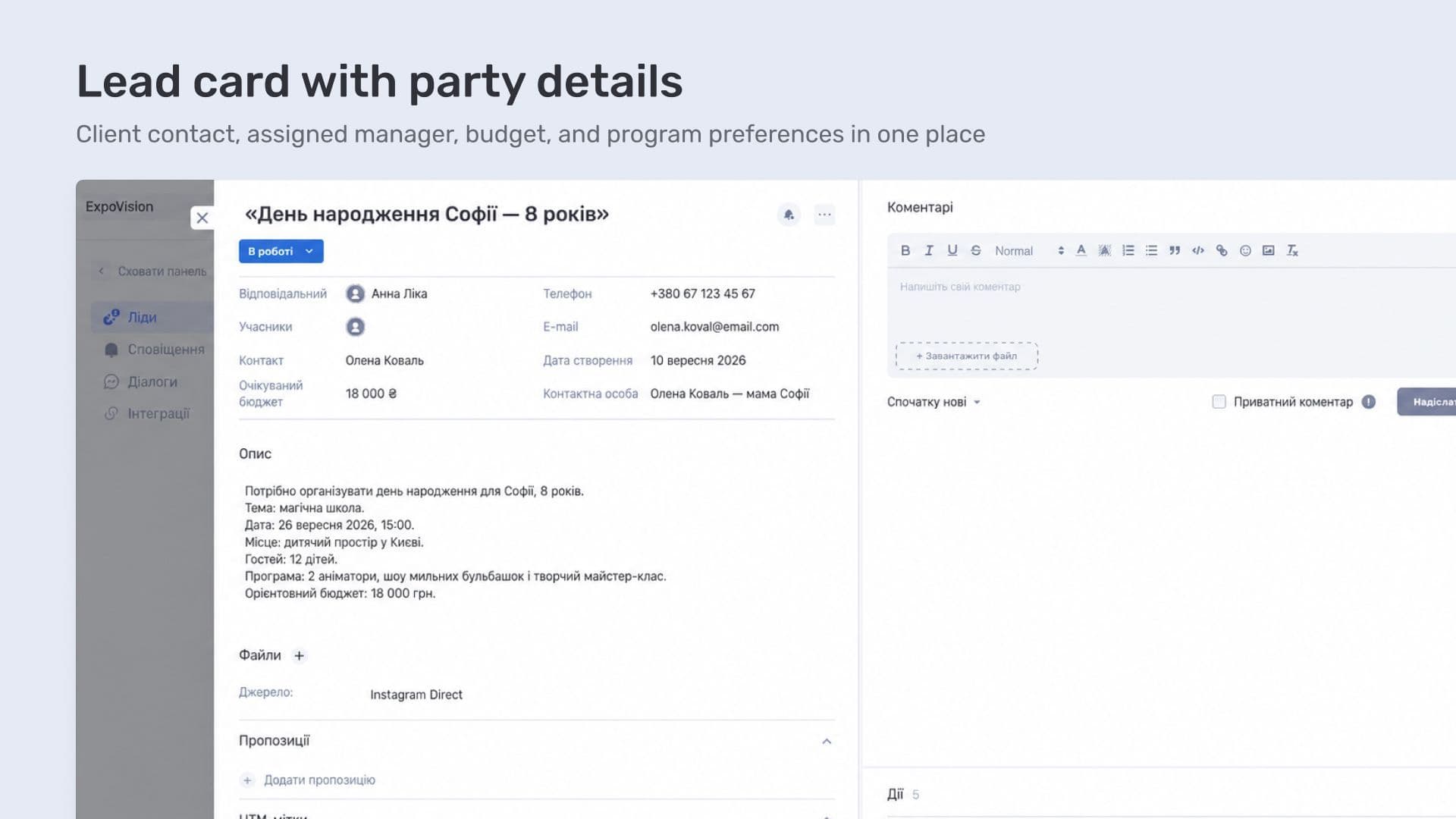
A lead card in if.team stores the client's contact details, responsible manager, status, and expected budget. The inquiry can also be supplemented with a description and files. For an event, this is a good place to keep the date, program preferences, and other details needed for the estimate.
Not every inquiry turns into an order right away. A client may need time to discuss the options with family members or decide on the program. At this stage, it is important to record when to return to the conversation and what still needs to be discussed.
For follow-up work with an inquiry, if.team includes reminders. A manager can schedule a call, meeting, or another action, set a date, and briefly note what needs to be discussed.
For example, if a client asks for a few days to choose a program, the manager can immediately schedule the next contact in the card and note which questions are still open. The action date will appear in the lead list and on the Kanban board.
The workday can start from the Notifications section, where all scheduled lead actions are collected. The manager can see who needs a reply today and which actions are already overdue. After a call or meeting, the action can be marked as completed.
Event estimate and commercial proposal for the client
Once the client's preferences are clear, the manager can move on to pricing. KiwiParty actively uses the commercial proposals module: managers combine services into an estimate and prepare a document that can be discussed with the client.
The estimate turns a discussion about the program into a specific list of services and prices. For example, if an entertainer and a magician are involved, their services can be added as separate line items. The proposal includes quantity and price, while the system calculates the total cost.
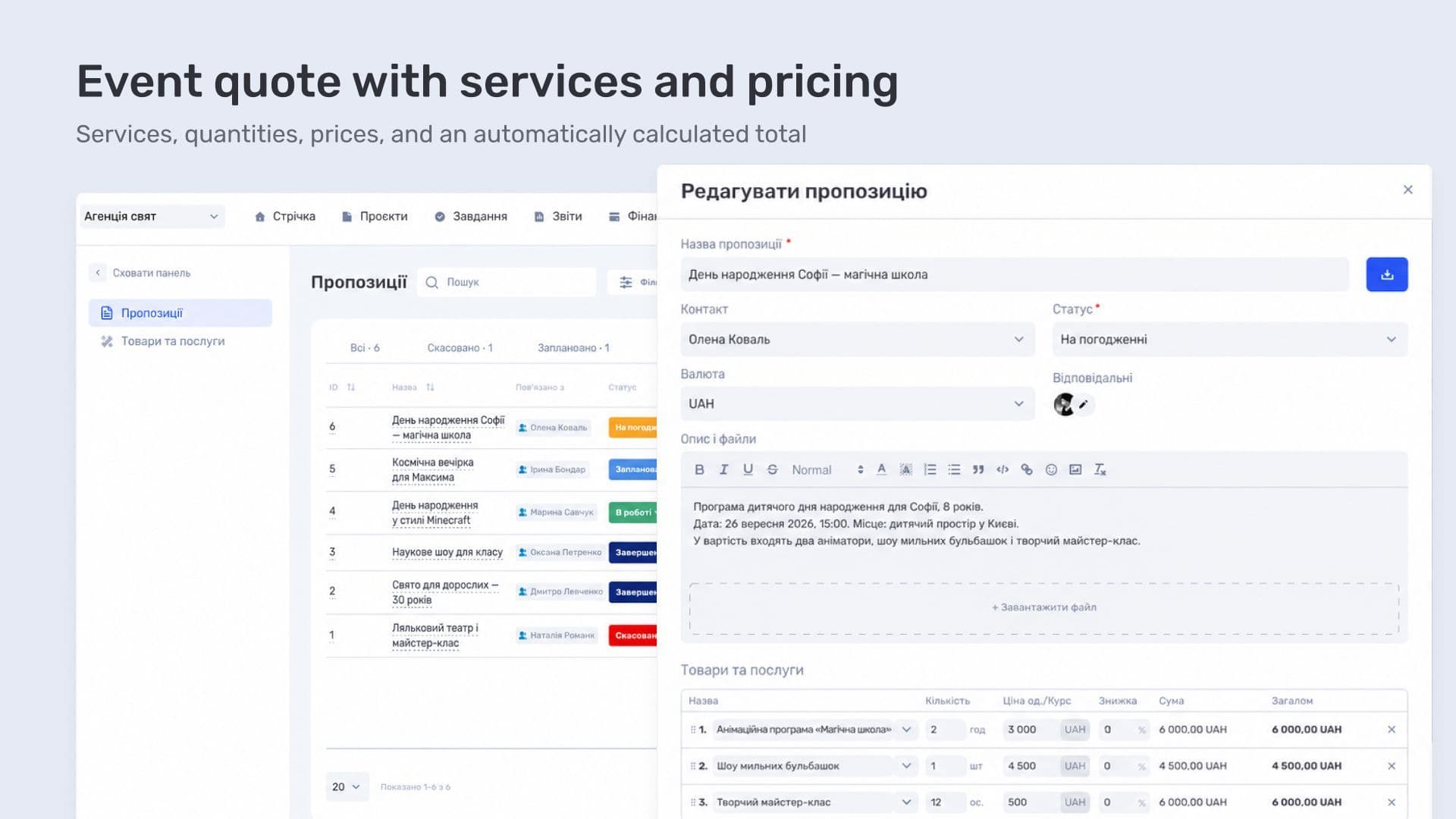
An estimate also makes it easier to return to the client's preferences. For example, if the family decides to add a workshop, the manager adds it as a separate line item and gets a new total. The document keeps the full program in one place, so the added service and its cost are both visible during the discussion.
Proposal in CRM and PDF for the client
KiwiParty saves the prepared proposal in the system and attaches it to the lead. The manager then generates a PDF from it and sends it to the client for review.
The client receives a document with the estimate that they can review and discuss. The manager keeps a proposal linked to the specific inquiry. This matters when there are many parallel orders: each conversation can be reopened together with its estimate.
From inquiry to project
Once the order is approved, a project can be created directly from the lead in if.team. The system fills in the name, contact, and budget, while the manager completes the remaining details by setting the status, project manager, and other required parameters.
The project can also include start and end dates, employees, and a description of the approved program. For an event, this can be separated clearly: dates show the work period, participants show the preparation team, and the description keeps the order details. Contractors involved in the event are linked to the project through contacts.
Event planning and team coordination
An approved order needs to fit into the agency's overall schedule. KiwiParty manages events as projects in if.team and uses a Gantt chart for planning. It shows event timelines and dates when several projects overlap.
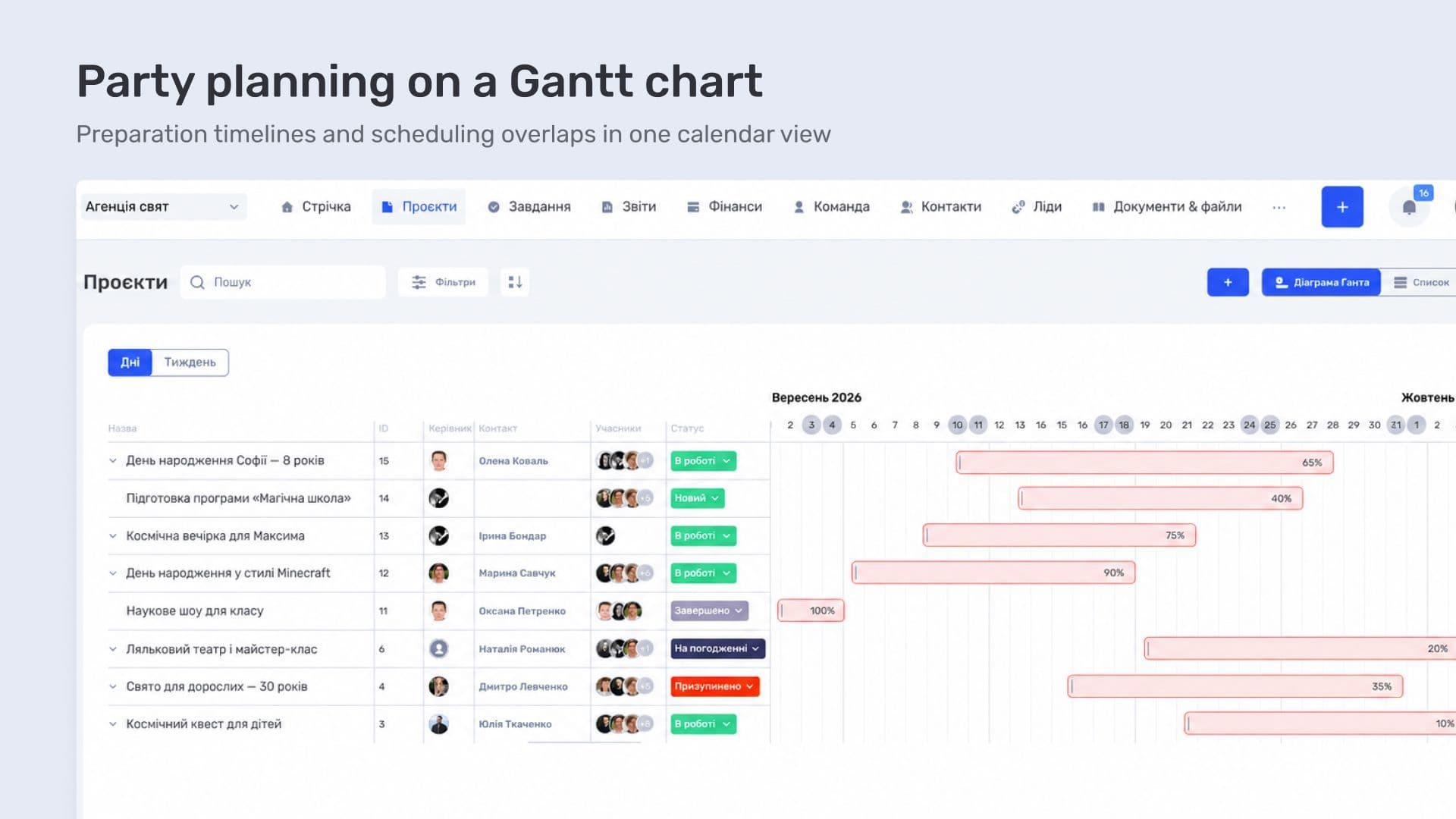
Imagine that two events are scheduled for the same date. The schedule shows the overlap, but organizing them requires more detail: event time, location, and the people involved. If the same performer is working at both events, their participation needs to be coordinated with these conditions in mind.
KiwiParty uses the overall schedule to plan availability. Performer participation is agreed separately: a date overlap on the Gantt chart alone is not enough to determine whether someone can work at both events.
The agency manages preparation for individual events in the tasks module. In if.team, tasks can be linked to a project, assigned to a responsible person, and given a due date.
For event preparation, these tasks might include confirming the program with the client or checking a performer's availability. The project link shows which order the work belongs to. This helps distinguish similar tasks when an employee is preparing several events at the same time.
The project status describes the preparation of the event as a whole, while task statuses describe individual actions within it. For example, the program may already be approved while a performer's participation still needs to be confirmed. In if.team, the appropriate set of statuses can be selected for project tasks.
Contractors for event organization in CRM
Part of the preparation involves finding people for the agreed program. KiwiParty keeps a contractor database in if.team, divided into groups by specialization, including entertainers and magicians.
This division helps the team start with the right group. Once the services included in the program are known, the team can find the appropriate specialists and contact them.
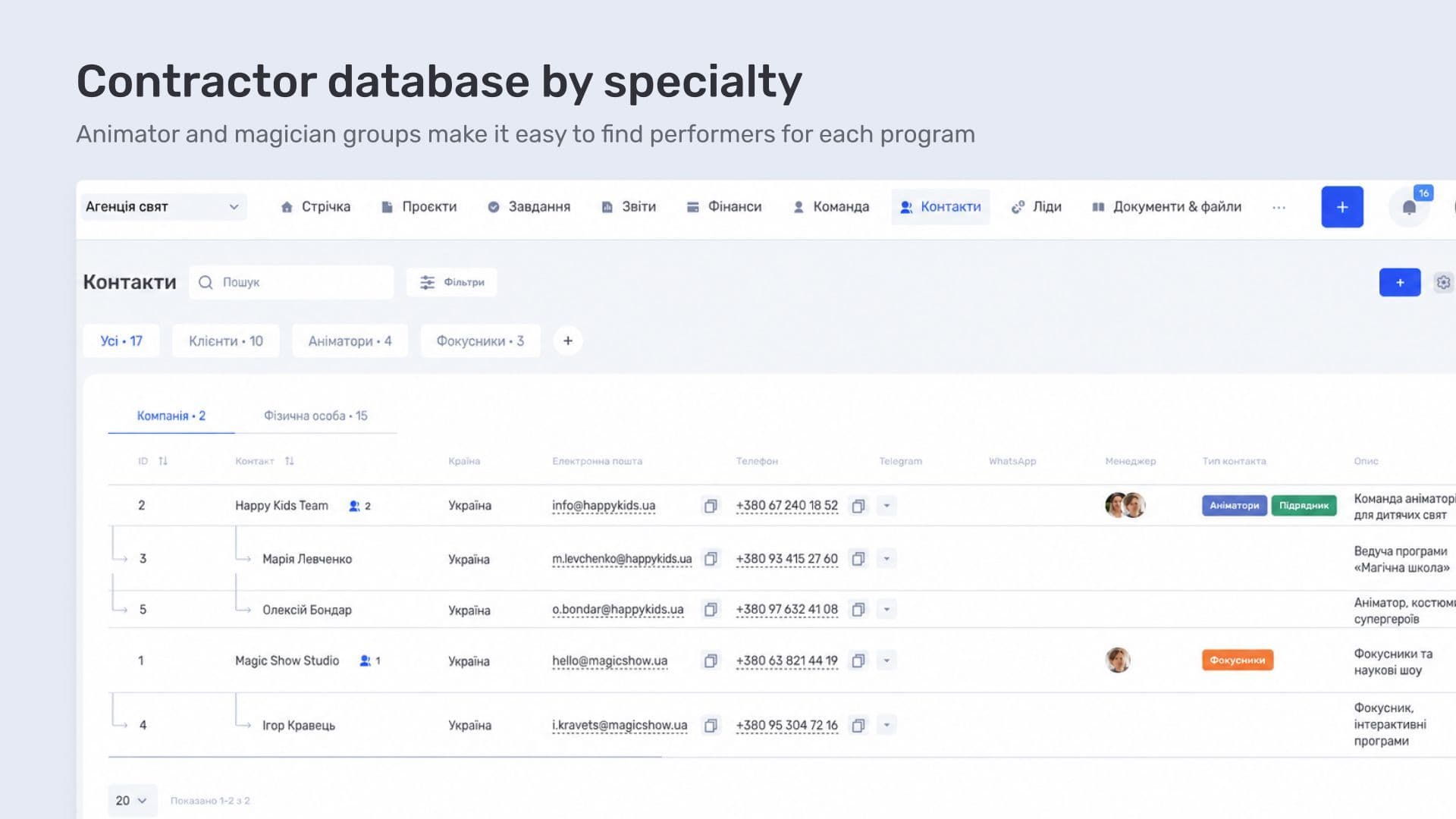
The agency links contractors to the projects in which they take part. In an if.team contact card, the team can also review related projects and return to previous orders.
Tracking event income and expenses
The performers involved also need to be paid. Their fees are part of the agency's event expenses, while the estimate for the client shows the order price. KiwiParty uses the if.team financial management module, where these operations can be assigned to the relevant order.
Consider a simple example. The program includes an entertainer and a magician. The price of their services for the client is already included in the proposal, while the amounts the agency pays the performers need to be recorded as project expenses. Otherwise, the estimate alone does not show what remains for the agency after payments are made.
Client payments and settlements with performers
For this type of accounting, a transaction includes the project, counterparty, category, amount, date, and account. Once transactions are assigned to the right event, incoming payments from the client and payments for the program can be viewed together.
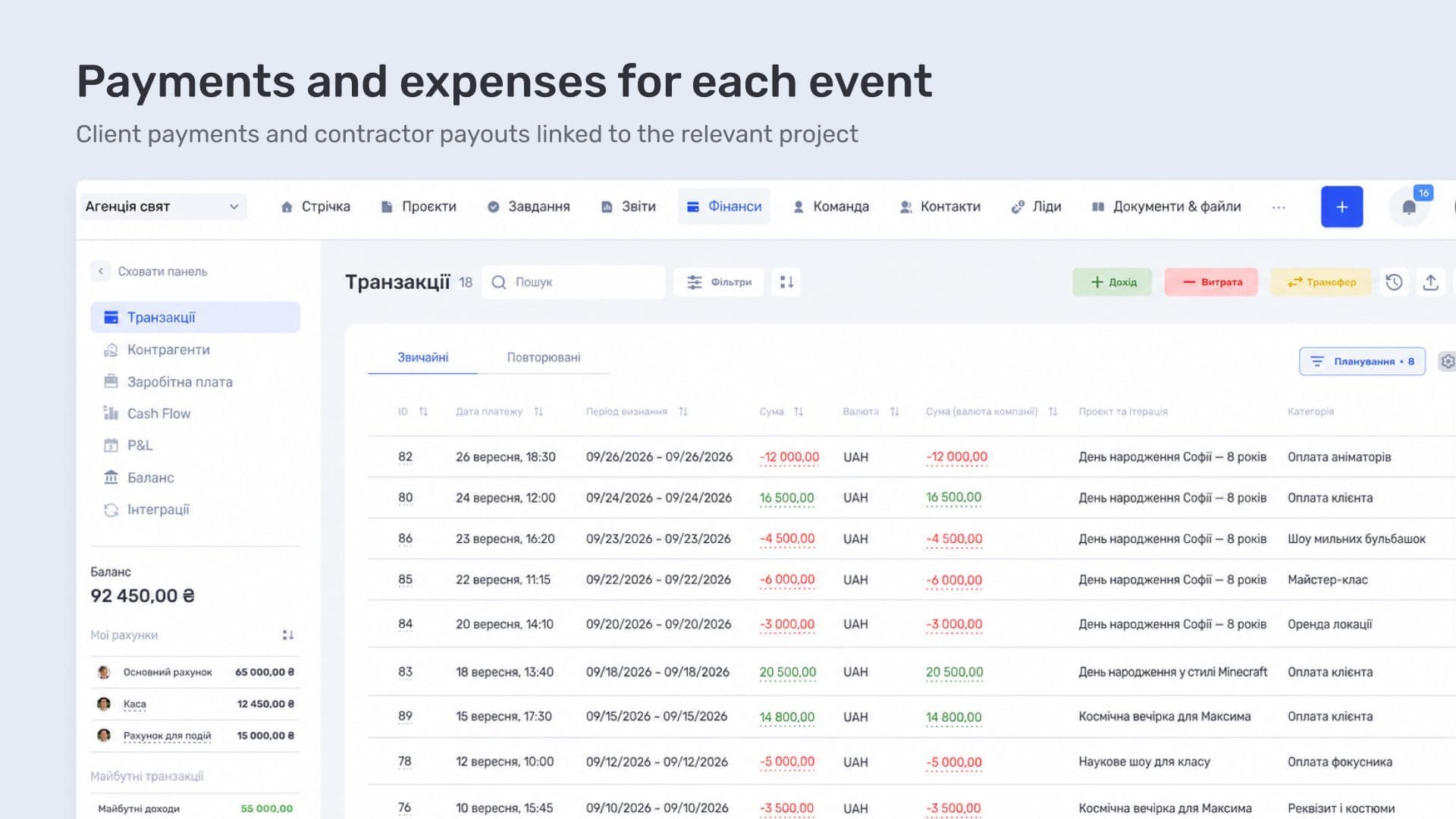
If a payment needs clarification, the record shows who was paid and which order the transaction relates to. This is especially useful when the same performer takes part in several events: the expense needs to belong to the project for which the performer was hired.
When events need to be separated by type
KiwiParty runs both children's and adult events. For companies with this mix of services, the system supports business lines: projects can be grouped and each group analyzed separately. This separation makes sense if the agency wants to compare the finances of different types of orders.
Cash Flow and P&L reports are available for analysis. The first shows cash movement, while the second shows income, expenses, and profit for a period. Selecting a business line narrows the report to the relevant projects, while transactions for a specific event remain available for review.
Repeat client inquiries
Once an event is over and all payments have been completed, the order may still become useful again during the next conversation with the family. KiwiParty's database contains thousands of clients, and some of them may return. Children's birthdays provide a natural reason to continue the relationship — the next celebration, for which the agency can offer a different program.
The agency keeps its client database in if.team. The contact card makes it possible to review related inquiries, projects, and proposals. Before a new conversation, the manager can open the previous order and check which services were discussed and ordered before.
If the contact includes the birthday date, the manager can reach out to the family in advance, ask about their plans, and suggest a program. The date helps choose the right time for the conversation, while the previous order helps recall the client's preferences and services already used.
if.team CRM for event agencies with a high volume of orders
For an agency that handles a large number of short orders every day, the key is not losing context between the initial inquiry and the event itself. At KiwiParty, three main communication channels — Instagram Direct, Telegram, and WhatsApp — come together in one CRM, while the client database contains thousands of contacts.
The value of CRM here is therefore not in an individual client card, but in the end-to-end process: inquiry → estimate → approved order → project → event preparation → history for the next inquiry.
KiwiParty uses if.team throughout the entire order journey. The manager handles the inquiry, clarifies preferences, and prepares the estimate. The proposal stays with the lead, while the client receives a PDF with the list of services and prices that can be discussed with the family.
Once the order is approved, preparation begins: the team manages the project and tasks, checks the schedule, and coordinates with contractors. For an agency with many short events, it is important to see both overall availability and the details of each event. The financial module adds income and expense tracking for each order.
A completed event remains in the client's history. Before the next conversation, the manager can open the previous proposal, review the chosen program, and suggest other activities. This way, KiwiParty's client database stores not only contacts, but also the context that makes it easier to continue working with each family.
Another event-team scenario is preparing a large event on a very tight schedule. In the case study about a conference for 150 participants with a UAH 1 million budget, we show how if.team was used to coordinate tasks, contractors, and finances in seven days.
Frequently asked questions
How can inquiries from Instagram, Telegram, and WhatsApp be handled in one system?
The messengers are connected to the CRM, and inquiries from them appear in a shared lead list. The manager can see which channel the request came from and continue the conversation in the card without switching between apps.
How can you prepare an event estimate and send it to the client?
Services are added to a commercial proposal as separate line items with quantity and price, and the system calculates the total. The final document is generated as a PDF using the agency's template and remains attached to the inquiry.
How can payments to entertainers and other contractors be tracked?
Contractors are stored as contacts and linked to a specific event. Payments are recorded as transactions linked to the project, so the client-facing order price and performer costs can be viewed together.
Can you view a client's previous order history?
Yes. The contact card brings together all inquiries, projects, and proposals. Before a new conversation, the manager can open the previous event and review which services were ordered before.
Author
Vladyslav ChesnokovPublished
Sep 16, 2026
More articles to read
How Creatura manages event projects, budgets, and finances in if.team ERP for event companies
How if.team ERP for an event company helps Creatura manage event projects and budgets, receive transactions from PUMB, and automatically create folders in Google Drive.

How BigShow manages concert projects and finances in if.team ERP for event agencies
How if.team ERP for a concert agency helps BigShow manage concert projects, preparation stages, contractor agreements, and the finances of concerts and the orchestra.
How an Event Agency Organized an Event in 7 Days with a 1 Million UAH Budget Using if.team
Our client was organizing a conference for 150 participants at the Parkovy Conference Center. To coordinate all this quickly and without mistakes, the team chose if.team.
if.team is the New Task Manager for the Atlas Weekend Team
Atlas Weekend was looking for a task manager to organize the team’s internal workflow. They needed a tool where projects could be managed, tasks assigned across departments, work planned, and the real status of operations visible at any moment.

How Ukrainian Business Brotherhood automated meetings and tasks with Claude and if.team
Ukrainian Business Brotherhood connected Claude to if.team: Google Meet calls are recorded with Fathom, agreements become tasks automatically, and each team member has personal AI skills.

How LEVIN group tracks finances in if.team by voice with ChatGPT
LEVIN group logs income and expenses in if.team with voice messages, receipt screenshots, and files sent to ChatGPT, and uses AI for tasks, projects, and CRM.
See if.team in action for your company
We’ll show how projects, team time and finances connect in one system, using your processes as an example.