Webhooks
A webhook sends data to your URL whenever an event happens in if.team: a lead is created, a task status changes, a transaction is added. This is how if.team connects to n8n, Make, Zapier, or your own backend without constantly polling the API.
A webhook sends a message to your URL every time a certain event happens in the system. This is the main way to connect if.team with external automation services (n8n, Make, Zapier) or your own backend — without polling the API.
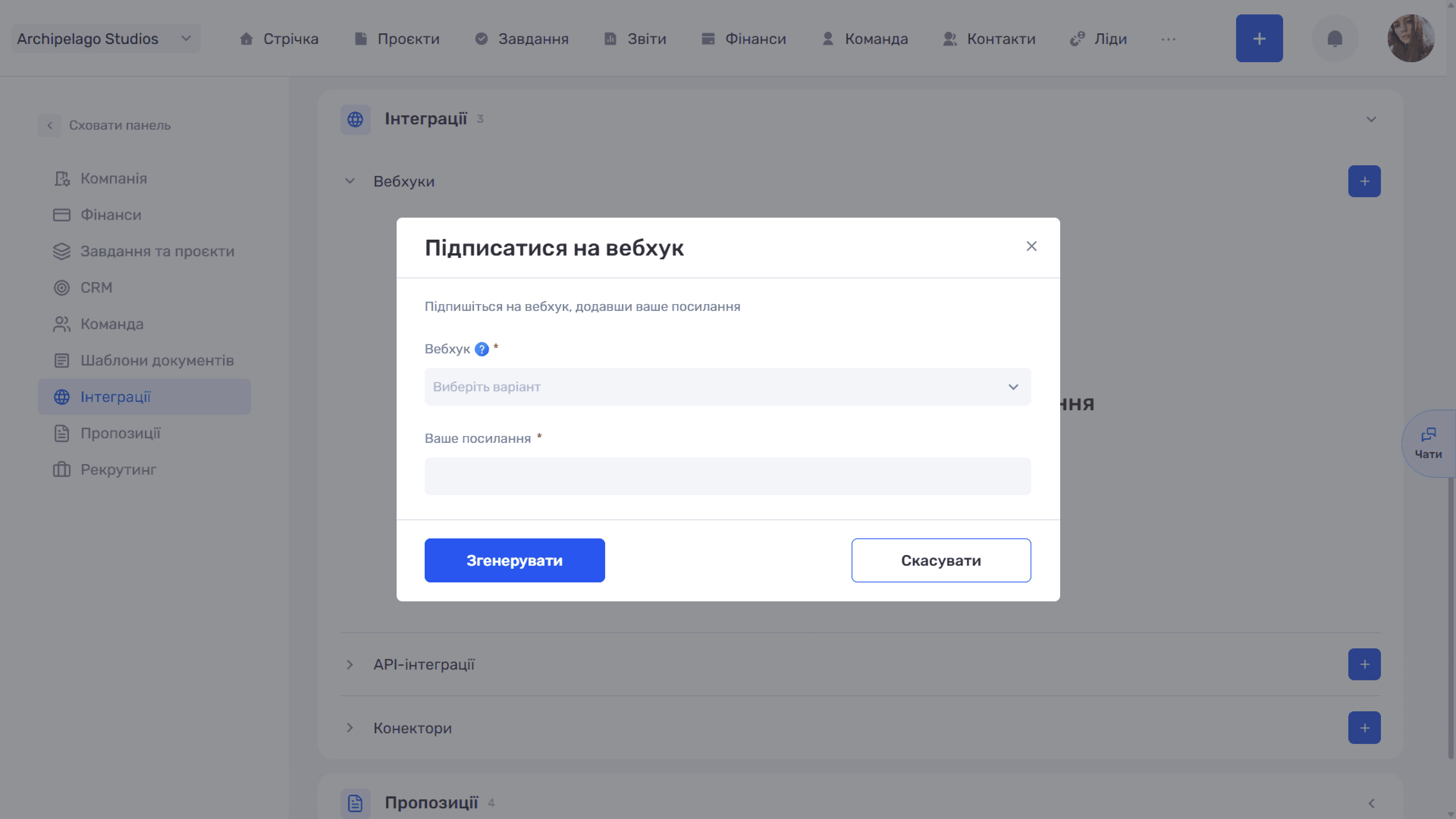
Click “+” next to “Webhooks”, and the “Subscribe to webhook” window opens:
- Webhook (required) — the event you subscribe to.
- Your link (required) — the URL the system will send event data to.
The “Generate” button creates the subscription, “Cancel” closes the window.
Events and Their Codes
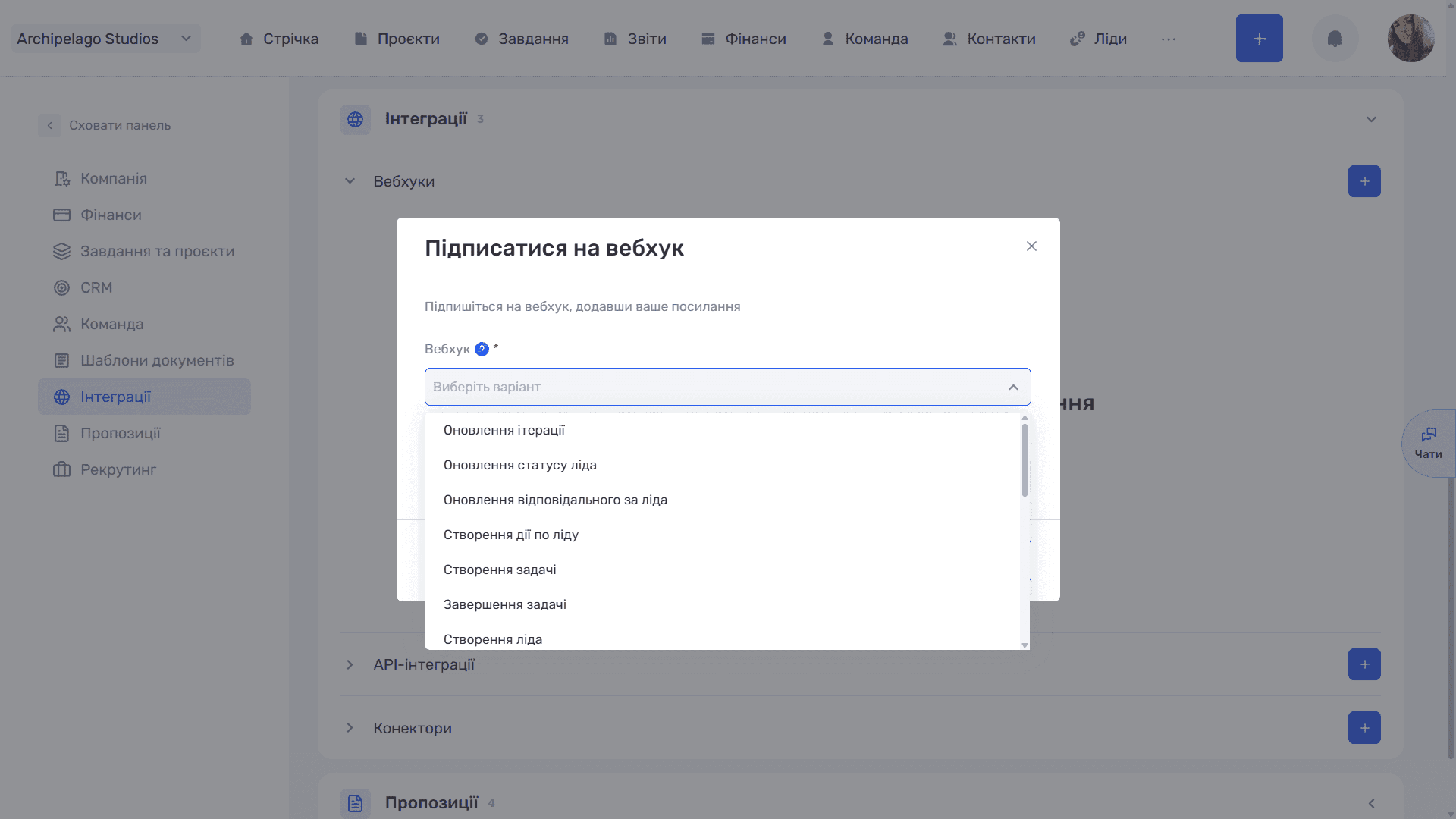
The available events cover the main entities of the system. The code on the right comes in the type field of the payload — this is how your handler tells events apart.
Leads
- Lead created —
LEAD_CREATED - Lead name updated —
LEAD_NAME_UPDATED - Lead status updated —
LEAD_STATUS_UPDATED - Lead owner updated —
LEAD_RESPONSIBLE_UPDATED - Lead custom field updated —
LEAD_CUSTOM_FIELD_UPDATED
Lead actions
- Lead action created —
LEAD_ACTION_CREATED - Lead action updated —
LEAD_ACTION_UPDATED - Lead action completed —
LEAD_ACTION_FINISHED - Lead action deadline —
LEAD_ACTION_DEADLINE
Tasks
- Task created —
TASK_CREATED - Task updated —
TASK_UPDATED - Task status updated —
TASK_STATUS_UPDATED - Task custom field updated —
TASK_CUSTOM_FIELD_UPDATED - Task completed —
TASK_FINISHED - Task deadline reminder —
TASK_DEADLINE_FINISHED_REMIND
Projects and iterations
- Project created —
PROJECT_CREATED - Project updated —
PROJECT_UPDATED - Iteration created —
ITERATION_CREATED - Iteration updated —
ITERATION_UPDATED
Clients
- Client created —
CLIENT_CREATED - Client updated —
CLIENT_UPDATED
Team
- Member created —
PARTICIPANT_CREATED - Member updated —
PARTICIPANT_UPDATED - Member schedule entry created —
PARTICIPANT_GRAPHIC_CREATED
Finance
- Transaction created —
TRANSACTION_CREATED - Transaction updated —
TRANSACTION_UPDATED
Please note
Project names in your company may differ — if a custom term is set in the settings instead of “project”, the event list will use that term.
Typical scenarios: a Slack or Telegram notification about a new lead, syncing tasks with an external system, or starting an automation chain when a transaction status changes.
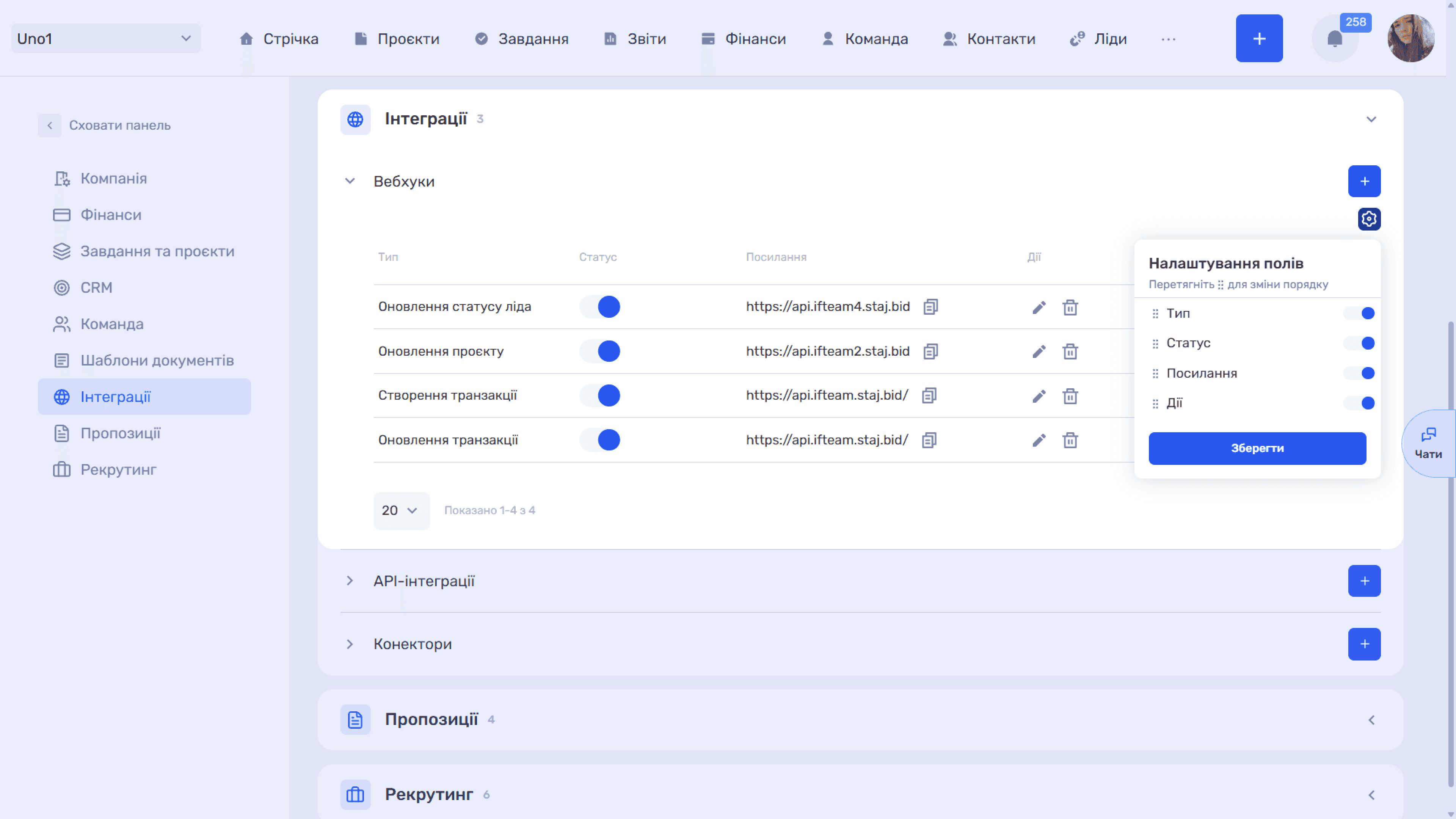
Created subscriptions are shown in a table with the columns Type, Status, Link, and Actions:
- Type — the event the subscription is for.
- Status — a toggle that temporarily stops sending without deleting the subscription.
- Link — the URL; the icon next to it copies it in full.
- Actions — “✏” edit and “🗑” delete.
The “⚙” icon above the table opens “Field settings”: toggles turn columns on and off, and dragging by “⠿” changes their order. Changes are applied with the “Save” button. Below the table there is a rows-per-page selector and a record counter.
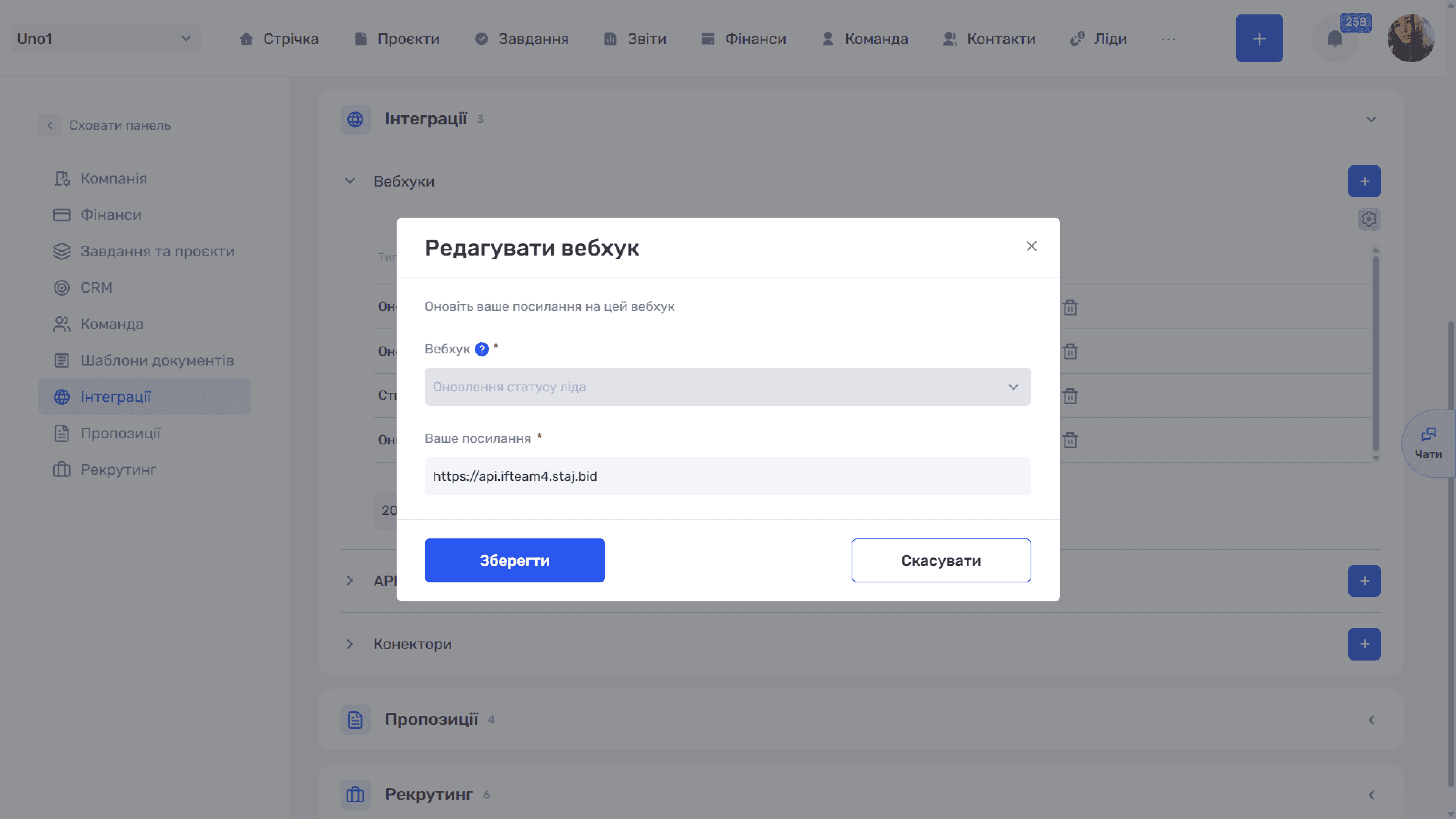
The “✏” icon in a row opens the “Edit webhook” window. Here you can change only the link — the “Webhook” field with the event type is shown for reference and cannot be edited. To subscribe to a different event, create a new webhook and delete the old one or turn it off with the toggle in the list.
Webhook Data Format
When an event occurs, if.team sends JSON with two fields to the address you specified:
- type — the event code;
- entity — the data of the entity the event happened to. The set of fields depends on the event type.
Example for a lead status update:
{ "type": "LEAD_STATUS_UPDATED", "entity": { "id": 1, "name": "Lead 123", "status": { "id": 1, "name": "Processing" } }}
Example for a member schedule entry:
{ "type": "PARTICIPANT_GRAPHIC_CREATED", "entity": { "type": 3, "creator": { "id": 1, "name": "user1" }, "participant": { "id": 2, "name": "user2" }, "from": "2026-01-01", "to": "2026-01-07" }}
Here participant is the employee the entry was created for, creator is who created it, from and to are the period boundaries, and type is the numeric code of the day type (vacation, sick leave, and so on).
Please note
The “Member schedule entry created” event refers to entries in an employee's absence schedule — vacations, sick leave, and similar periods — not the company's work schedule.
Delivery Technical Details
Data is sent with the POST method and the Content-Type: application/json header; the request body is JSON with the structure described above.
Delivery is considered successful if your server responds with a 2xx code. If the server does not respond or returns another code, the system makes up to four attempts in a row, with no pauses between them. After that, the event is considered undelivered and is not sent again.
Please note
Retries do not protect against server downtime. Since all four attempts follow each other within fractions of a second, they protect only against a momentary network glitch. If your server is restarting, overloaded, or down for even a few seconds, all four attempts fail and the event is lost for good. Do not rely on webhooks as the only data source for critical processes: periodically reconcile the state via the if.team API.
Security and Repeated Events
Requests are not signed. if.team does not add a signature or secret token to the webhook, so your server cannot cryptographically verify that the request really came from if.team. If your endpoint performs significant actions, protect it yourself: make the URL unpredictable (add a long random segment and check it), restrict incoming requests by IP, and verify data via the API before irreversible actions.
Your handler must be idempotent: receiving the same event again must not create duplicates. The payload has no delivery ID, so you will have to recognise repeats by the content of entity.
Still have questions?
Maybe we haven't added this information yet. But you can always reach out:
Request a demo
Submit a request and we'll show you how the service works and its capabilities.
Book a demo