External Services
External services let automations perform actions outside if.team. One such action is currently available — creating a folder in Google Drive.
Create folder
The “Create folder” action creates a folder in a connected Google Drive. A typical scenario is a separate folder for each new project with a name that matches the project name. Then client files are always in a predictable place.
- Variable name * — The name under which to store the result of the action
- Name — The folder name or path to it. Combines text and dynamic values via the “+”* button
- Connectors — Which Google Drive connection to use to create the folder. The “Create”* link in the list leads to creating a new connector
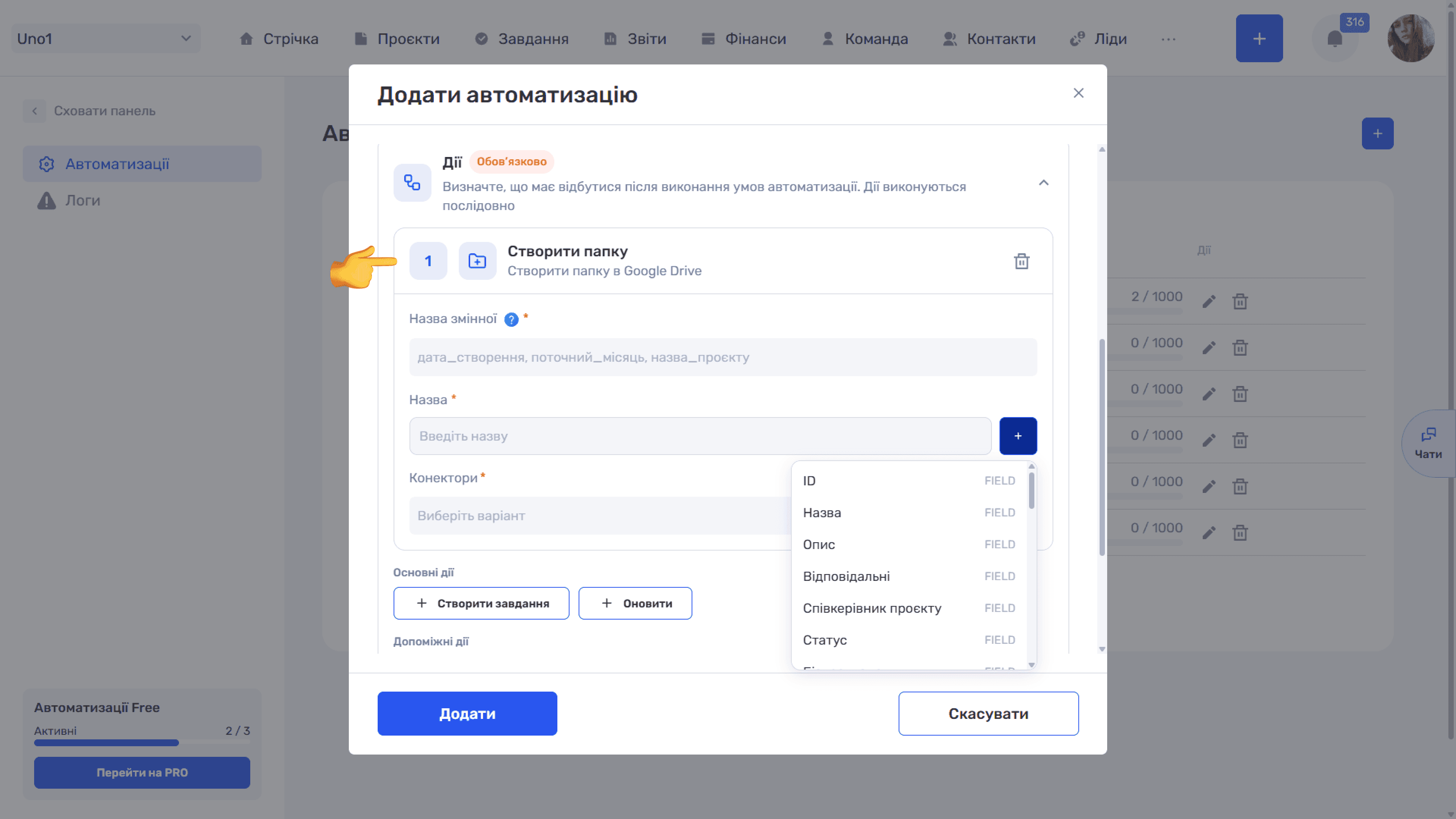
Example. Name Shared_Drive/Projects/2026/ + prefix + “-” + formattedCount + Name. For the project “Website redesign”, a folder with a name like “609-012 Website redesign” is created at the specified path.
Please note
On success, the action variable contains the ID of the created folder on Google Drive. You can insert it as a chip into the project or task description to keep a link to the folder at hand.
Please note
A connector is required first. The action works only through a Google Drive connector created and connected in Admin panel → Integrations → Connectors. The connected account must have access to the folder specified in the path.
Still have questions?
Maybe we haven't added this information yet. But you can always reach out:
Request a demo
Submit a request and we'll show you how the service works and its capabilities.
Book a demo