
How Oasis Comfort manages HVAC and plumbing projects in if.team
Oasis Comfort handles inquiries in the CRM, schedules site stages and teams on a shared Gantt chart, and compares planned and actual financial performance of its HVAC and plumbing projects in if.team.

When a company designs and installs building services systems, work on a site passes through several teams. Managers handle inquiries, designers develop the solutions, and installers carry out the work. The project manager needs to see how these stages connect, who is involved, and how the job's financial performance is changing.
Oasis Comfort organizes these processes in if.team. The company collects inquiries in the CRM, manages sites as projects, and schedules work packages on a shared Gantt chart. The team also reviews planned and actual financial performance for each project.
An implementation partner is involved in the rollout. The Oasis Comfort team actively uses the product and commissions improvements to fit its processes. Some of these changes involve stage planning, stage teams, and the management of clients and contractors.
About Oasis Comfort
Oasis Comfort designs, installs, and maintains building services systems at sites across Ukraine. The company works with HVAC (heating, ventilation, and air conditioning), as well as water supply and drainage systems. Its jobs cover residential developments, commercial premises, and industrial facilities.
Work featured on the company's website includes the PERETYN and PORT logistics centers, the FORMATSIA industrial park, the Seven-G business center, and Viking Business Park Lviv. The purpose of each facility determines the requirements for its building services and the scope of work.
The team supports jobs from design through installation and ongoing maintenance. It prepares design documentation and cost estimates, selects equipment and materials, and handles installation and commissioning. Several building services systems may be combined at one site, requiring their designs to be coordinated.
Design specialists, engineers, and installation crews all take part in delivery. Each group has its own activities and deadlines, and the readiness of one part affects the next. Installation, for example, requires approved designs and the appropriate materials.
In if.team, Oasis Comfort organizes site work into projects, work packages, and tasks. The company uses a shared schedule for planning and assesses each job's financial performance separately. Work on a prospective project starts in the CRM.
Inquiries from different channels in the CRM
Oasis Comfort has connected a messaging integration. Inquiries from different channels are collected in the CRM, where the team handles them and prepares them to become projects.
A lead record in if.team can hold the client's contact details, the assigned manager, a status, a description, and files. For an engineering job, this is a useful place to collect details about the site, the systems required, and the initial materials for further discussion.
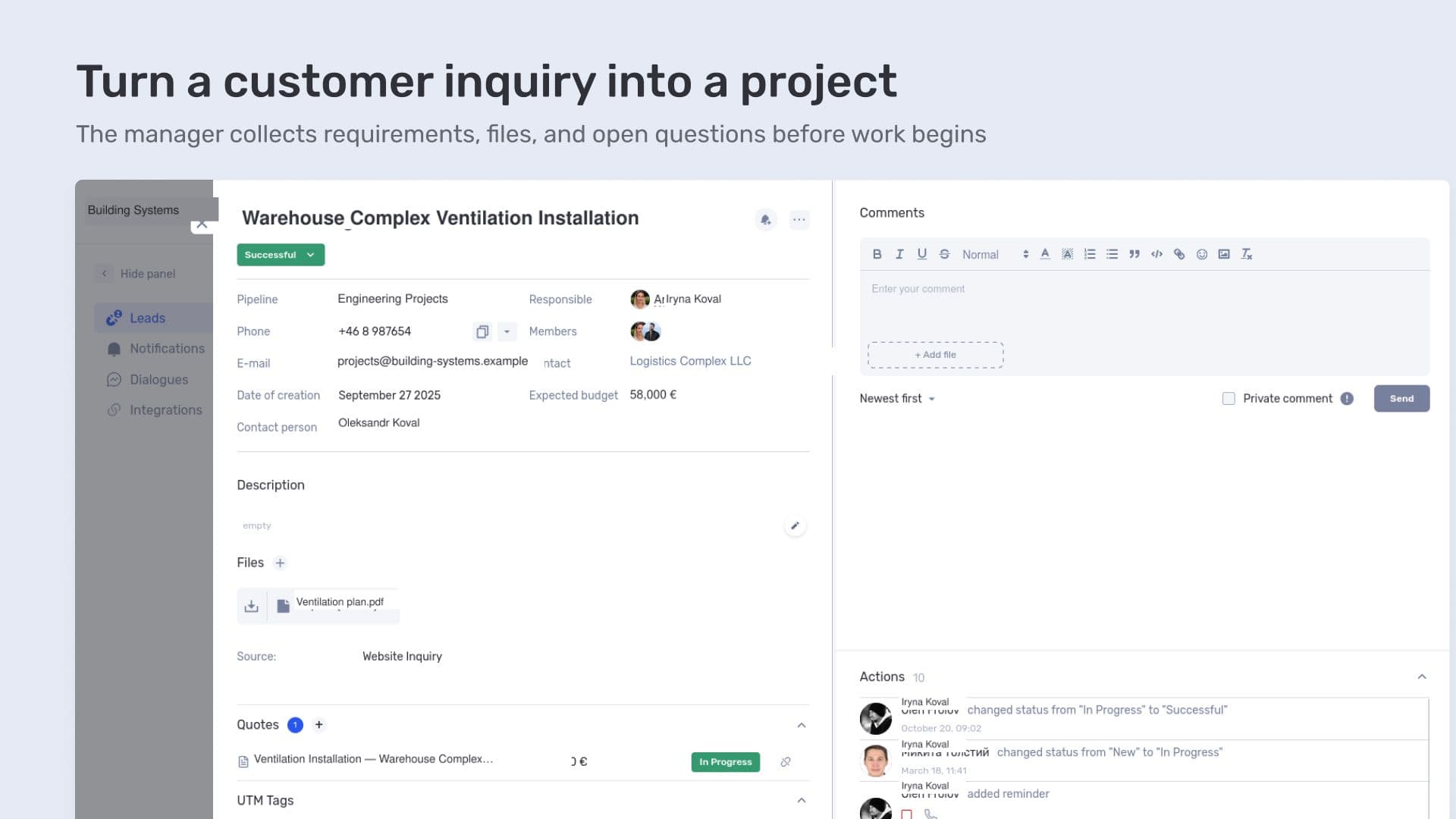
Turn a customer inquiry into a project
For example, a client asks about ventilation for a property. During the conversation, the manager clarifies the requirements and receives the materials needed to prepare an estimate. The inquiry can record both the information received and any questions that still need to be resolved. The client may have sent a floor plan while the system requirements are still being clarified. The record then shows what information is missing before the next step.
Once the job is agreed, Oasis Comfort moves on to a project. In if.team, it can be created directly from the lead, with the details checked and supplemented with delivery information: dates, a project manager, participants, and a description of the work. The inquiry becomes the basis for organizing work at the site.
At this handover, the agreed scope needs to be distinguished from open questions. If the client is still choosing between options, this should be noted in the description. The delivery team needs to know which decisions have been made and what must be clarified before the relevant work begins.
Clients and contractors with assigned managers
The company maintains a contact database in if.team that includes clients, contractors, and other parties it works with. Each contact has an assigned manager.
This assignment is linked to access permissions: managers see the contacts within their area of responsibility. We developed this manager assignment functionality further during our work with Oasis Comfort.
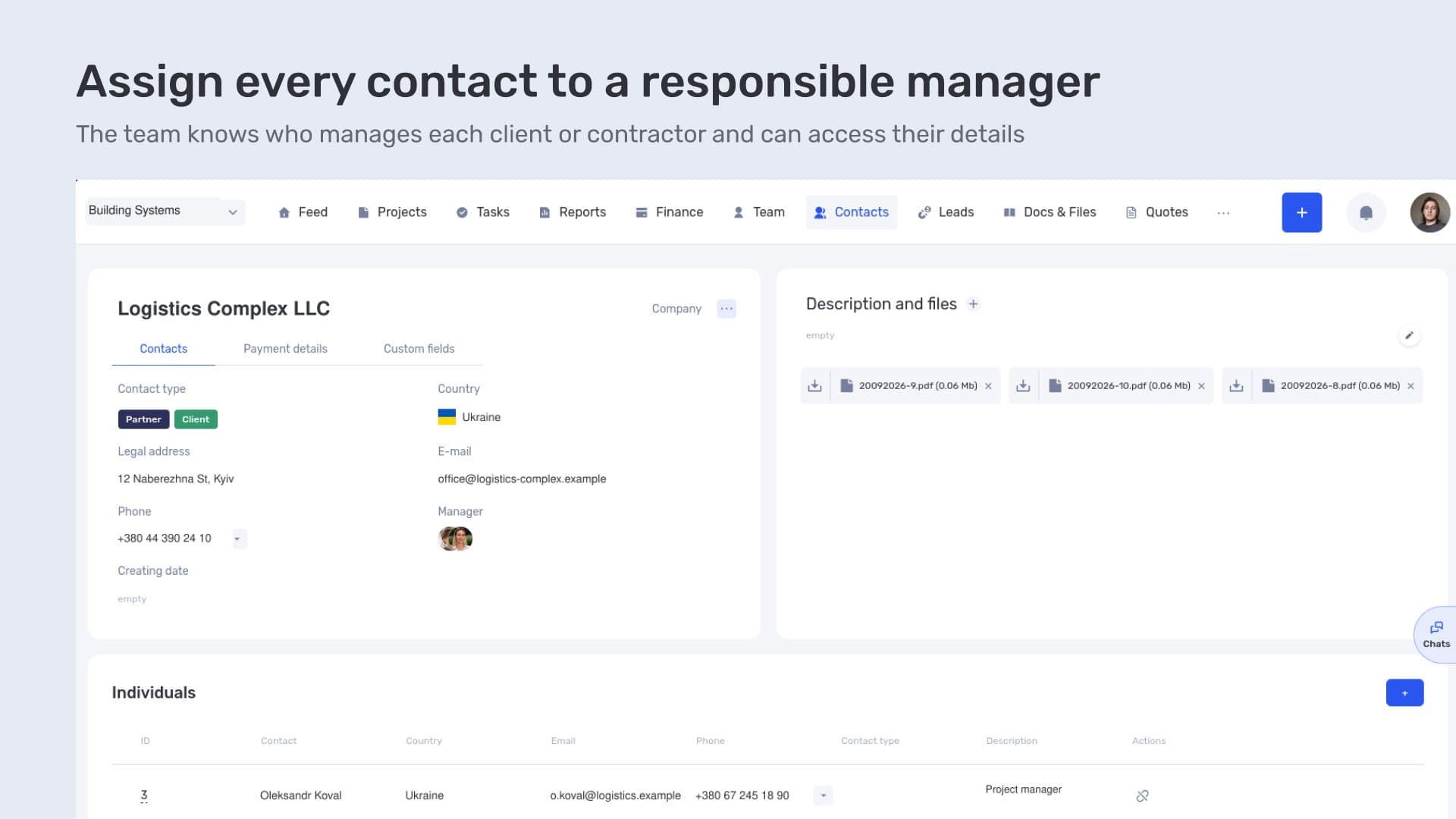
Assign every contact to a responsible manager
This makes it clear who handles the relationship with a particular client or contractor. The database identifies the person responsible for the contact, and access to information reflects the manager's responsibilities.
For an engineering and installation company, this matters as the number of jobs and organizations involved grows. The team works from a shared database while retaining clear responsibility for individual contacts.
Sites and work stages on a shared Gantt chart
Oasis Comfort manages each site as a separate project. Within it, the team creates work packages and connects them through dependencies. The plan shows the sequence of delivery: which activities can run in parallel and which must wait for earlier work to finish.
The company has found the overall Gantt chart particularly useful because projects can be expanded to show individual stages. One screen displays the schedules of several sites, their work packages, and the links between them. Oasis Comfort uses this view in its work and has commissioned improvements to this part of the system.
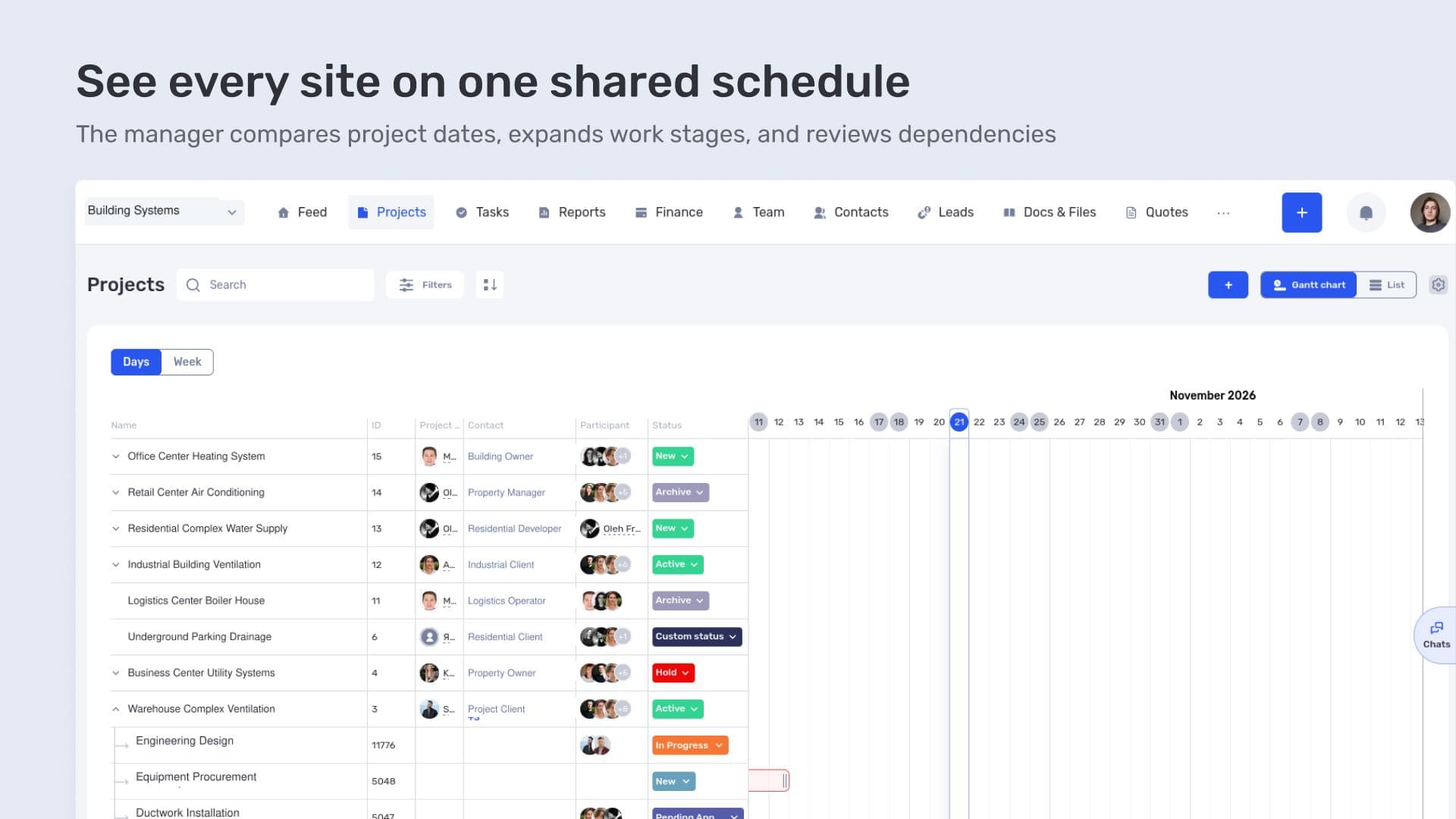
See every site on one shared schedule
The project manager can start by reviewing all current projects. If several installation stages fall on the same dates, they appear alongside one another. To examine a particular site, the manager can review its work packages and check which activities come before installation.
This level of detail is needed to coordinate plans. A site's overall timeline shows only the start and finish of the project. Expanded stages show what happens between those dates.
In if.team, dependencies can be set between stages and tasks. For example, installation in a particular area may be waiting for the relevant documentation to be completed. If its preparation is delayed, the manager can see which subsequent activities depend on that stage.
How dates respond depends on the type of dependency. A hard dependency automatically recalculates the dates of linked activities. A soft dependency retains the sequence but lets the manager decide separately how to adjust the schedule.
The critical path also matters to Oasis Comfort: it is the sequence of activities that determines when the site work can be completed. A delay on this path affects the overall schedule. When reviewing the plan, the manager therefore needs to understand where there is still float and where rescheduling work changes the completion date.
Teams and tasks for individual stages
Each Oasis Comfort work package has its own team. Participation is defined at the stage level, separately from the overall project team. We also developed this capability further during our work with the company.
For example, a project may involve design specialists, engineers, and installers, while a particular work package requires only some of those people. The stage team shows who is working on that part, and tasks break its scope down into individual activities.
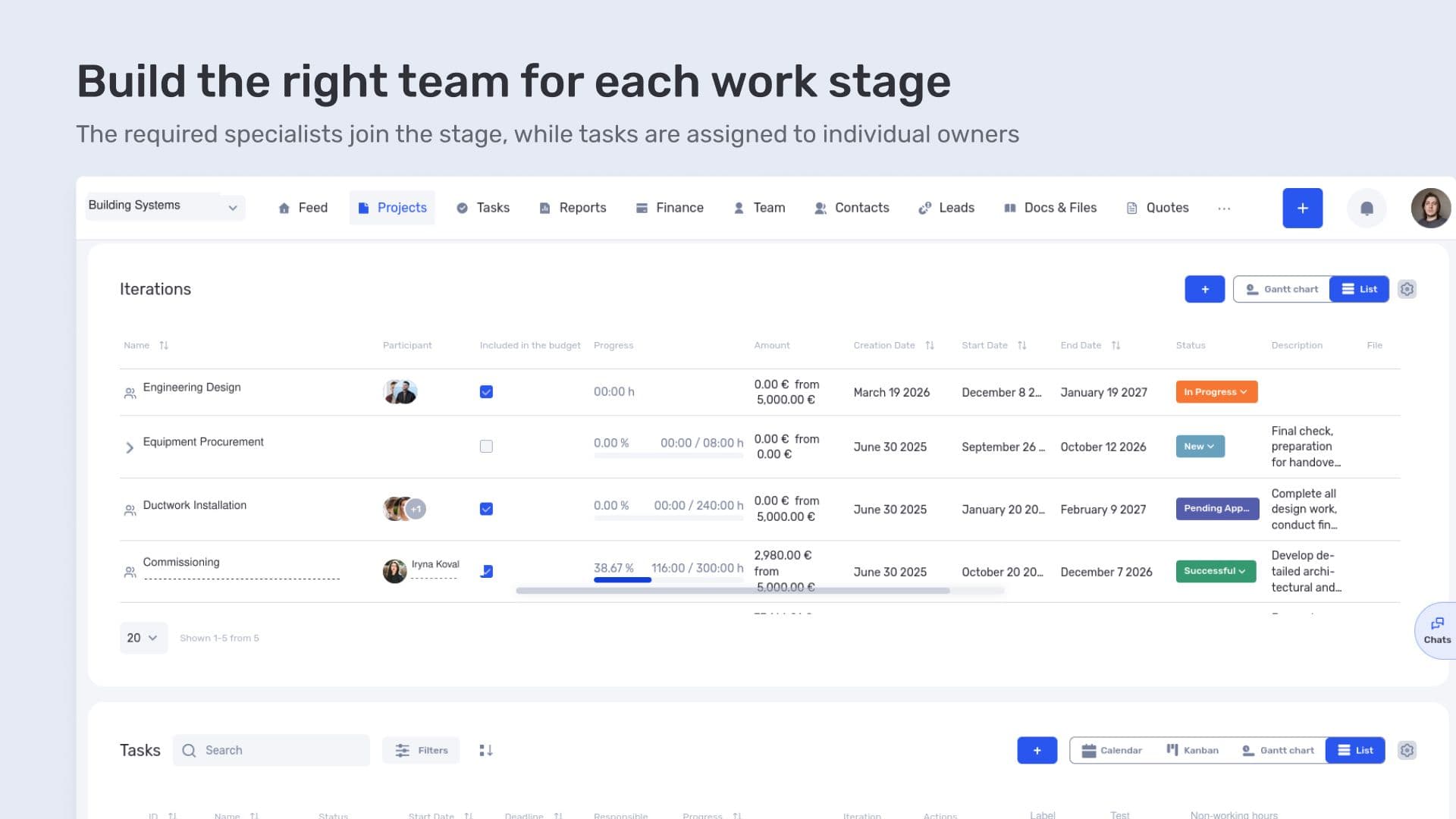
Build the right team for each work stage
Oasis Comfort uses tasks and dependencies between them. When reviewing the progress of a stage, the manager can open its activities to check assignees, deadlines, and sequence.
The system also allows the overall Gantt chart to be filtered by stage participant. This helps the manager review a person's involvement across projects over a selected period. For example, a specialist may be involved in several stages at different sites. The filter shows where they fall on the calendar so the manager can check for overlapping dates. An overlap alone does not mean the person is overloaded: the scope and time required at each stage still need to be checked.
Design documentation and site files
The company uses documents and files in if.team to store project materials. Design documentation stays linked to the site it belongs to.
This link has a practical purpose in engineering work. Drawings, technical specifications, and other materials are needed to carry out specific activities. Organizing them by project means the search starts with the relevant site.
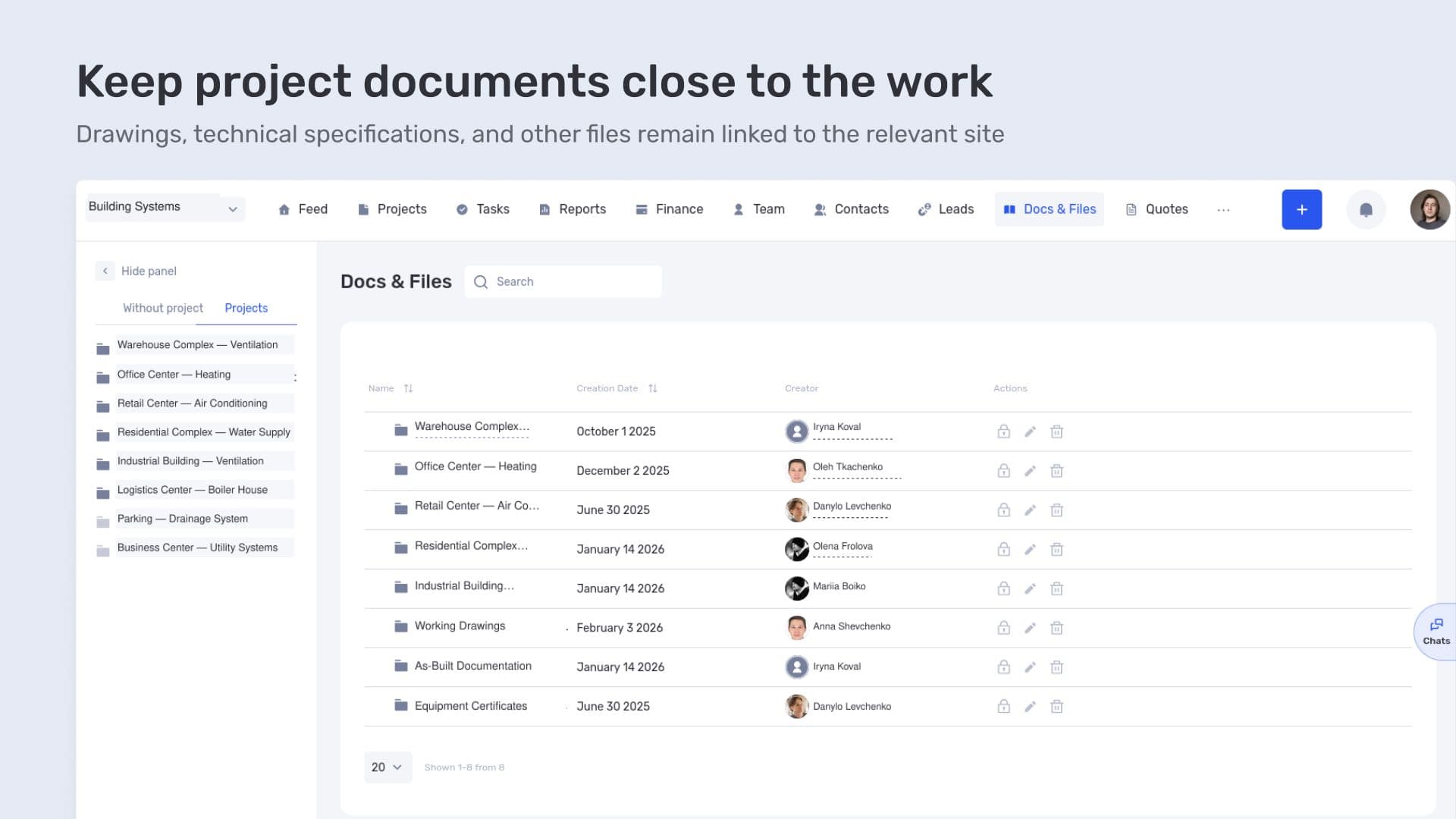
Keep project documents close to the work
For example, to clarify an installation detail, the team can open the materials for that job and find the relevant document. A file can also be attached to a task, where questions about the work can be discussed.
This complements the project plan: stages show the sequence, tasks describe the work assigned to individuals, and documents contain the materials they use.
Planned and actual project financial performance
One reason Oasis Comfort chose if.team was to understand the financial performance of each project. The company assesses planned and actual project profitability as the work progresses.
Planned figures reflect the expected result based on the data entered. Actual figures show what has already been recorded. Comparing them helps identify variances and investigate their causes.
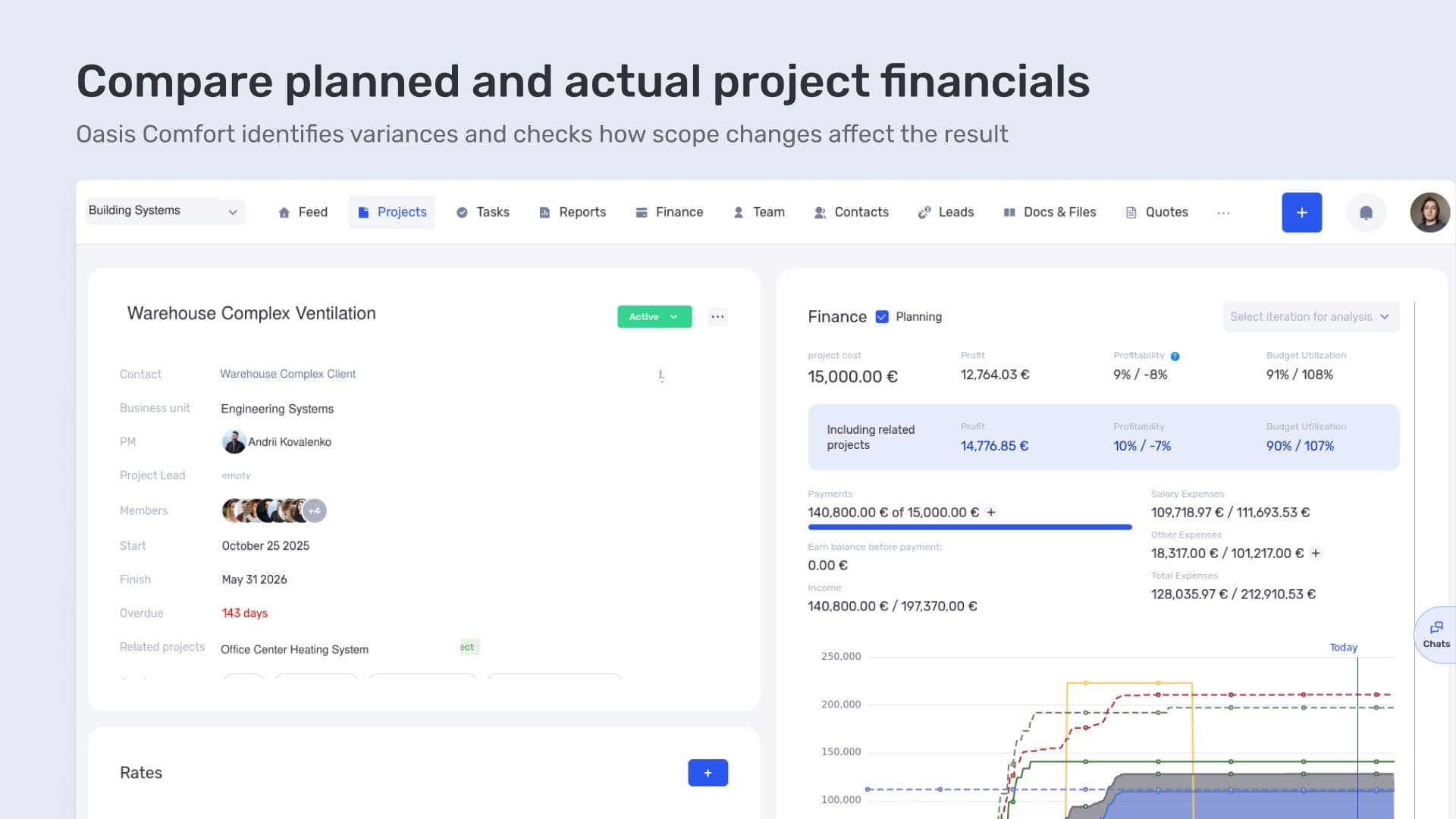
Compare planned and actual project financials
For example, the installation scope may change during delivery. To assess the impact, the additional costs need to be recorded and the agreed contract value checked. The expected project result can then be reviewed.
The overall variance indicates where a closer look is needed. Its cause is investigated through the site data: which activities have been added, which costs have changed, and what remains to be done. Linking the data to a project keeps this analysis specific to the job.
Accounting for materials in project costs
The next area of development is inventory management linked to project financials. Oasis Comfort needs to track material balances and account for their use in the costs of the relevant project.
The planned module is intended to support multiple warehouses, stock balances, and goods transfers. The workflow starts with an employee's request for materials. Warehouse staff process the request and transfer the required items to the project's warehouse.
As materials are used, their value is intended to be automatically charged to the project's costs. This link matters to the job's financial performance: materials transferred to a site may still be held in stock, while those already consumed form part of its costs.
For example, materials may be delivered to a site for several installation stages. Some are used immediately, while the rest await later work. The planned tracking is intended to distinguish between this remaining stock and materials already issued to costs.
The company is also planning an integration with 1C. The data exchange is intended to connect the information needed from the two systems; its scope and configuration are still being defined. Inventory management and the integration are the next steps in the implementation.
Managing engineering and installation projects at Oasis Comfort
At Oasis Comfort, if.team connects a client's inquiry with the work that follows. Managers use the CRM, teams manage sites and tasks, and the project manager reviews the stages of several projects on the overall chart.
The company's processes shaped the implementation: separate teams for work packages, assigned managers for contacts, a shared site schedule, and financial tracking for each project. The next step is to bring material movements and consumption into that process.
Frequently asked questions
How do you turn a client inquiry into an installation project?
The inquiry is handled in the CRM. Once the job is agreed, a project can be created from the lead, its details checked, and dates, a project manager, participants, and a description of the work added.
How can you see the dates and stages of several sites at once?
Projects on the overall Gantt chart can be expanded to show their stages. This allows site schedules to be compared and individual work packages to be reviewed on one screen.
Can each stage have its own team?
Yes. Stage participants are defined separately from the overall project team. This is useful when different specialists are involved in design, installation, and other work packages.
How can you compare planned and actual project financial performance?
Planned and actual data are recorded in the project and the figures compared. If there is a variance, the team checks changes to the contract value, scope of work, and costs. Future expenses are also included when forecasting the result.
How can contacts be distributed between managers?
Contacts can be assigned to managers, with access permissions configured accordingly. At Oasis Comfort, managers see the contacts within their area of responsibility.
Author
Vladyslav ChesnokovPublished
Oct 23, 2026
More articles to read

How Lvivbud tracks the financial performance of construction projects in if.team
Lvivbud, a general contractor from Lviv, manages each construction site as a separate project in if.team and tracks its budget, costs and financial result.

How engineering company ALMIS plans design work and manages project finances in if.team
ALMIS Engineering Center plans design work, assigns tasks to engineers and tracks the costs and payments of each site in if.team, with an API integration to 1C.
How architectural design studio Replus implemented if.team and built a project and financial management system in two years
This case shows how their current workflow is structured and how an ERP system connected operational processes with the economics of the business.
ERP for Managing Architectural Projects: YOD Group Experience
In this case, we talk about YOD Group — an architectural agency that uses ERP to manage complex projects in hospitality and commercial design.
How if.team ERP for Architects Became the Foundation for Designing the Future
How the architectural bureau Drozdov & Partners gained a unified platform for managing projects, teams, and processes. Learn how if.team ERP for architects helps organize workflows and manage large-scale projects more efficiently.

How Creatura manages event projects, budgets, and finances in if.team ERP for event companies
How if.team ERP for an event company helps Creatura manage event projects and budgets, receive transactions from PUMB, and automatically create folders in Google Drive.
See if.team in action for your company
We’ll show how projects, team time and finances connect in one system, using your processes as an example.