
Professional Service Automation Software Comparison: How to Choose the Right PSA Solution in 2025
A professional service automation software comparison is more than a checklist — it’s a step toward unlocking new business potential. PSA (Professional Services Automation) is a type of software designed to streamline operations for service-based companies — from IT teams and marketing agencies to…

A professional service automation software comparison is more than a checklist — it’s a step toward unlocking new business potential. PSA (Professional Services Automation) is a type of software designed to streamline operations for service-based companies — from IT teams and marketing agencies to consulting firms and design studios. It automates the entire workflow: from task planning and time tracking to financial management, contracts, and reporting.
In 2025, as the professional services market evolves rapidly and competition intensifies, having a professional services automation solution is no longer a nice-to-have — it’s essential infrastructure. PSA software enables your team to stay aligned, gain full visibility, and make data-driven decisions instead of relying on intuition. That’s how businesses grow — without chaos.
Among today’s top professional services automation solutions, if.team stands out. Built in Ukraine, it’s a PSA platform created specifically for service-based businesses working across multiple markets. With a user-friendly interface, flexible functionality, and multilingual support, it’s a great fit for both small studios and larger teams managing dozens of active projects.
What goes wrong without PSA software: problems that drain time, money, and energy
PSA software isn’t a trend — it’s a response to real problems service-based businesses face every day. Especially in teams offering services like IT, marketing, design, or consulting. When your business has just a few projects and a small team, it might be possible to manage things manually. But as soon as workload increases or the team changes, the old system starts to break. Here’s what that looks like:
Invisible time losses
Without a professional services automation solution, team members waste hours looking for information, clarifying tasks, or checking deadlines. Time tracking happens in Google Sheets — or doesn’t happen at all. As a result, no one really knows where the 40 hours of the week went.
Manual billing and financial confusion
Invoices are sent manually. Someone forgets, someone makes a mistake, someone sends the wrong file. There’s no clear picture of which projects are profitable and which are draining resources. Decisions are based on gut feelings instead of numbers.
Uneven workload distribution
One person is overloaded, another is idle. Resource planning is done “by feel.” Everything depends on “strong managers” who keep things in their heads or personal notes.
Inconsistent quality and broken processes
With no centralized communication platform, teams rely on scattered messenger threads. Tasks get lost. Deadlines slip. Replacing a team member becomes a major risk to project continuity.
Automate Your Professional Services Today
Choose the professional services automation solution that fits your team — and start working smarter with if.team.
PSA software is no longer optional — it’s what today’s business demands
How PSA solutions work: professional service automation software comparison
All modern PSA software (Professional Services Automation) shares a common goal — to unify business processes in a single, integrated environment where everything from tasks to finances is under control.
In practice, these are all-in-one platforms that typically include:
- Task and project planning tools — so teams can see priorities and deadlines clearly.
- A financial module (billing) — for automated tracking of expenses, revenue, and invoicing.
- A built-in CRM system — to manage clients, contracts, and leads.
- Reporting and analytics — to assess efficiency, profitability, and performance.
Modern professional services automation solutions create a unified digital workspace where planning, finances, client management, and analytics follow a single, coherent logic. This reduces chaos and brings structure to day-to-day operations.
Why companies use PSA platforms
The main benefit of a professional services automation solution is visibility and coordination. Companies adopt PSA platforms to:
- Gain real-time control over projects. Managers can see exactly where each project stands, who’s doing what, and where attention is needed.
- Eliminate manual billing and financial errors. PSA automates calculations — revenue, client invoices, and incurred costs are always up-to-date.
- Plan resources and workloads more effectively. See who’s overloaded and who has room for more tasks.
- Make faster, data-informed decisions. Forecasting, profitability, cycle duration — all in one place.
With the right PSA software, businesses gain real-time visibility, automation, and analytics — helping them move faster, reduce risk, and improve both team efficiency and profit margins.
What’s the catch with popular PSA tools?
Platforms like Mavenlink, Kantata, Accelo, Wrike, and ClickUp offer broad feature sets and have years of market presence. However, they often fall short when it comes to adapting to specific business needs.
That’s where if.team stands out. This PSA platform is built to adapt — companies frequently request custom features or UX improvements, and the team behind if.team responds quickly. This flexibility is a core strength: continuous product improvement based on real user feedback.
if.team is a next-generation PSA software solution developed with real-world agency, production, studio, and consulting workflows in mind. It delivers the power of enterprise-grade PSA platforms without the red tape — featuring localized support, clear logic, and a user-friendly interface that works for everyone, from project managers to finance teams.
Why companies chooseif.team over complex PSA platforms
Many PSA platforms are feature-rich but fall short on simplicity, flexibility, and localization. That’s why businesses are actively seeking alternatives — and increasingly choosing if.team as a clear, easy-to-implement, and needs-oriented PSA solution.
No overload — just a clean interface that works from day one
Most PSA platforms come with complex navigation and steep learning curves. if.team is built on a “click and go” principle — no clutter, just the essentials: tasks, calendar, time tracking, billing, and reporting.
A marketing team launches a new client project — they instantly create tasks, set deadlines, start time tracking, and allocate the budget. All in one platform, with no switching between tools.
Financial automation without the headaches
Sure, most PSA tools offer billing. But if.team fully automates cost calculations, invoice generation, payment reminders, and PnL analytics — all in a few clicks.
One standout feature: burn rate visualization. This real-time chart shows how fast a project budget is being spent, allowing managers and finance teams to adjust early — before overspending becomes a problem.
A design studio finishes a project phase — the system auto-generates the client invoice, and the manager instantly sees the profitability of each project block.
CRM that works with clients and teams
Most PSA systems separate CRM from task and financial management. In if.team, CRM is fully integrated. You get full visibility into client communication, contract terms, and financial history — all in one place.
A manager opens a client profile and sees active projects, payment history, and current tasks at a glance.
Actionable reports, not just dashboard templates
In 2025, data-driven decisions are everything. if.team lets you generate any report you need — on team productivity, financials, completed tasks, client profitability — in one click, no Excel spreadsheets.
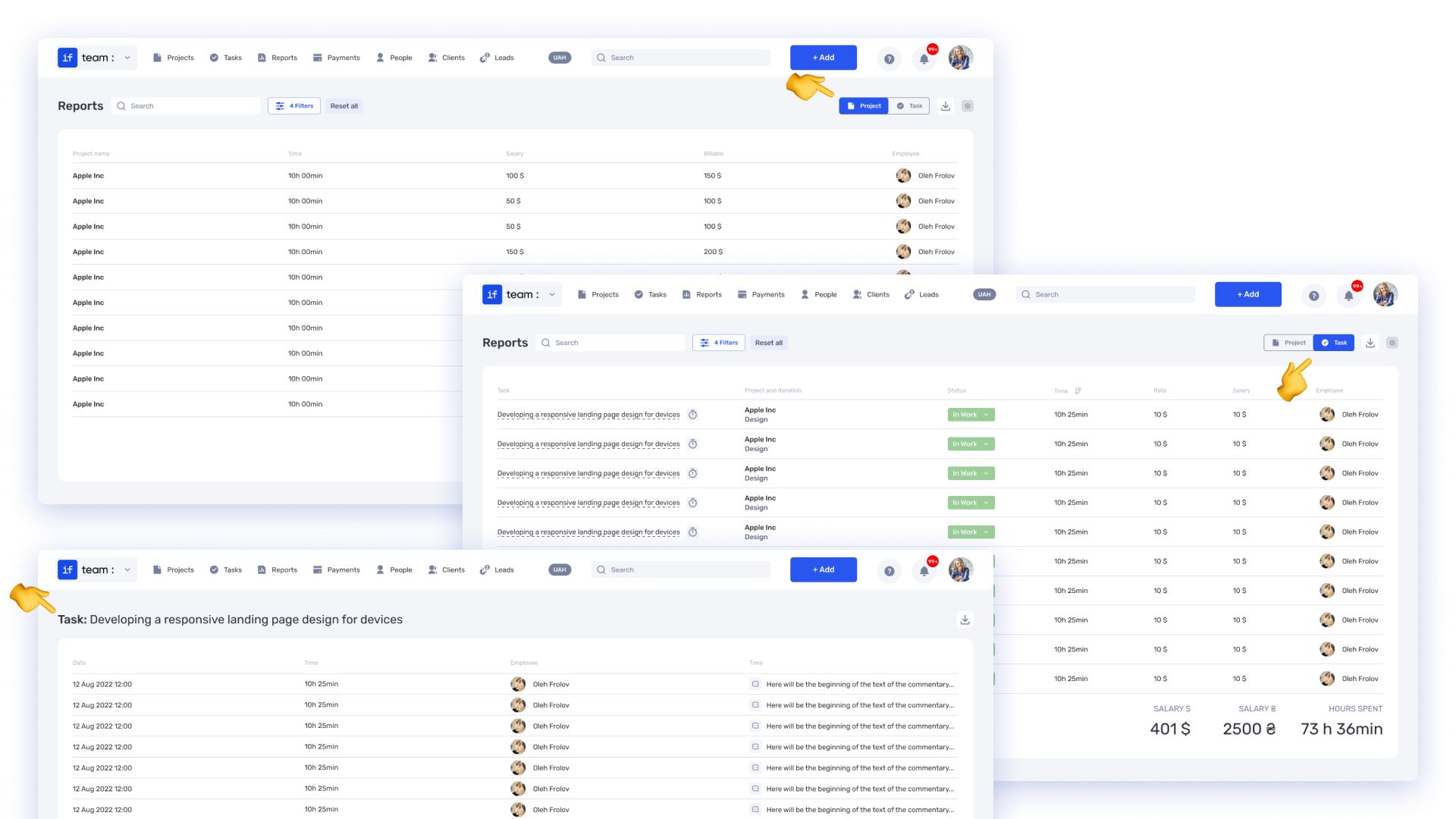
An agency reviews its most profitable projects — the platform shows ROI per client for the past six months.
Flexibility without the bloat
Most PSA platforms are built for large enterprises. if.team adapts to teams of any size — from freelancers to 50-person agencies. No unnecessary modules to slow you down.
An 8-person team disables what they don’t need, keeping only time tracking, billing, and Kanban — nothing more, nothing less.
PSA software comparison 2025: a practical guide for modern teams
To help you navigate the PSA software landscape, we compared some of the most talked-about tools for professional services automation: if.team, Kantata (formerly Mavenlink), ClickUp, and Wrike.
Rather than listing technical specs, we focused on real-world impact — things that matter in day-to-day operations: ease of onboarding, billing clarity, analytics, localization, and pricing flexibility.
As the table shows, if.team isn’t about piling on features for the sake of marketing checklists. It’s about what actually improves workflow: fast onboarding, integrated processes, easy financial tracking, and localization that makes sense.
How to choose the best PSA tool in 2025
Don’t chase a list of features — choose a tool that helps your team work better. Here’s what really matters when evaluating PSA platforms:
- Save time. A PSA platform should reduce repetitive tasks, centralize communication, and streamline approvals. Everything that can be automated — should be.
- Track Profit, Not Just Projects. Many PSA tools focus only on task management. But without financial visibility, you’re missing half the picture. The right platform helps you track revenue per client, pinpoint cost drivers, and monitor margins over time.
- Automate the Boring Stuff. No team should waste hours on filling timesheets, creating invoices, or chasing payment reminders. Automation frees your people to focus on real work, not admin chaos.
- Scale Without the Growing Pains. Your team might be 5 people today and 50 tomorrow. A good PSA platform should scale with you — without breaking your processes or your budget.
Everything above is already built into if.team — clearly, reliably, and with full support in English and Ukrainian. The platform fits seamlessly into your workflows and scales painlessly as your business grows.
if.team vs complex PSA systems: a practical choice
When it comes to choosing PSA software, don’t be swayed by brand names or long feature lists. True value lies in simplicity, clarity, and how well a tool helps your team do great work.
if.team isn’t just another PSA — it’s a solution built on real experience with projects, finance, and client work. Its key advantages:
- Clean UI with zero learning curve
- Flexible setup for any team size or role
- Automation that eliminates busywork
- Transparent financial tracking — including burn rate and PnL insights
- Real, actionable reports that drive smart decisions
if.team wins where it matters — letting your specialists and managers stop fighting clunky software and focus on what counts: great delivery, happy clients, and real profit.
Author
Vladyslav ChesnokovPublished
May 16, 2025
More articles to read
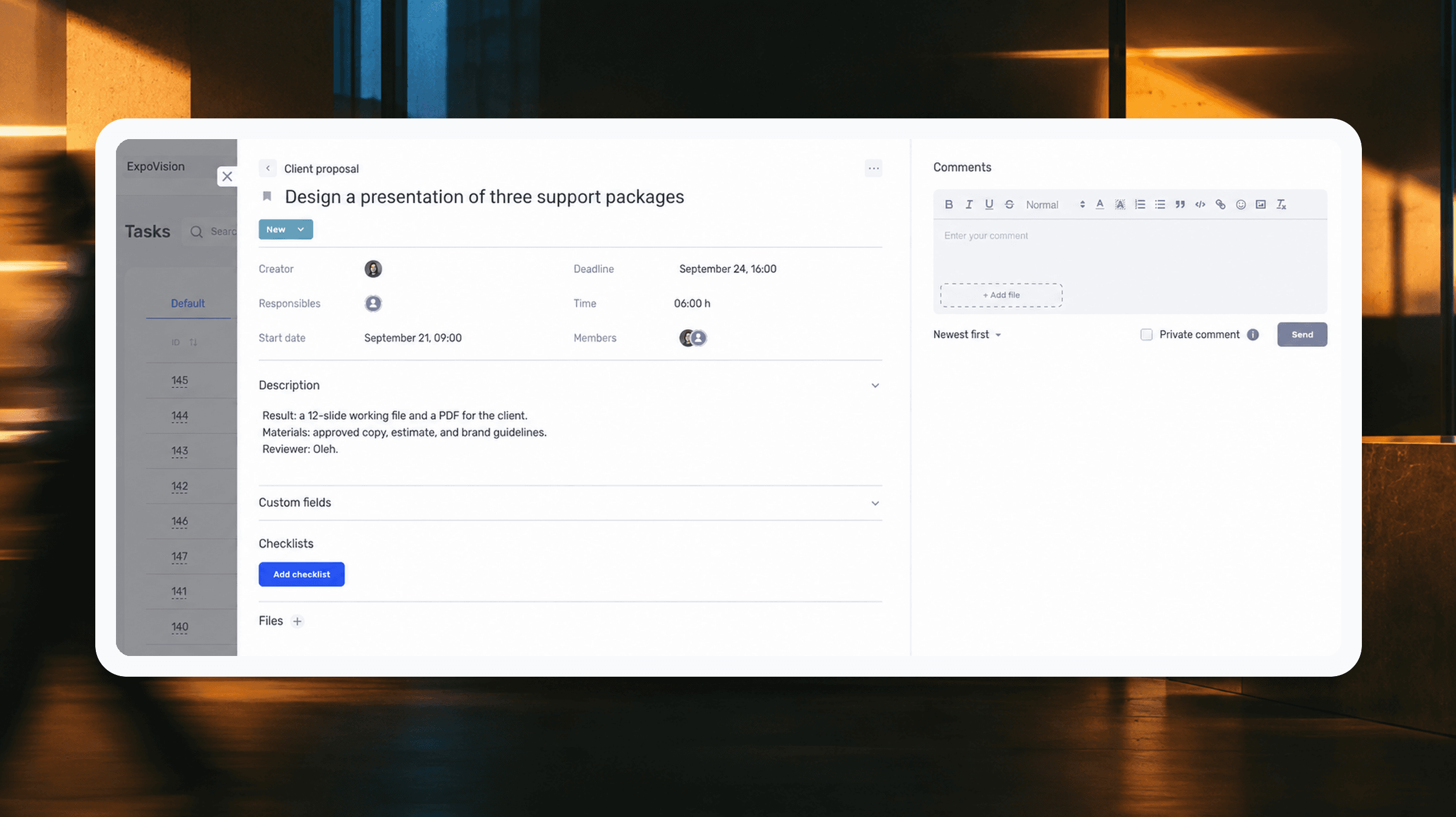
How to assign tasks to your team: from briefing to tracking completion
We break down how to assign tasks so they actually get done: what a brief must contain, how to word the result and the deadline, who takes ownership and how to check completion. With an example, an acceptance checklist and a template for running the task in if.team from start to finish.
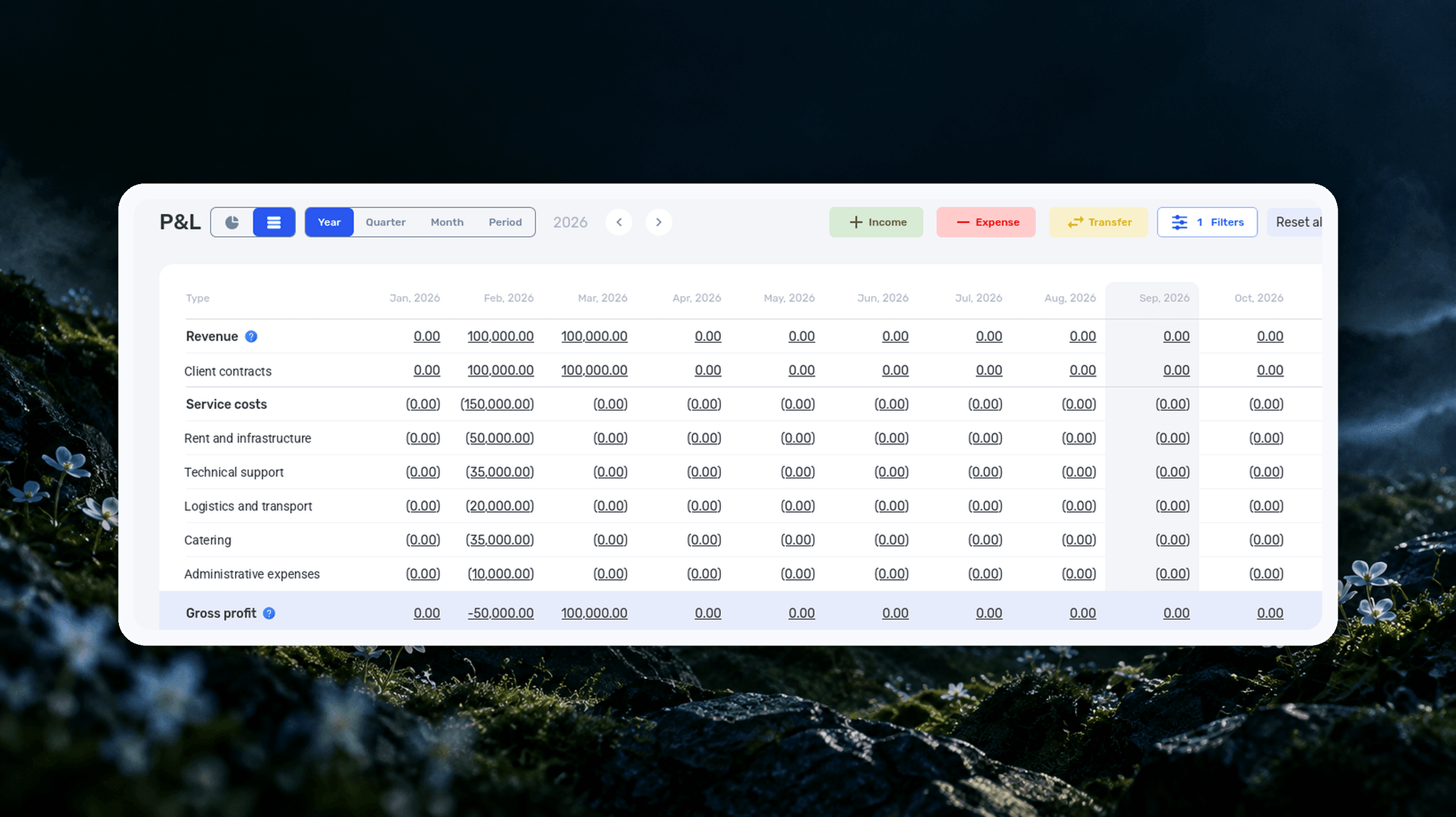
Profit and Loss Statement (P&L): What It Is, How to Prepare and Analyze It
We explain what a profit and loss statement is, how it differs from Cash Flow, and why profit is not the same as the cash left in your account. We break down the P&L structure from revenue to net profit, walk through a calculation for a service company and show how to build your first report.

What Is a KPI in Simple Terms, What It’s For, and How to Evaluate It
What is a KPI in simple terms? It’s one number or several numbers that show whether you’re actually moving toward a specific goal. Not how many actions you took, but whether a result appeared. A KPI isn’t for reporting. It’s for managing work. You look at the indicator and understand what exactly…

What a Bottleneck Is in Business and How to Identify It
A bottleneck in business is the point where a process actually slows down. Not formally, but in reality. This is where tasks pile up, waiting time increases, and the entire system starts working more slowly than it could. It can be a specific person who physically cannot handle the workload. It…

RACI Matrix: Simple Explanation, How It Works, and Use Cases
The RACI matrix helps teams quickly agree on who does what in a project: who performs the work, who is accountable for the final result, who provides expertise, and who needs to receive updates. When these roles are defined upfront, it becomes easier to align decisions and coordinate actions.…

Gantt chart: what it is, why you need it, and how to build a simple working format
In this guide, we’ll break down what this format is, the types of Gantt charts, how to work with them, and how to build a simple online version. No fancy terms or unnecessary decoration. Only what helps you plan.
Start your free 7-day trial
No credit card required. Get full access to all features and see how if.team can transform your team's workflow.