Access Permissions
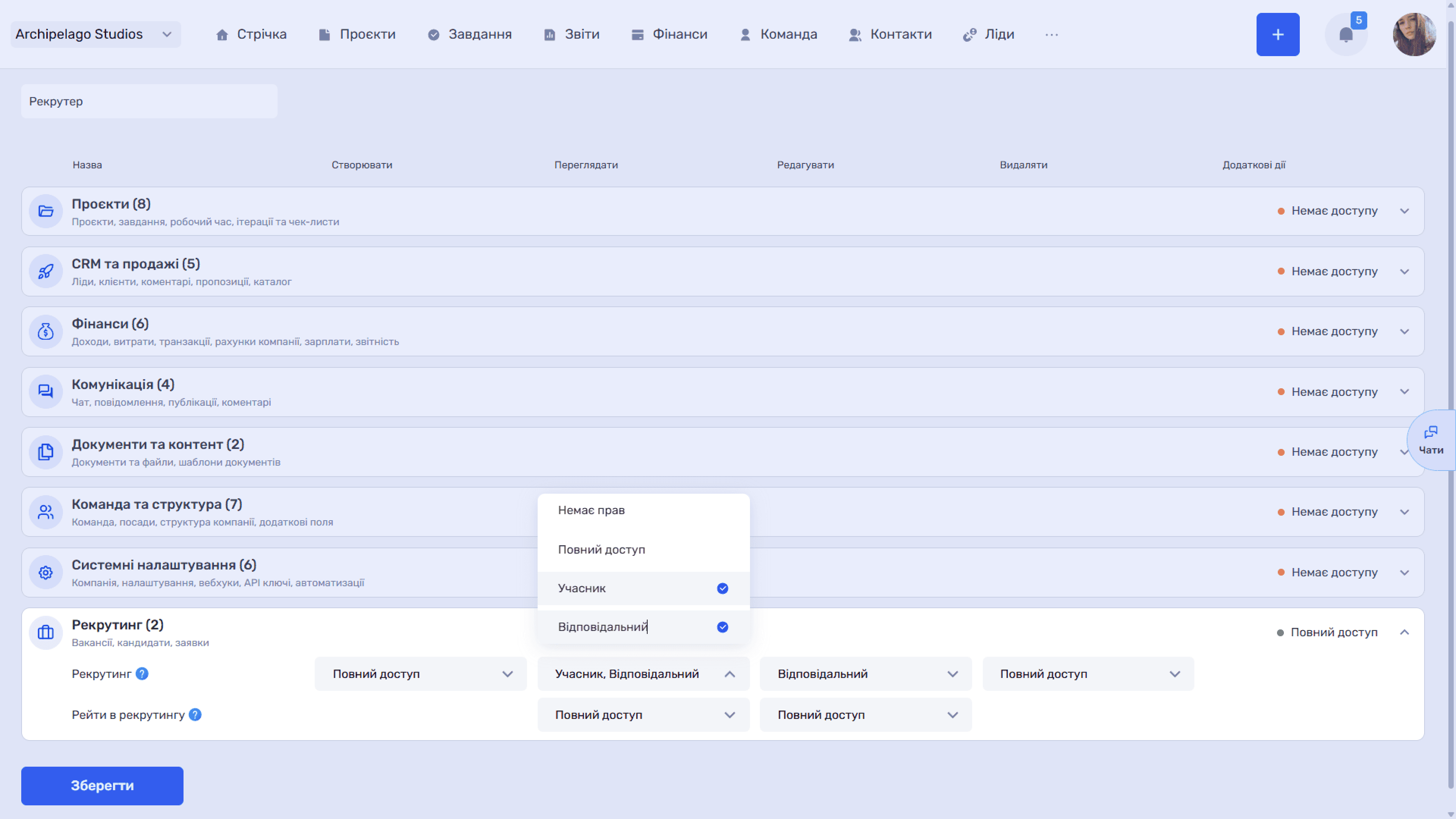
Access to the module is configured in the admin panel: Team → Roles, the Recruiting group (vacancies, candidates, applications). The group contains two rows of rights.
- Recruiting — creating and editing vacancies, viewing and approving candidates. The Create action has two values: No rights or Full access. View, Edit, and Delete have four: No rights, Full access, Member, or Responsible.
- Recruiting rates — working with candidates' salary data. Only View and Edit are configured here, each with two values: No rights or Full access.
Recruiting rates are access to the Salary type and Expected salary fields in vacancies and candidates. Without this right, the amounts in these fields are hidden.
Please note
The Recruiting rates right lets a recruiter work with vacancies and candidates without seeing salary data — handy when the financial side stays with the manager.
The Member and Responsible values correspond to the Members and Recruiters fields in a vacancy: the user sees and edits only the vacancies where they are assigned in that role.
The group header shows a summary access state — No access, Partial access, or Full access.
The full permission matrix for all modules is described in the Access permissions article of the Team section.
Still have questions?
Maybe we haven't added this information yet. But you can always reach out:
Request a demo
Submit a request and we'll show you how the service works and its capabilities.
Book a demo