
How engineering company ALMIS plans design work and manages project finances in if.team
ALMIS Engineering Center plans design work, assigns tasks to engineers and tracks the costs and payments of each site in if.team, with an API integration to 1C.
Designing a boiler plant or gas pipeline involves a series of tasks: gathering initial data, carrying out calculations, and preparing and approving documentation. Each task needs an owner and a deadline. At the same time, the company has to track the cost of the project and payments from the client.
ALMIS Engineering Center manages design work and project financials in if.team. The team schedules work packages, assigns tasks to engineers, and reviews the financial performance of each job. To exchange data with 1C, where some of its processes still run, the company has built an API integration.
About ALMIS Engineering Center
ALMIS designs, builds, and maintains energy facilities. The company specializes in heating and gas supply systems and works with public- and private-sector clients. Projects featured on its website include the Lypynka, Varshavskyi, Avtohraf, and Nova Anhliia residential developments, as well as the Roshen biscuit production facility.
Work starts with the client's requirements and initial project data. Engineers define system parameters, select equipment, calculate gas pipeline diameters, and develop technical solutions. The company also coordinates the approval of design documentation and helps obtain technical specifications and permits.
Once the design is complete, ALMIS supplies the site with materials and equipment, handles installation and commissioning, and brings the systems into operation. The team then provides ongoing maintenance, inspecting equipment and controls, troubleshooting faults, and scheduling service work.
Each project therefore involves calculations, documentation, approvals, and work carried out by individual specialists. This case study focuses on the parts ALMIS manages in if.team: design planning, engineering tasks, and project financials.
Planning design work for each site
Each site has a separate project in if.team. Within it, ALMIS creates work packages and schedules them on the calendar. This breaks the overall design timeline into parts that the team can track as work progresses.
For example, an engineering project can have separate work packages for calculations and documentation. Each can be given a time frame and then broken down into tasks. The work packages depend on the system being designed and the scope agreed with the client.
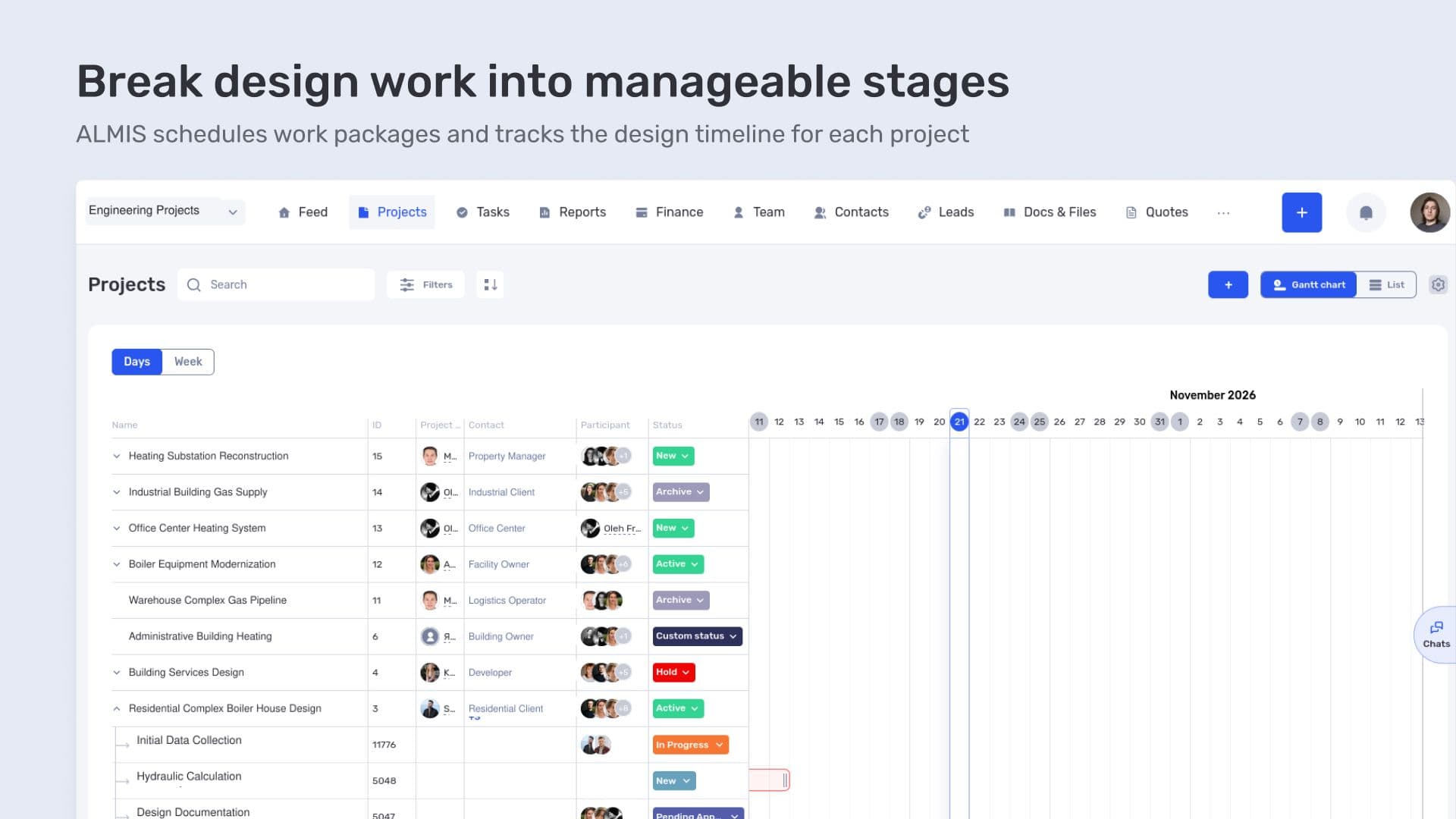
Break design work into manageable stages
The schedule lets the project manager check when the team is working on each part of the job. Where more detail is needed, they can move from the overall schedule to the tasks for that site.
Separate projects also help distinguish between jobs running in parallel. Calculations for one boiler plant and documentation for another remain linked to their respective sites, even when the same specialists are working on both.
Tasks for engineers and design specialists
Within its projects, ALMIS assigns tasks to engineers, design specialists, and other team members. Each task describes a specific piece of work and stays linked to the site.
In if.team, a task can have an assignee, a deadline, a status, and a description. For example, a hydraulic calculation can be set up as a separate task, specifying which section it covers and what needs to be delivered. This makes it easier to assess whether the work is complete.
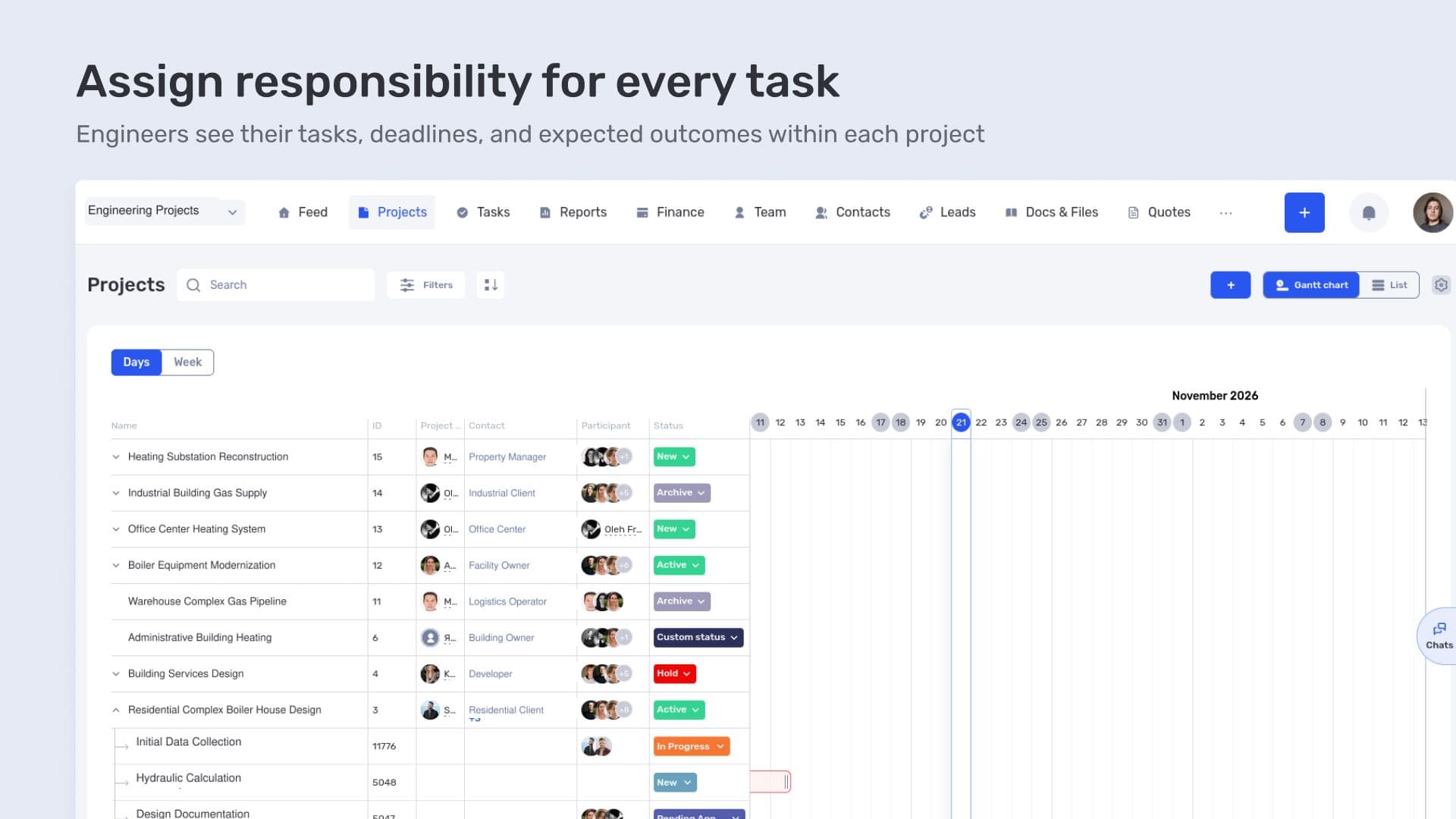
Assign responsibility for every task
The list shows how work is distributed within the job. The project manager can check who is handling a task and its current status. The assignee can see which project it belongs to and the deadline the team is working toward.
When reviewing the plan, task statuses show which parts are still in progress. If documentation is not ready, the manager can check the relevant tasks and clarify what remains to be done.
For example, the initial project data may be revised. The task should specify which calculation needs to be updated and the expected result. The assignee receives a clear instruction, and the manager can later review that specific work. This illustrates how a detailed plan helps account for changes during the design process.
Costs, payments, and financial performance for each project
Alongside design work, ALMIS manages project financials in if.team. The company needs to understand how much it has spent on a job, which payments it has received from the client, and the project's financial result.
Linking financial data to a site allows each job to be reviewed separately. The team does not have to rely solely on company-wide cash receipts and expenses, which combine transactions from different jobs.
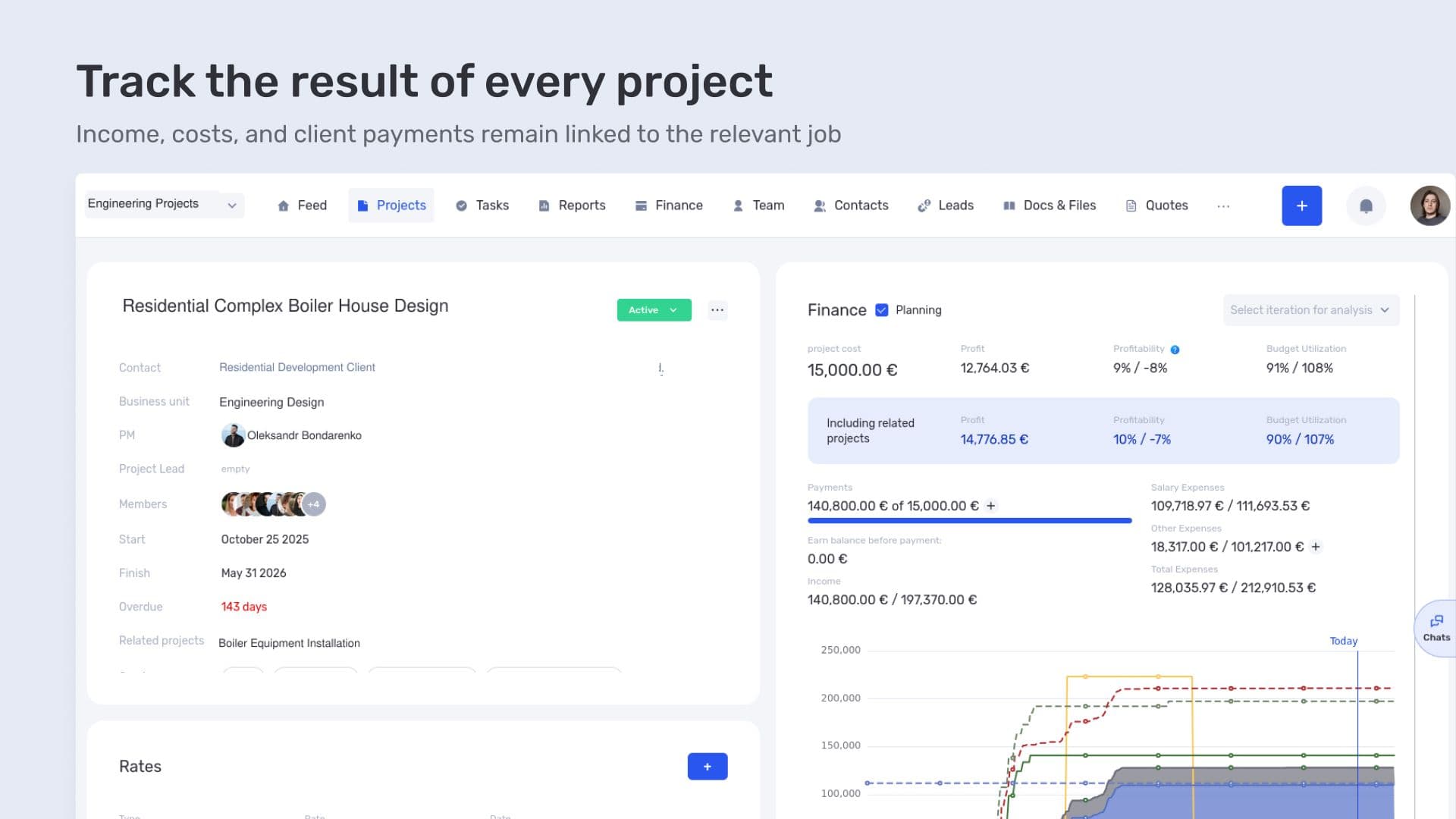
Track the result of every project
For example, a client may have paid an advance for design work while some of that work is still underway. The amount received shows the client's payment position. To assess the job's profitability, the company also needs to account for the cost of delivering it.
This review is useful before the project is complete, too. If the scope has grown, the manager can return to the project financials and check how the additional costs affect the result. Those changes need to be recorded for the figures to reflect them.
Planning and financial performance therefore refer to the same job. The team can check the progress of the design work and separately examine what it costs the company to deliver it.
Integration with 1C and the move to management accounting in if.team
Before adopting if.team, ALMIS already had many processes tied to 1C. The company continues to use it and has built an integration through the if.team API, allowing the two systems to work together.
An API is an interface that systems use to exchange data. Setting up an integration involves deciding what information to transfer and how it should be updated. ALMIS used this capability to connect if.team with its existing accounting system.
For a company with established accounting processes, this offers a practical way to make the transition. While some processes remain in 1C, the team is already planning design work and managing project financials in if.team. It can then decide which financial operations to move and which data it still needs to receive from 1C.
The company is gradually moving toward managing its internal finances in if.team. The product supports income and expense tracking, Cash Flow and P&L reports, project financials, and bank integrations. These capabilities can support the migration of the relevant financial processes.
For other companies, if.team can also serve as an alternative to 1C for management accounting. The scope of the transition depends on the operations and reports they need. ALMIS began by running the systems together; a complete move away from 1C remains a longer-term prospect.
Design planning and finances within the same project
ALMIS has organized its work in if.team around engineering projects. Each has a plan, assigned tasks, and financial figures. The project manager can review the job as a whole and open the details they need.
The 1C integration allows the company to retain its existing accounting processes during the transition. ALMIS already uses if.team for design planning and project financials and can gradually expand its management accounting in the system.
Frequently asked questions
How can you organize design work across multiple sites in one system?
Each site is managed as a separate project. Work packages are scheduled within it, and tasks are assigned to engineers. Deadlines, assignees, and financial data stay linked to the relevant job.
How can you track the financial performance of an individual project?
Costs and other financial data are allocated to the relevant project. This makes it possible to assess its performance separately from other jobs. Client payments show the payment position, while profitability is assessed using the project's income and expenses.
Can if.team be integrated with 1C?
Yes. ALMIS has implemented an API integration. The data exchanged and the rules governing that exchange are configured around the company's processes.
Can if.team replace 1C for management accounting?
if.team supports financial tracking, project financials, Cash Flow, and P&L. If these capabilities meet the company's needs, the relevant processes can be moved into the system. The scope of the transition is determined individually; ALMIS currently continues to use its integration with 1C.
Author
Vladyslav ChesnokovPublished
Oct 15, 2026
More articles to read

How Oasis Comfort manages HVAC and plumbing projects in if.team
Oasis Comfort handles inquiries in the CRM, schedules site stages and teams on a shared Gantt chart, and compares planned and actual financial performance of its HVAC and plumbing projects in if.team.

How Lvivbud tracks the financial performance of construction projects in if.team
Lvivbud, a general contractor from Lviv, manages each construction site as a separate project in if.team and tracks its budget, costs and financial result.
How architectural design studio Replus implemented if.team and built a project and financial management system in two years
This case shows how their current workflow is structured and how an ERP system connected operational processes with the economics of the business.
ERP for Managing Architectural Projects: YOD Group Experience
In this case, we talk about YOD Group — an architectural agency that uses ERP to manage complex projects in hospitality and commercial design.
How if.team ERP for Architects Became the Foundation for Designing the Future
How the architectural bureau Drozdov & Partners gained a unified platform for managing projects, teams, and processes. Learn how if.team ERP for architects helps organize workflows and manage large-scale projects more efficiently.
How Creatura manages event projects, budgets, and finances in if.team ERP for event companies
How if.team ERP for an event company helps Creatura manage event projects and budgets, receive transactions from PUMB, and automatically create folders in Google Drive.
See if.team in action for your company
We’ll show how projects, team time and finances connect in one system, using your processes as an example.