
How Urban Reform Manages Projects, Teams, and Finances with if.team ERP for Nonprofits
Ukrainian nonprofits often begin with a small team and one specific problem they want to solve. Some support internally displaced people and veterans, while others work in education, culture, or community development. As they grow, so does the volume of day-to-day operational work.
Each grant-funded project has its own timeline, budget, team, tasks, and reporting requirements. Some information is stored in spreadsheets, while the rest is scattered across work chats, documents, and managers’ personal notes. This system can work while there are only a few projects. But over time, even answering a simple question like “What is happening with the project right now?” requires opening several files and messaging several people.
Organizations of different sizes go through this stage. Hundreds of small NGOs operate in Ukraine, implementing valuable initiatives while members of the core team often manage the operational processes themselves. They plan work, monitor deadlines, account for colleagues’ workloads, and track the resources used—all while working on the projects themselves.
Urban Reform, a Ukrainian nonprofit, reached this exact stage of development. To bring its management data together in one place, the team began gradually moving its operational processes to if.team. The first step covered projects, tasks, time tracking, and team planning. The next stages are financial management and CRM for handling inquiries.
About the Client
Urban Reform is a Ukrainian nonprofit organization founded in Kharkiv in 2014. Its mission is to support the development of Ukrainian cities so they become more comfortable, equitable, resilient, and vibrant.
The organization works at the intersection of urban planning, education, and resident engagement in the development of their cities. The team studies territories, helps communities shape a vision for the future, works with public spaces, and promotes modern approaches to urban development.
Urban Reform’s areas of work include tactical urbanism, sustainable mobility, urban environment development, heritage preservation, educational programs, and the creation of development visions for communities and territories. Across its projects, the team combines research, fieldwork, education, engagement with local residents, and collaboration with Ukrainian and international partners.
For example, Urban Reform runs a non-formal education school focused on spatial planning and urban development. In other initiatives, the organization works directly with communities: conducting research, involving residents in discussions, and helping turn the ideas collected into a concrete vision for the territory’s development.
Urban Reform’s internal work is therefore also organized around projects. Each initiative has its own goals, timeline, team, set of tasks, and budget. Some specialists may contribute to several projects at once, while the intensity of their work changes depending on the stage: research, event preparation, fieldwork, content creation, or reporting.
The Challenge Urban Reform Needed to Solve
Before moving to if.team, Urban Reform’s management data was stored across different spreadsheets and work chats. This is a familiar setup for a small organization: one spreadsheet covers projects, another tracks time, separate files are used for budgets, and the latest context remains in messages.
Spreadsheets work well for a specific calculation or register. The difficulty arises when data needs to be connected: which tasks belong to a project, who is currently working on them, how much time has already been spent, and how that compares with the plan.
To check the status of work, a manager has to collect information manually. An employee has to switch between several tools to find a task description, a deadline, or the latest agreement. If the person responsible goes on leave, some of the context may temporarily disappear with them.
Urban Reform needed a shared system for its core management processes. The team divided implementation into stages: first, it organized day-to-day operations; financial management and CRM were planned as the next steps.
How Urban Reform Manages Projects and Tasks in if.team
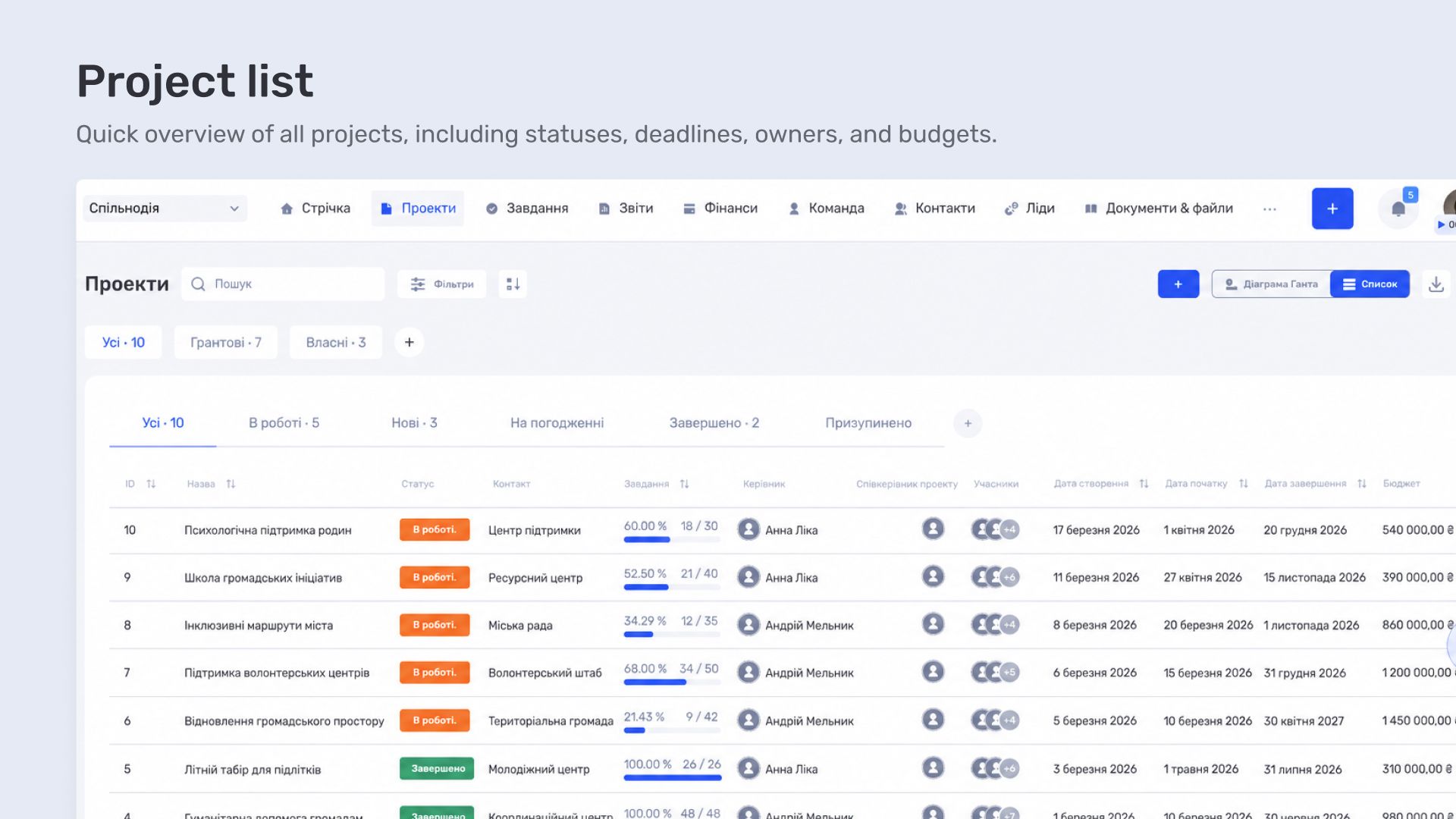
In the first stage, Urban Reform moved its projects and tasks to if.team. Each initiative gets a dedicated space with its own timeline, status, manager, and team. A project can include a description, services or areas of work, attached files, and assigned participants.
This gives managers an overview before they move into the details: which projects are currently active, who is responsible for them, when they are due to finish, and what stage they have reached. The key information is available in the main project list.
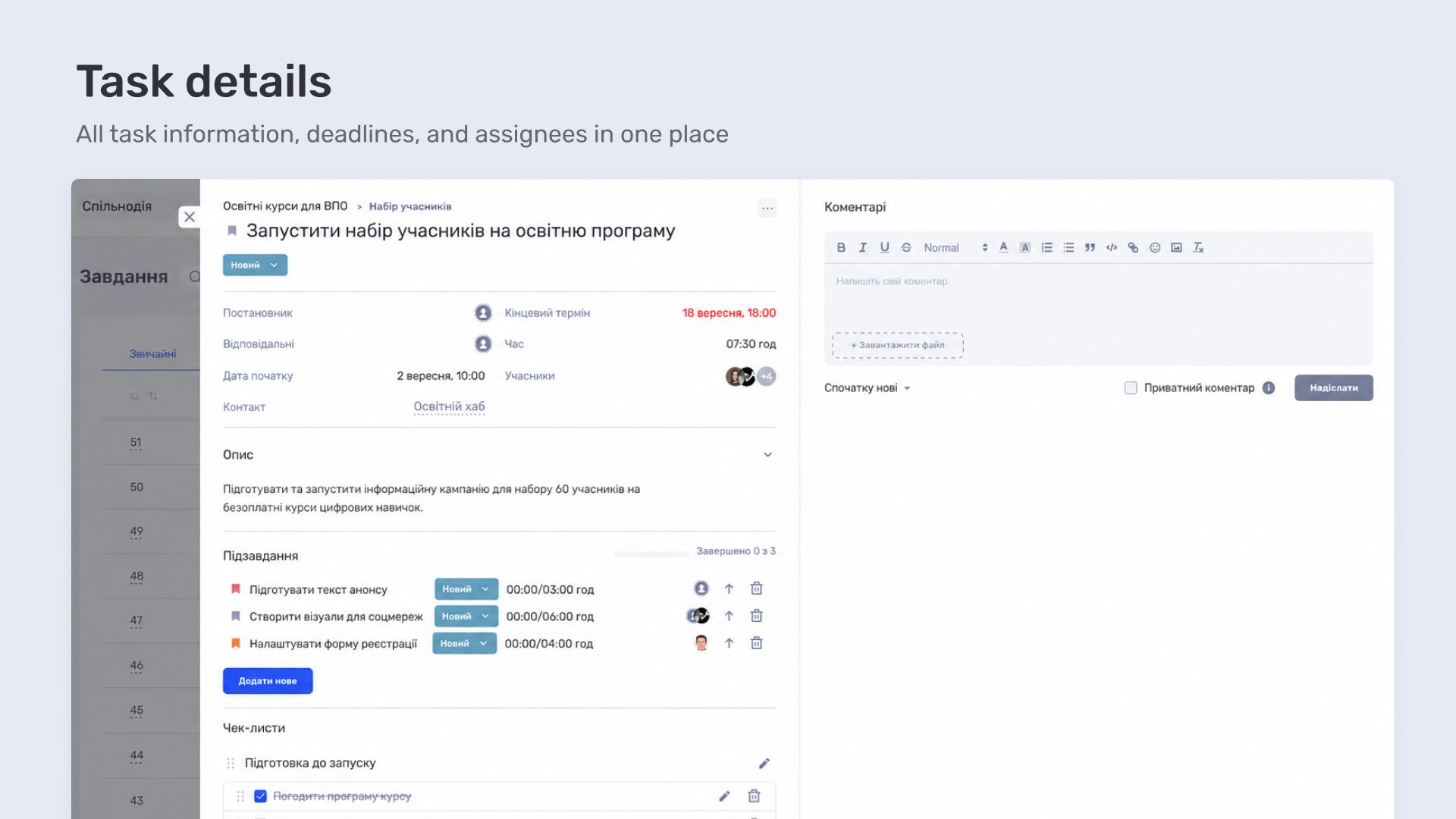
The team creates tasks within each project. Every task has a creator, assignees, start date, deadline, priority, status, and estimated time. A large piece of work can be broken down into subtasks or a checklist, while dependencies define the order in which related actions should be completed.
The description, files, comments, and change history are stored in the task card. This keeps the work context alongside the work itself. When a new person joins the project or a task is handed over to another team member, the full discussion history is already available in the task card.
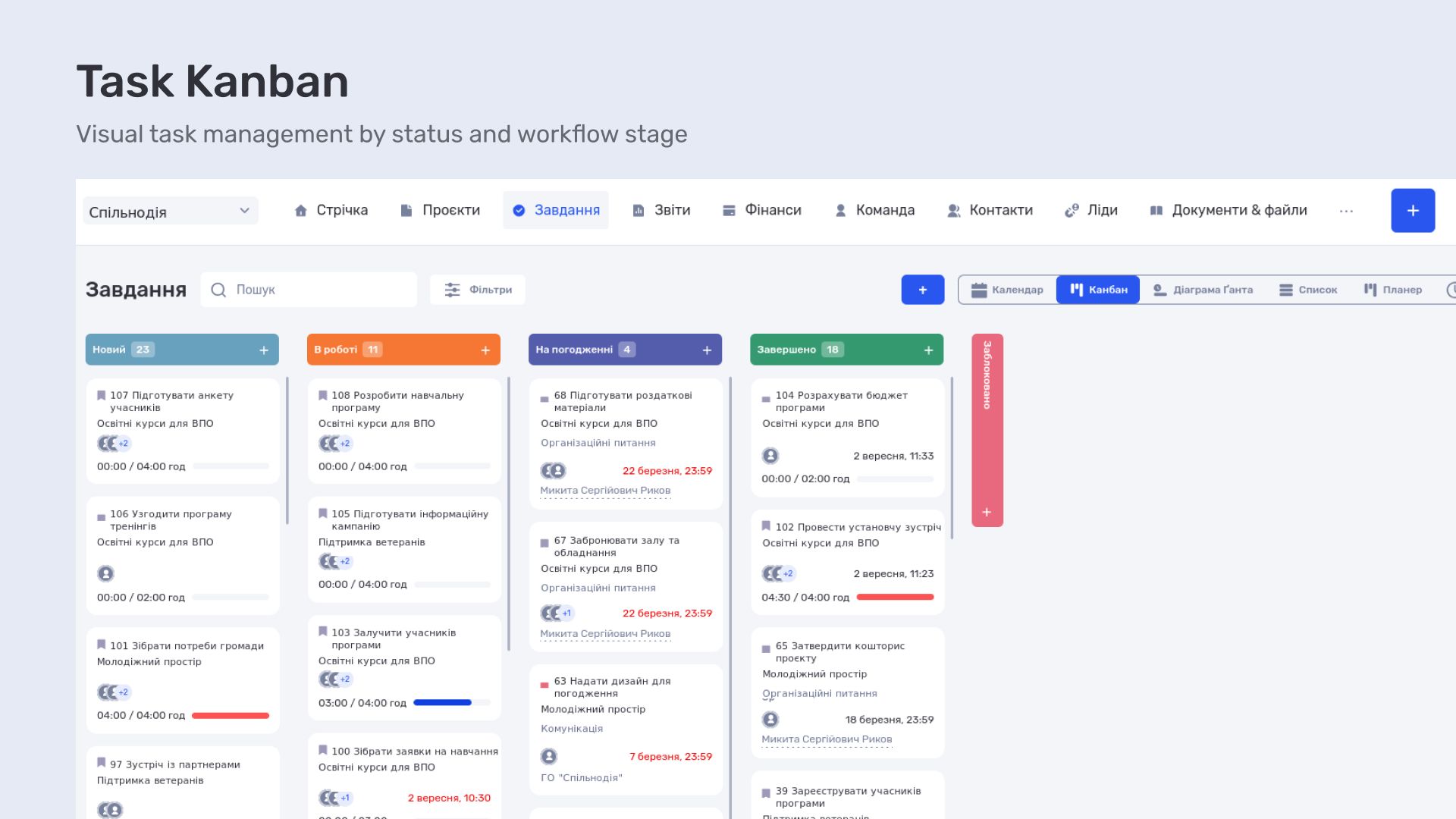
The same tasks can be viewed in several modes. The list is convenient for day-to-day work with a large number of tasks. The Kanban board shows how tasks move between statuses and helps reveal where work is piling up. The calendar arranges tasks by date, while the Gantt chart shows the duration of each stage and the dependencies between them.
For a nonprofit, this is especially useful when preparing a research project, educational program, or event. Such projects consist of many connected actions: reaching agreements with partners, shaping the program, preparing materials, running a communications campaign, organizing the event, and collecting the results. If one stage is delayed, it is immediately visible in the overall plan.
How Much Time the Team Spends on Each Project
The actual amount of work is reflected most accurately by the time spent. Preparing a single research project can take more hours than a dozen small organizational tasks. That is why Urban Reform also uses time tracking.
An employee can start a timer directly from the task card. The recorded time is automatically linked to the task, project, and individual team member. A time entry can also be added manually, with details of what the employee worked on.
Based on this data, if.team generates reports by project, task, and time. A manager can select the required period, filter the information by project or employee, and see how many hours the team actually spent on the work.
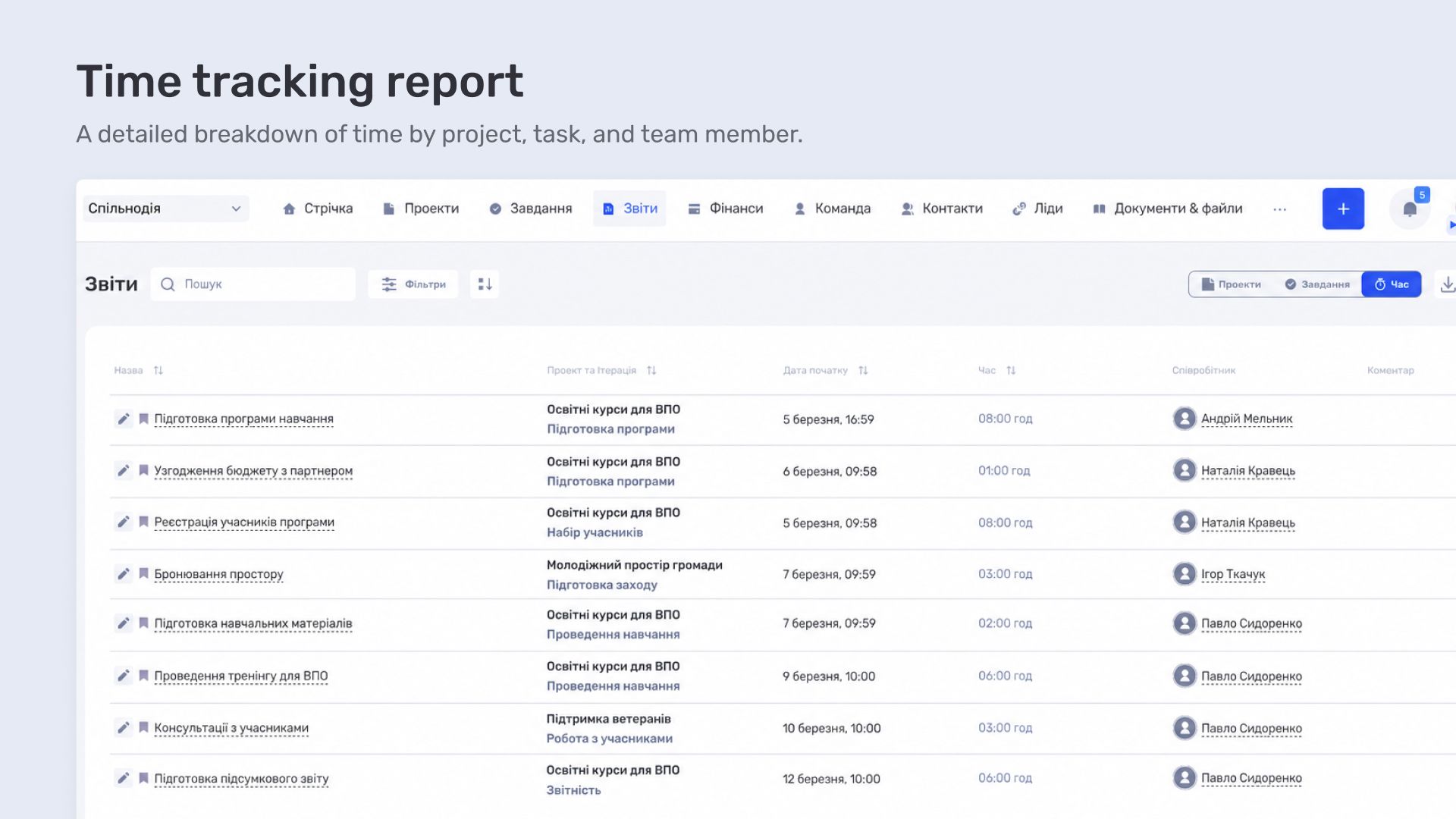
Time-tracking data helps Urban Reform evaluate the actual workload of different stages, plan future initiatives more accurately, and understand where a project requires more human resources than initially expected. Reports can also be exported to Excel for further work or internal reporting.
How the Team Plans Workloads and Absences
In a project-based organization, one person often contributes to several initiatives. A task spreadsheet may make it look as though they have free time, even though their work is already distributed across other projects. Vacation, sick leave, and non-working days must also be taken into account.
Urban Reform uses team planning tools for this purpose. In Planner mode, tasks can be distributed across employees and days, with each person’s individual work plan visible at a glance. Workload mode shows people’s capacity over a selected period and helps identify both overcapacity and available resources.
A separate work calendar stores information about schedules, working hours, vacation, and sick leave. When planning the next stage of a project, a manager can see each person’s actual availability.
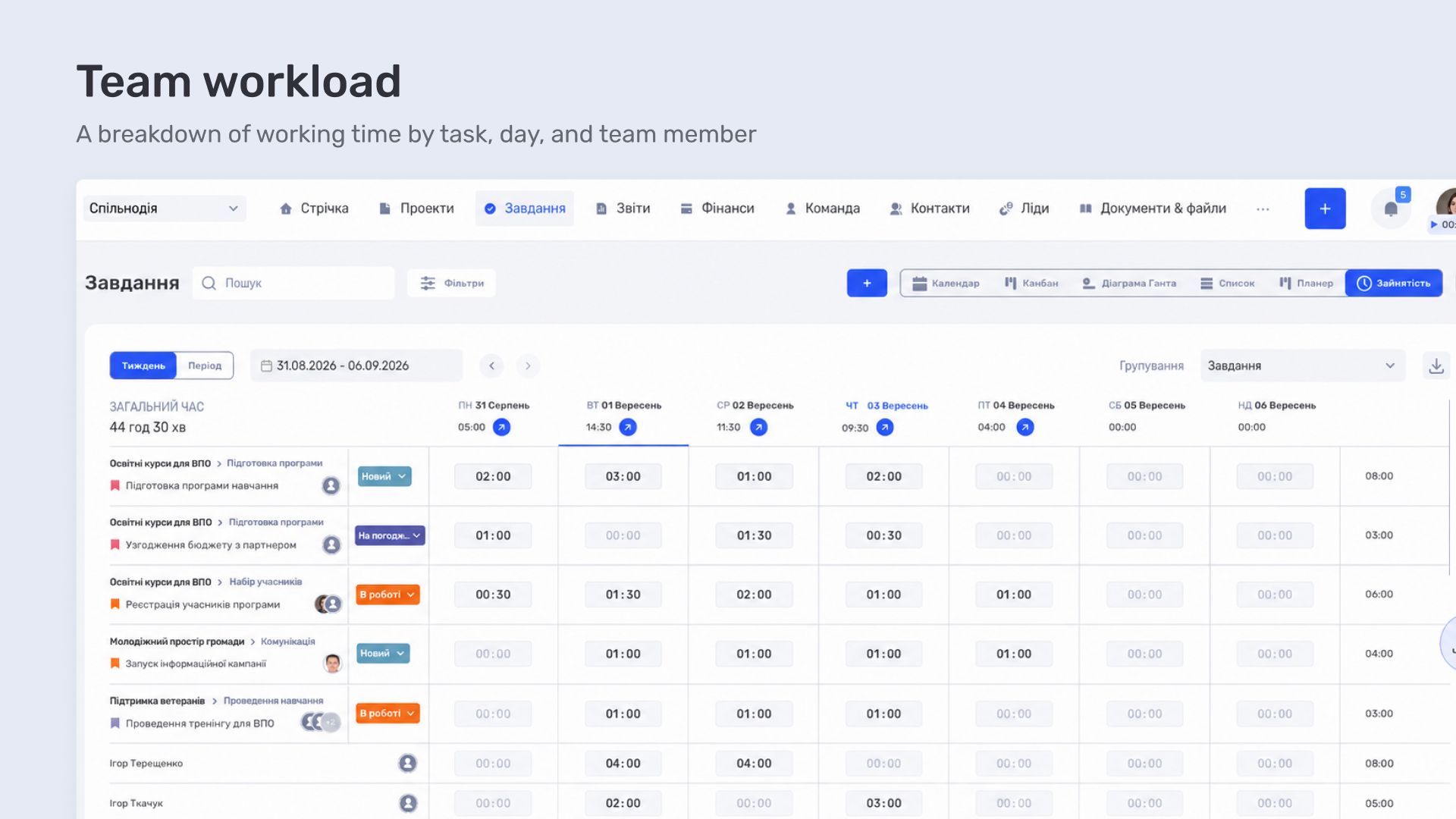
This approach reduces the number of manual check-ins in chats. Information about upcoming absences is available to the whole team, while managers can reschedule a task or assign another person in advance.
Project Finances During Implementation
Projects, tasks, and time tracking already form the operational side of Urban Reform’s work. The next objective is to connect operations with finances. The organization is now gradually configuring the if.team financial module to match its accounting structure and the requirements of project-based funding.
Within each project, planned income and expenses can be set in advance by category. For example, separate amounts can be allocated to team costs, events, travel, rent, materials, or communications. Once actual expenses are added, the system displays them alongside the plan, allowing a manager to see both the total budget and the status of each category.
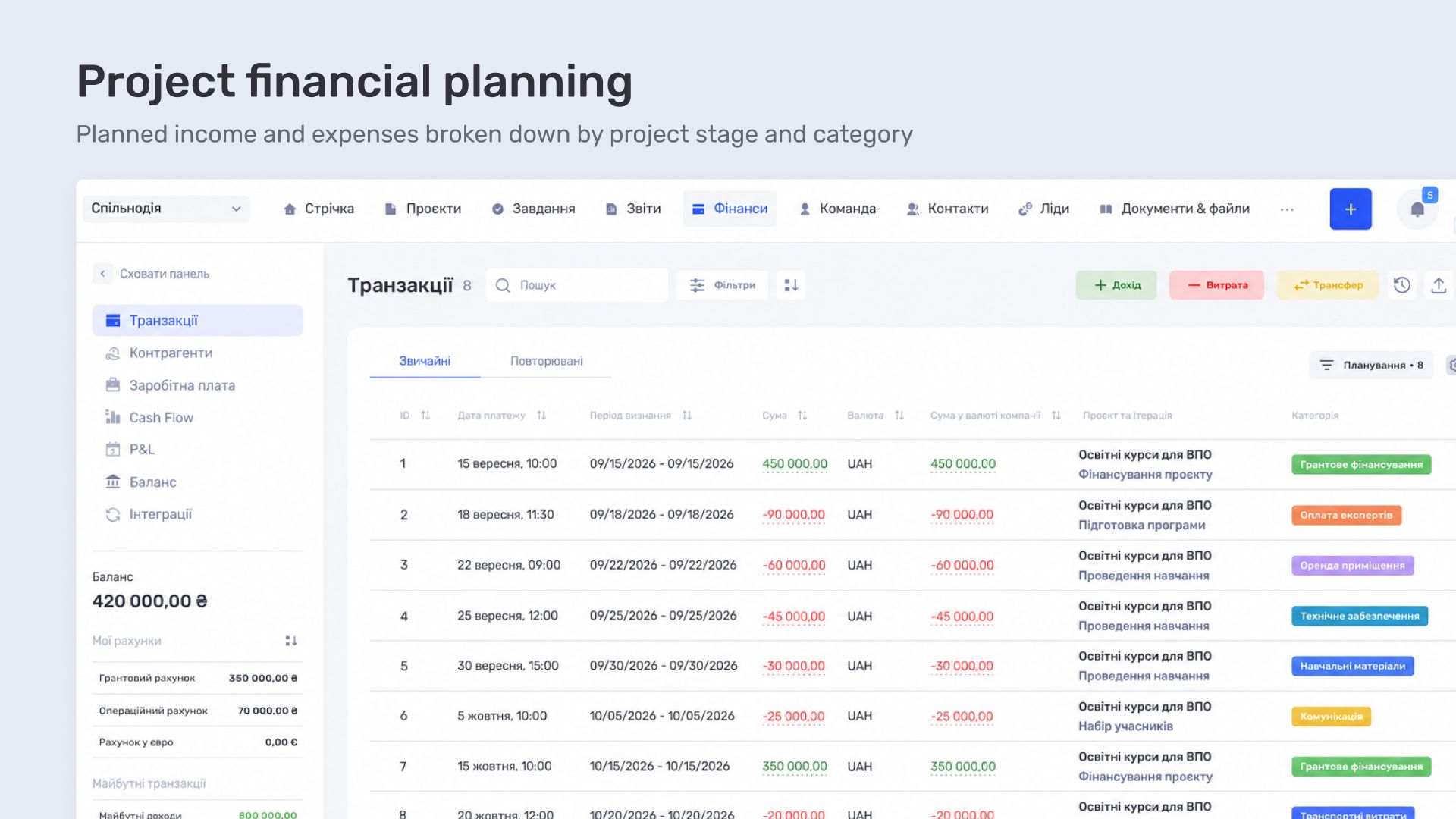
The main if.team financial module brings together accounts, income, expenses, transfers, and scheduled payments. Cash Flow shows actual and projected cash movement, P&L shows income and expenses for a selected period, and the transaction register makes it possible to review every operation separately. A transaction can be linked to a specific project, contact, and category.
For a nonprofit, the main value of this approach is the ability to view finances in the context of the work. It shows not only that money was spent, but also which project it belongs to, which budget category was used, and how much remains according to the plan.
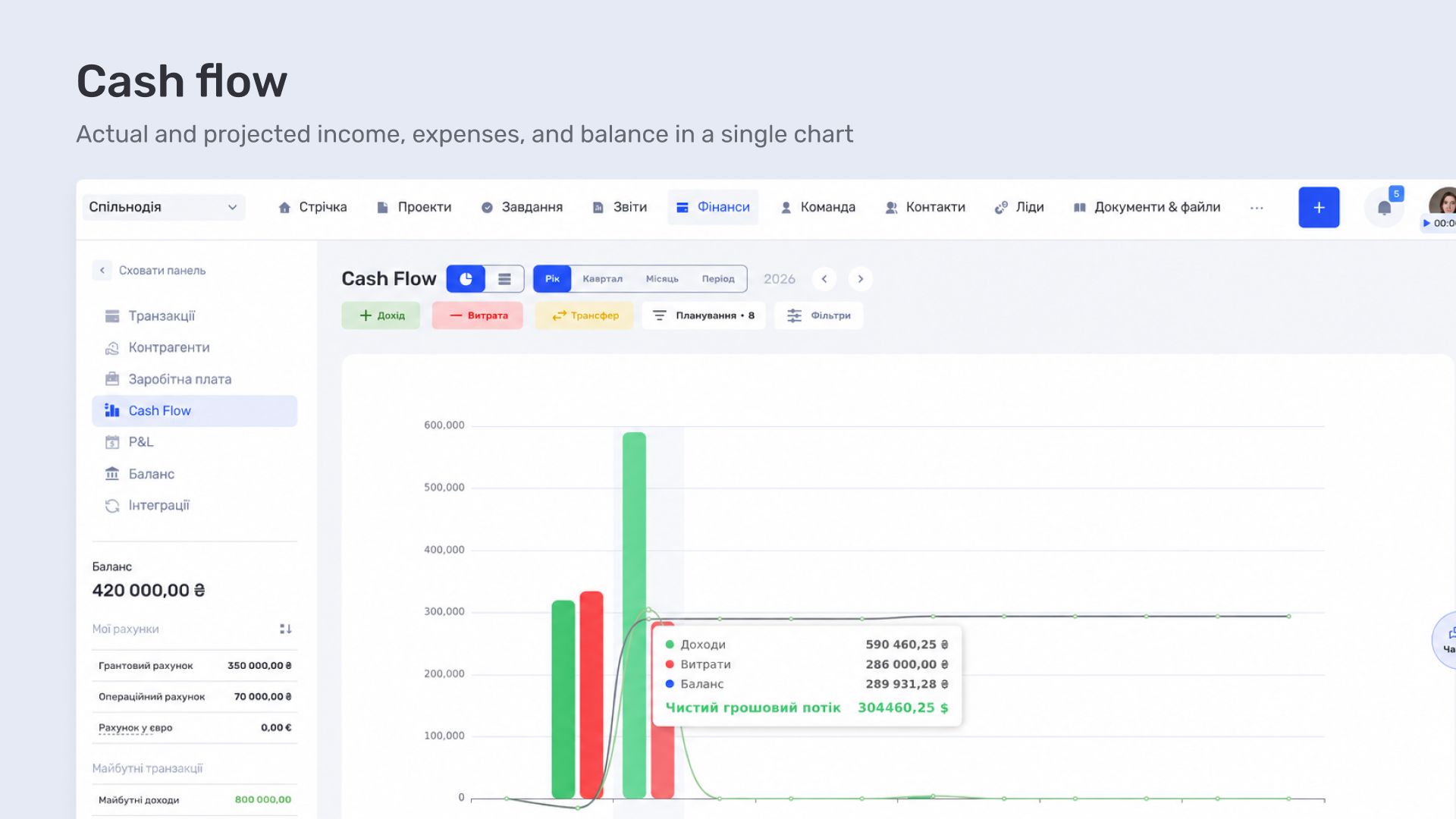
Financial implementation at Urban Reform is still in progress. Once configuration is complete, the team will be able to manage project plans, tasks, time spent, and actual finances in a single system. All data will be connected and available for analysis.
Managing Inquiries from Different Channels in CRM
Another implementation stage is configuring CRM to manage inquiries. Nonprofits receive partnership proposals, requests from communities, applications to participate in programs, and inquiries from experts and potential project participants.
CRM brings messages from different channels into a shared workspace. In if.team, every inquiry can be created as a lead, with its source, contact, expected outcome, and next step recorded. The responsible person can see the interaction history, while the manager can view the overall pipeline and current status of every inquiry.
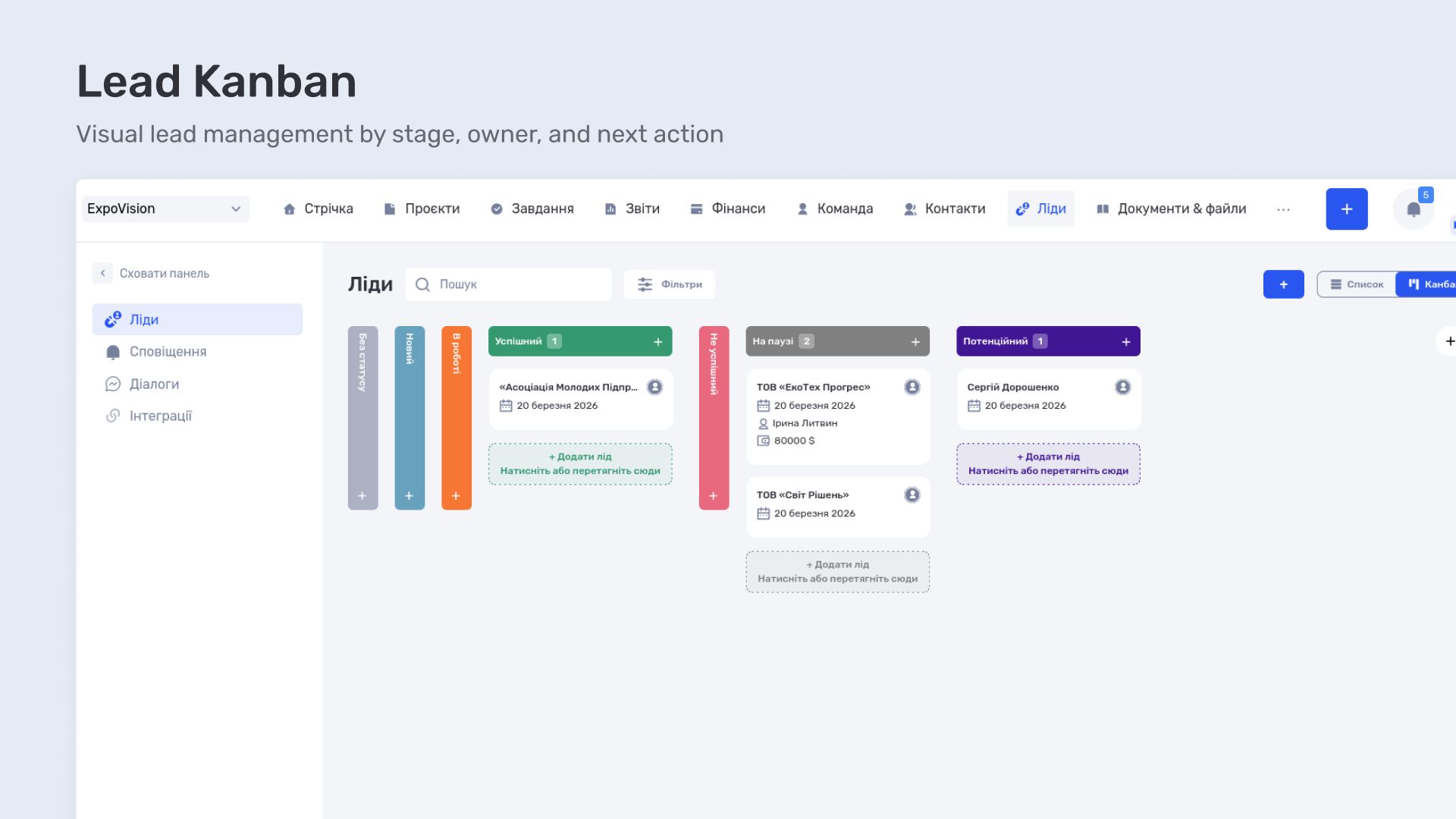
Integrations send inquiries from connected communication channels directly to CRM. The team can then process a request, schedule the next action, leave comments, and—if the inquiry grows into a separate initiative—create a project from it while retaining the key data.
Urban Reform is preparing this part of the system for full use. CRM will be the logical continuation of the transition already underway: after organizing internal projects and team processes, the organization will also bring order to external inquiries.
What Has Already Changed
rban Reform only recently began working with if.team, so this case study captures the first stage in the transformation of its internal processes. Implementation is ongoing, with the financial module and CRM planned for the next stages.
However, the core operational work is already moving from spreadsheets and chats into a shared system. Projects have a clear structure, tasks are linked to assignees and deadlines, time spent is recorded in the context of specific work, and planning takes the team’s actual workloads and absences into account.
Managers can open the system and immediately see current tasks, deadlines, assignees, and time spent. Employees work with descriptions, files, agreements, and next actions in a single work context.
The next step is to add actual financial data and external inquiries to this picture. This will make the entire workflow visible in one environment: from the initial request and project planning to task execution, the use of team resources, and financial control.
if.team — an all-in-one management system for nonprofit organization
Urban Reform’s experience demonstrates a realistic path to digital transformation for a small project-based NGO. A team can start with the processes it uses every day: projects, tasks, deadlines, and time tracking. It can then gradually add resource planning, finances, and CRM.
The value of if.team in this scenario lies in the connection between all modules. Projects, tasks, the team calendar, time tracking, finances, and CRM work in a shared environment and create a unified management overview.
In if.team, a task belongs to a project, time spent belongs to a task and an employee, an expense belongs to a project and a budget category, and an inquiry can become a new project. All data is connected, giving managers a complete view of the organization’s work.
For NGOs and nonprofit organizations, this means spending less time consolidating information and more time on the initiatives themselves. This is especially valuable as the number of projects grows, the team works across several areas at once, and process transparency matters both for internal management and for partners and grant providers.
Author
Vladyslav ChesnokovPublished
Sep 3, 2026
More articles to read

How KiwiParty manages inquiries, prepares estimates, and organizes events in if.team CRM for event agencies
How if.team CRM for event agencies helps KiwiParty manage inquiries from Instagram, Telegram, and WhatsApp, prepare estimates, and plan turnkey events.
How Creatura manages event projects, budgets, and finances in if.team ERP for event companies
How if.team ERP for an event company helps Creatura manage event projects and budgets, receive transactions from PUMB, and automatically create folders in Google Drive.

How BigShow manages concert projects and finances in if.team ERP for event agencies
How if.team ERP for a concert agency helps BigShow manage concert projects, preparation stages, contractor agreements, and the finances of concerts and the orchestra.
How a Ukrainian charity foundation manages projects and finances in if.team ERP
In a Ukrainian charity foundation, finances are closely tied to individual projects. Funds come in for different initiatives, expenses have their own structure, and the team needs a clear view of both each project budget and the foundation’s overall cash flow.

How Ukrainian Business Brotherhood manages members, subscriptions, and business club operations in if.team
A business club revolves around its members. The team maintains the member database, tracks subscriptions, organizes events, coordinates internal tasks, and keeps information about how people take part in the life of the community.
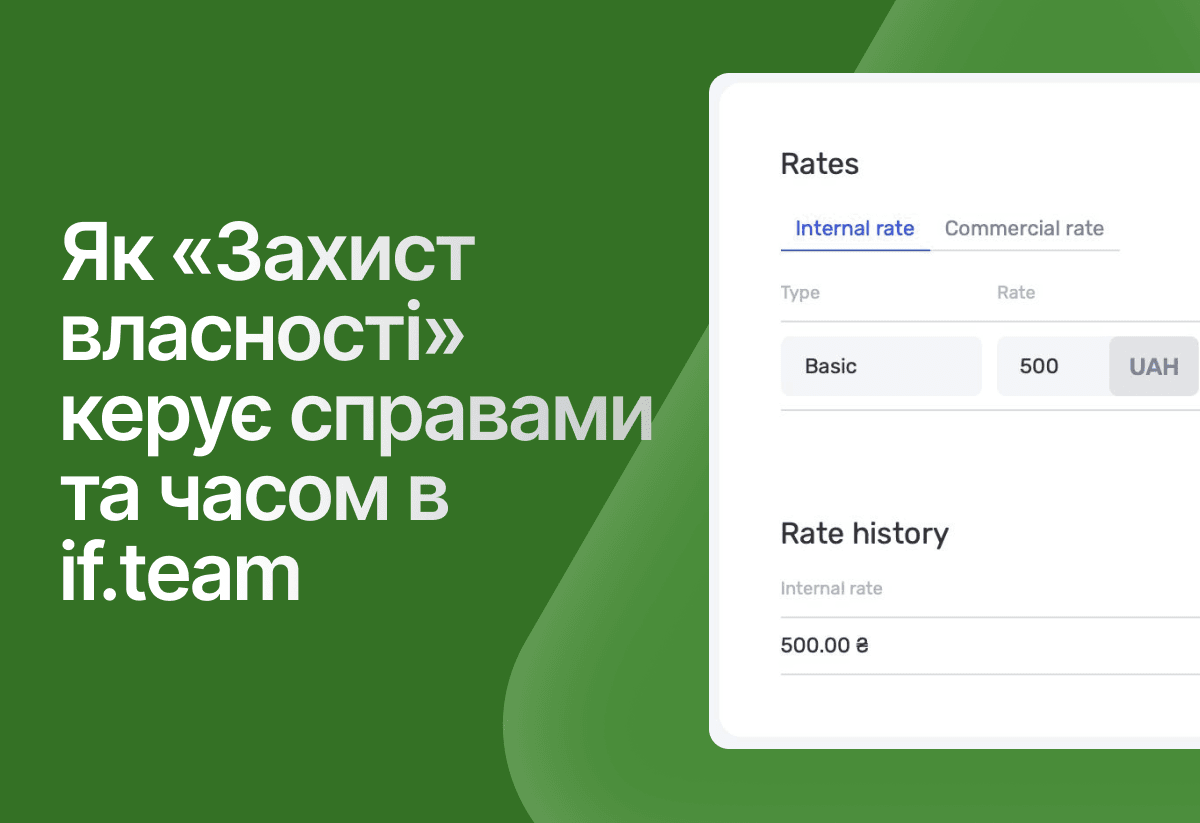
How the legal company “Zakhyst Vlasnosti” uses if.team for project management and time tracking
In this case, we will look at which tasks were important for the company “Zakhyst Vlasnosti”, how they came to using if.team, and how they built their work in the system.
See if.team in action for your company
We’ll show how projects, team time and finances connect in one system, using your processes as an example.