
New in if.team: payroll calendar and expanded transaction functionality
We continue to improve financial management tools in if.team. This time — payroll planning and a major upgrade of transactions.
Generate AI summary
Open this page in your favorite AI assistant
What’s changed
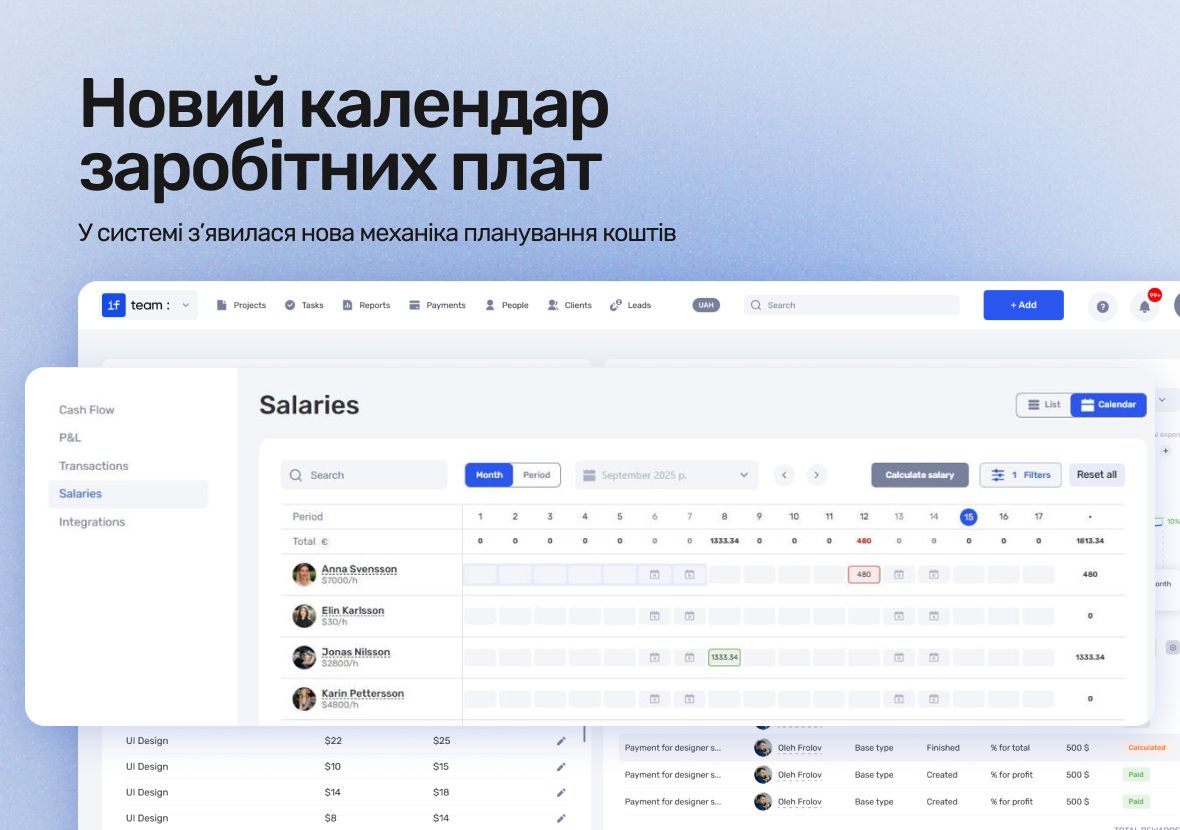
A new planning mechanism has been added. It helps forecast cash flow and identify potential cash gaps in advance. Transaction management has also been significantly enhanced.
Payroll calendar
Now you can:
- Plan settlements with your team and see scheduled payment amounts in the calendar by weeks and months (including daily and monthly totals).
- “Process” payments, respond to overdue obligations, and, if needed, reschedule payment dates by simply dragging them in the calendar.
- View which periods in an employee’s calendar are “closed” with payroll statements, and create new calculations by simply selecting a period — in just a few clicks (taking into account sick leaves, vacations, etc.).
- Soon, payroll calculation will be automated. This will allow you to set up payroll rules for each employee or group of employees and eliminate manual work when creating payroll statements.
Expanded transaction functionality
We’ve significantly enhanced transaction management. Added:
- Change log: full history of who created the payment and when changes were made.
- Discussions: full-featured comments (including private and pinned), replies, file sharing, and more.
- A dedicated transaction page with a unique link that can be shared with colleagues and accessed directly from notifications.
Author
Vladyslav ChesnokovPublished
Sep 23, 2025
Was this update helpful?
Your feedback helps us prioritise what to ship next.
Start your free 7-day trial
No credit card required. Get full access to all features and see how if.team can transform your team's workflow.